Computer ScienceExam code: 0984
Memory and Storage
Hardware
Solid-state storage has no moving parts. It stores binary data as electrical charge trapped in tiny transistor cells on a flash-memory chip.
How a solid-state drive (SSD) works
- The drive is a chip (or several chips) containing millions of tiny memory cells.
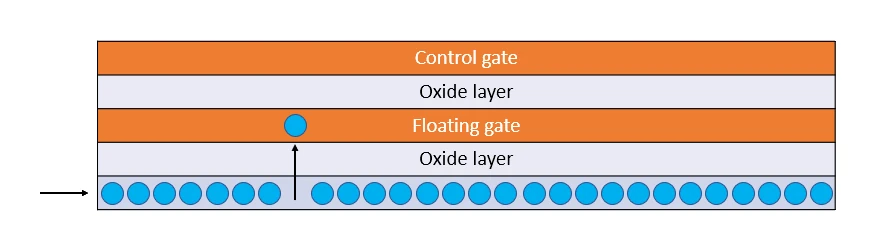
- Each cell contains a special transistor with a floating gate: a small conductor sandwiched between insulating layers that can hold an electrical charge. The charge stays in place even after the power is removed, which is what makes flash memory non-volatile.
- An erased cell holds no trapped charge on its floating gate, and the cell reads as a 1.
- To store a 0, a high voltage pushes electrons through the insulator and traps them on the floating gate; a cell with trapped charge reads as a 0.
- To read, the cell is checked for whether the floating gate is charged: no charge gives a 1, trapped charge gives a 0.
Because there are no moving parts, the drive can be small, silent, and resistant to shock. Reading and writing also happens entirely electronically, which is much faster than mechanically moving a head over a spinning disc.
Common solid-state devices:
- (solid-state drives) inside laptops and desktops, replacing magnetic HDDs as the primary internal drive
- USB flash drives
- SD cards in cameras and phones
- Internal storage of smartphones and tablets
Advantages and disadvantages
| Advantages | Disadvantages |
|---|---|
| Very fast read/write | Expensive per gigabyte compared to HDDs |
| No moving parts: durable, shock-resistant, silent | Limited number of write cycles (each cell wears out after a limited number of writes, typically thousands) |
| Small, light, portable | Smaller maximum capacities than the biggest HDDs |
| Low power use (good for laptops) |