Memory and Storage
Hardware · 4 question types
stores binary data as the magnetic polarity of tiny regions on a metal platter, which spins at high speed inside a sealed enclosure.
How a hard disk drive (HDD) works
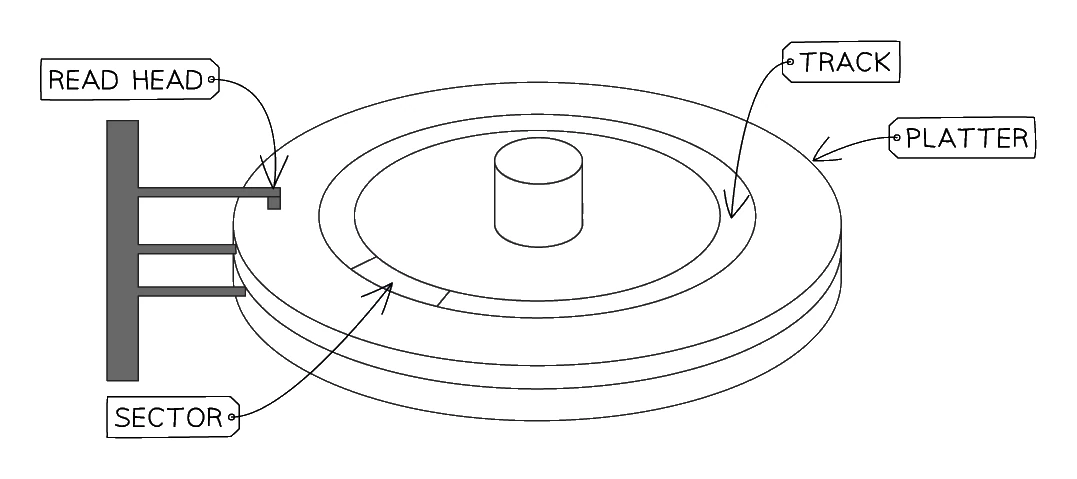
- The drive contains one or more circular metal platters coated with a magnetic material.
- The platters spin at high speed (typically 5400 or 7200 RPM).
- A movable read/write arm holds an electromagnetic head close to the platter surface, but never touching.
- To write a 1 or 0, the head magnetises the region beneath it to one polarity or the other.
- To read, the head detects the polarity of the region as the platter spins past.
- Data is organised in concentric tracks, and each track is divided into sectors.
Advantages and disadvantages
| Advantages | Disadvantages |
|---|---|
| Very large capacity (multi-terabyte) | Moving parts are fragile; easily damaged by drops |
| Low cost per gigabyte | Heavy and bulky compared to SSDs |
| Moderate read/write speed | Slower than SSDs |
| Prone to mechanical failure over time | |
| Audible (spinning platter, head movement) |
Magnetic disks remain popular for bulk storage (backups, archives, large media collections) where price per terabyte matters more than speed.
Give features of magnetic storage
What comes up: "Give two features of magnetic storage" or a matching question asking you to link a description to the correct storage type.
Write (two marks): (1) Data is stored on spinning platters divided into tracks and sectors, and a moving read/write arm positions the electromagnetic head over the correct location. (2) The magnetic field of each tiny region on the platter surface determines whether it represents a binary 1 or 0.
Watch out: the mark scheme does not credit describing an HDD simply as "magnetic" or "uses magnets" without the extra detail. You need to mention the platter, the read/write arm or electromagnet, and (for a "how data is stored" question) the magnetic polarity representing 1s and 0s. Do not confuse this with optical storage — magnetic storage uses a physical read/write arm, not a laser.