Memory and Storage
Hardware · 4 question types
Virtual memory is an area on secondary storage that the operating system uses as an extension of when RAM is full.
Imagine a computer running so many programs that physical RAM fills up. Without some way to free RAM, the system would have to refuse to launch any new program. Virtual memory solves this by temporarily moving inactive data and instructions out of RAM and onto , freeing space in RAM for whatever is currently active.
How it works
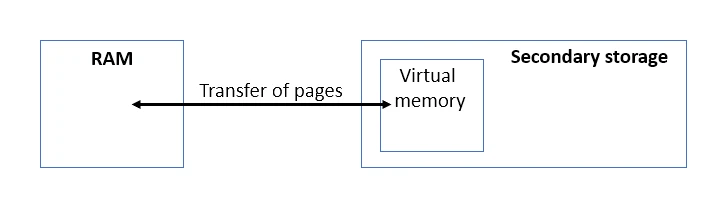
The operating system breaks RAM and virtual memory into fixed-size chunks called pages.
- RAM becomes full while several programs are running.
- The OS picks pages that have not been used recently (e.g. a video editor that the user has minimised).
- Those pages are copied out of RAM onto secondary storage, into the virtual-memory area.
- The space they used to occupy in RAM is now free for new active data.
- If the user goes back to the minimised program, its pages are copied back from into RAM (and, if necessary, some other inactive pages are sent out to make room).
Effects on performance
Virtual memory lets the computer keep working when RAM is full, but it has a cost:
- Secondary storage is much slower than RAM. Whenever the CPU needs a page that is currently in virtual memory rather than RAM, the system has to fetch it from disk first. This causes a noticeable pause.
- Moving pages back and forth uses CPU time and adds disk wear.
- If the OS spends more time shuffling pages than running programs, the system is said to be thrashing, and performance collapses.
The fix is straightforward: add more physical RAM so the system rarely needs to fall back on virtual memory.
Common misconception: virtual memory does NOT add to the physical capacity of RAM. It simply borrows space on secondary storage as a slow stand-in, used only when the real RAM is exhausted.
State the purpose of virtual memory
What comes up: a one-mark "state the purpose of virtual memory" question, or a scenario question asking you to explain how virtual memory works when RAM is full.
Write: Virtual memory allows programs to run when there is insufficient RAM to hold all the data and instructions currently needed — it uses an area of secondary storage as an extension of RAM so the computer can continue operating.
Watch out: do not say virtual memory "increases the size of RAM" or "adds extra RAM". The mark scheme credits the idea that it is secondary storage used as if it were RAM, not that it physically expands RAM. For a longer "explain" question, add that the OS swaps pages of inactive data out to secondary storage to free space in RAM, then swaps them back when needed.