0984
Memory and Storage
Hardware · 4 question types
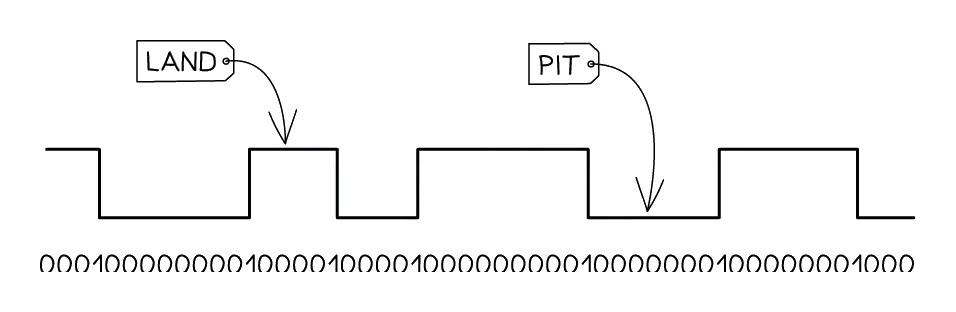
uses a laser to read (and sometimes burn) microscopic pits and lands on a reflective disc to represent binary data.
How a CD, DVD or Blu-ray works
- The disc is a thin layer of reflective metal sandwiched in plastic.
- Data is recorded as a long spiral track of pits (tiny depressions) and lands (the flat regions between pits).
- To read, a laser shines on the spinning disc; the reflection is bright over a land and dimmer over the transition between pit and land.
- A sensor detects the changes and the drive translates them into 1s and 0s.
- On writable discs (CD-R, DVD-R, BD-R), the laser also burns new pits into a dye layer, but this can normally only be done once. Rewritable formats (CD-RW, DVD-RW) use a special phase-change material that can be erased and rewritten many times.
Capacities
| Disc | Capacity |
|---|---|
| CD | ~700 MB |
| DVD | ~4.7 GB (single layer) |
| Blu-ray | ~25 GB (single layer), 50 GB (dual layer), up to 100+ GB (XL) |
Advantages and disadvantages
| Advantages | Disadvantages |
|---|---|
| Very cheap per disc | Very small capacity compared to HDD or SSD |
| Small and lightweight; easy to post or carry | Slow read/write speed |
| Discs are removable, so they can be archived | Prone to scratches and surface damage |
| No physical contact between laser and disc surface | Modern laptops often have no optical drive at all |
Optical storage is now mostly used for legacy distribution (older software, music albums, films on Blu-ray) and archival: a properly-stored disc can outlast many digital drives.