Computer Architecture
Hardware · 4 question types
Three characteristics of a CPU set how quickly it can process work: , cache size, and number of .
Clock speed
Clock speed is the number of fetch-decode-execute cycles the CPU can complete in one second, measured in hertz (Hz).
- 1 Hz = 1 cycle per second.
- 1 GHz (gigahertz) = 1 billion cycles per second.
- A typical modern CPU runs at 2 to 5 GHz.
A higher clock speed means the CPU completes more cycles per second, so it processes more instructions per second. Doubling the clock speed roughly doubles the rate of instructions (assuming nothing else becomes a bottleneck).
Why not just push the clock speed to 100 GHz? Higher clock speeds:
- Use more electrical power
- Generate more heat
- Require more advanced cooling
- Hit physical limits in the silicon
So modern CPUs balance clock speed against power and heat, often around 3 to 5 GHz.
Cache size
Cache is a small, high-speed memory built into (or sitting beside) the CPU. It holds copies of frequently-used instructions and data so the CPU can grab them without making a slow trip out to main memory (RAM).
- The CPU can access cache much faster than RAM.
- A larger cache holds more frequently-used data, so more requests can be served by the cache and fewer slow trips to RAM are needed.
- Typical sizes: from a few kilobytes (L1 cache, the fastest level) up to tens of megabytes (L3 cache, the slowest of the cache levels but still faster than RAM).
A larger cache size means better performance, because the CPU spends less time waiting for data to arrive from main memory.
Number of cores
A core is a complete processing unit within a CPU chip, with its own Control Unit, ALU, registers and accumulator. A modern chip usually has multiple cores that can each fetch, decode and execute instructions at the same time.
- A single-core CPU handles one instruction stream at a time.
- A dual-core CPU has 2 cores and can handle 2 instruction streams in parallel.
- A quad-core CPU has 4 cores; an 8-core CPU has 8; modern server CPUs may have 64 or more cores.
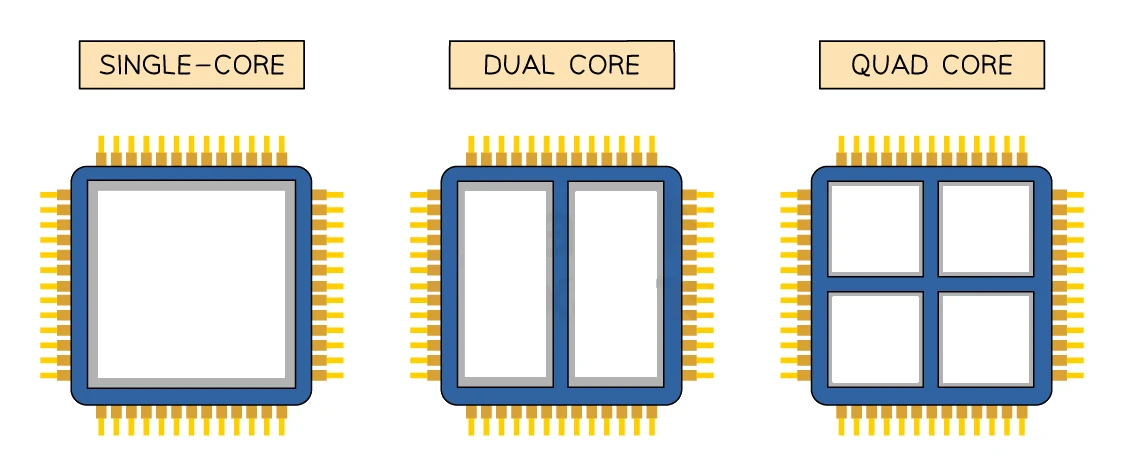
For tasks that can be split across cores (video encoding, scientific computation, running many apps at once), more cores means more work done per second.
Side-by-side summary
| Characteristic | If increased | Why performance improves |
|---|---|---|
| Clock speed | More cycles per second | More instructions executed per second |
| Cache size | More frequently-used data stays close to CPU | Fewer slow trips to main memory |
| Number of cores | More instruction streams run at once | Parallel work finishes in less wall-clock time |
Trade-offs and the headline number
Manufacturers usually advertise the clock speed first, but cache and cores often matter just as much. A 4 GHz quad-core with a large cache will usually outperform a 5 GHz single-core with a tiny cache on real-world workloads. When comparing two CPUs, you need to look at all three characteristics.
Explain how clock speed, cache, or cores affect CPU performance
What comes up: A 1–2 mark "explain the effect" question after a change to one characteristic (e.g. "the cache is increased to 64 kB — explain how this affects performance").
Write: State the effect, then give the reason. For clock speed: a higher clock speed means the CPU completes more FDE cycles per second, so more instructions are executed per second. For more cores: more cores mean more FDE cycles can run simultaneously (each core processes its own instruction stream at the same time), so more instructions are executed per second. For larger cache: a larger cache holds more frequently used data and instructions close to the CPU, so fewer slow accesses to RAM are needed, which increases performance.
Watch out: Each characteristic needs its own specific reason to earn both marks. "It is faster" alone scores nothing — you must say why (more cycles per second / simultaneous execution / fewer RAM accesses).