Types and Methods of Data Transmission
Data Transmission
USB (Universal Serial Bus) is the most common wired connection between computers and external devices. As the name says, USB is a serial method: the bits travel one after another along the cable.
Devices that use USB include: keyboards, mice, printers, scanners, external hard drives, flash memory sticks, webcams, mobile phones, audio interfaces, and most other peripherals.
USB connector shapes
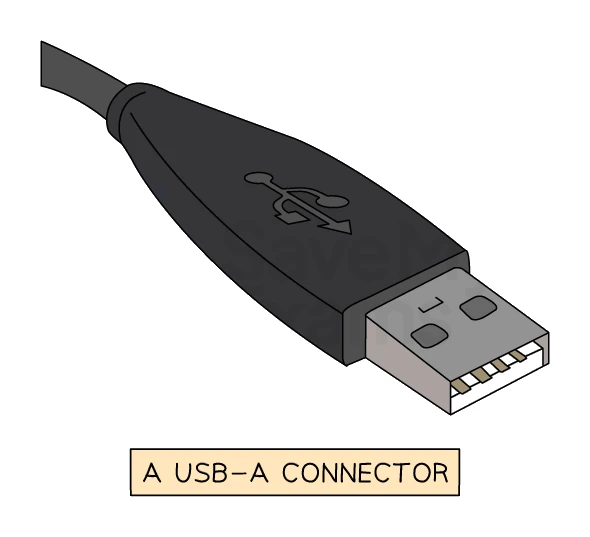
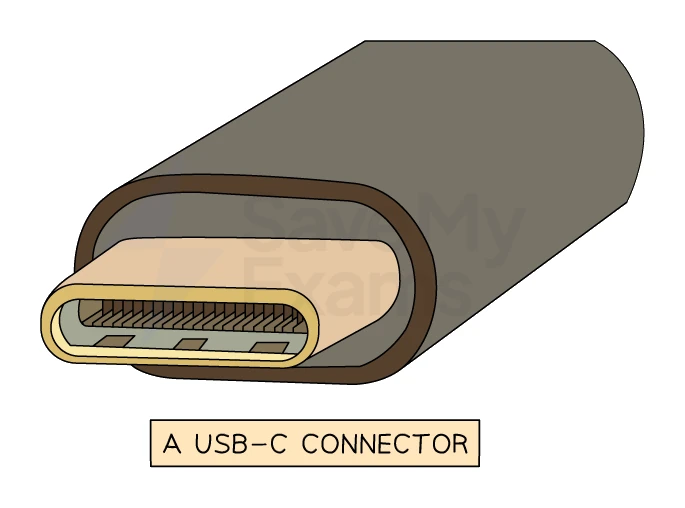
The letter in a USB name describes the physical shape of the plug:
- USB-A: the rectangular plug. Found on flash drives, mice, keyboards, older external storage devices.
- USB-B: square-ish plug. Found on the back of printers and older external storage.
- USB-C: small, oval, symmetrical (can be plugged in either way up). The current standard for phones, laptops and many modern peripherals. Can carry both data and large amounts of power.
USB generations and speeds
The number in a USB name describes the generation, which sets the maximum speed:
| Generation | Maximum speed |
|---|---|
| USB 1.1 | 12 Mbps |
| USB 2.0 | 480 Mbps |
| USB 3.0 / 3.1 / 3.2 | 5 Gbps to 20 Gbps |
| USB4 / USB4 2.0 | Up to 80 Gbps |
Newer USB generations are backwards-compatible with older ones. Plugging a USB 2.0 device into a USB 3.0 port works, but the device runs at USB 2.0 speeds.
Plug-and-play
When a USB device is connected, the operating system automatically:
- Detects that a new device has been plugged in.
- Looks up the device's identifier in its list of drivers.
- Loads the matching driver if it is already installed, or downloads and installs one if not. (For most common device types, a generic built-in driver works without any extra installation.)
- Makes the device available to applications.
This plug-and-play behaviour means the user does not have to manually install drivers or restart the computer in most cases.
Advantages of USB
| Advantage | Why it matters |
|---|---|
| Standardised connector | One port shape works across thousands of products and manufacturers; the plug only fits in one orientation so it cannot be inserted wrongly (USB-C goes in either way up) |
| Plug-and-play | Devices are detected automatically; the correct driver is loaded without user effort |
| Carries power as well as data | Many devices (mice, keyboards, flash drives, phones charging) need no separate power supply |
| High speeds and backwards compatibility | Newer USB generations offer multi-gigabit data rates while still working with older devices |
| Wide industry support | Drivers, cables and documentation are easy to find for any operating system |
Disadvantages of USB
| Disadvantage | Why it matters |
|---|---|
| Limited cable length | Maximum cable length is around 5 m before the signal degrades, so USB is not for long distances |
| Older USB generations are slow by modern standards | USB 2.0 maxes out at 480 Mbps, far below USB 3.0 and beyond |
| Older USB standards may be phased out | USB 1.1 and 2.0 may eventually lose support in future operating systems |