Types and Methods of Data Transmission
Data Transmission
The first wired-transmission choice is how many bits travel at once.
Serial transmission
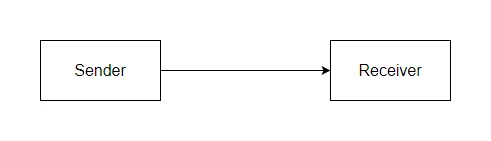
In , bits travel one at a time along a single wire (or one pair of wires). The bits arrive in the order they were sent.
Used by: USB, Ethernet, the internet itself, SATA disk interfaces, HDMI.
Common exam question
Describing how serial transmission sends data
Question: Describe how data is transmitted using serial data transmission, or explain how it is sent using serial simplex transmission (2–3 marks).
Asked in 2 of the 17 papers. Two marks are for the two halves of the definition: the bits travel one at a time, and they travel along a single wire. When the method named is serial simplex, the third mark is for the direction: the data flows in one direction only. Give all three, because a description of serial alone leaves the simplex mark unclaimed.
Parallel transmission
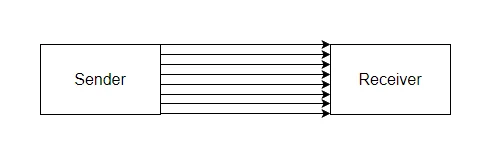
In , several bits travel simultaneously along several wires. With 8 wires you can send a whole byte at once. A clock signal usually keeps the wires synchronised.
Used by: the buses inside a computer (between the CPU and RAM, for example), old printer cables (LPT), older external hard-drive interfaces (IDE).
A subtle problem: skew
Parallel only works while every wire delivers its bit at the same instant. Over long distances, the wires drift slightly out of step (one wire is microscopically longer, or has higher resistance, or is more noisy), so the bits arrive at slightly different times. This effect is called , and it corrupts the data because the receiver can no longer tell which bits belong to which group.
Skew gets worse as distance grows. That is why short, internal connections inside a computer can use parallel happily, but long external links almost always use serial.
Side-by-side
| Feature | Serial | Parallel |
|---|---|---|
| Bits per moment | 1 | Many (one per wire) |
| Number of wires | Few (often 1 or 2) | Many (8, 16, 32 or more) |
| Cable cost | Cheaper | More expensive |
| Speed over short distances | Slower (one bit at a time) | Faster (multiple bits at a time) |
| Reliability over long distances | Much better | Poor (skew, interference) |
| Typical use | USB, Ethernet, internet, modern SSDs | Internal computer buses, legacy printer / drive cables |
Why modern fast links are actually serial
A common surprise: USB 3.0 (serial) runs at 5 Gbps, far faster than the old parallel printer port (about 8 Mbps). Modern serial links use very high clock speeds and avoid the skew problem, so they outrun every classic parallel interface. Parallel is not "always faster than serial"; it only wins over very short distances where skew is negligible.
Common exam question
Justifying serial or parallel for a scenario
Question: Give the benefits of serial transmission, explain why the stated method suits the scenario, or give its drawbacks (1–4 marks).
Asked in 3 of the 17 papers. Each point is one mark and its development ("so the speed is fast", "as the devices are all in one room") is another, so tie each reason to the scenario: distance, amount of data, whether a reply is needed. Serial is credited for no skew, less interference or crosstalk, reliability over a long distance, bits arriving in order, no collisions, and adequate speed for a small amount of data. Parallel is credited for speed, sending several bits at once down several wires, and for a short distance; its drawbacks mirror that: more interference, skew, more collisions when both directions run at once, more errors.
Direction counts too: full-duplex suits users sending to each other at once; where no reply is needed, saying half- or full-duplex is unnecessary earns a mark.