0984
Pseudocode and Flowcharts
Algorithm Design and Problem Solving · 4 question types
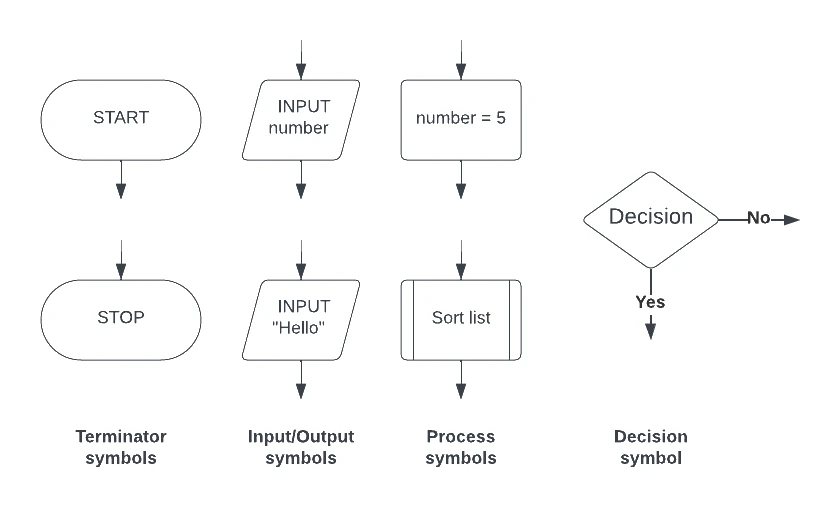
A flowchart describes an algorithm visually. Each step is a labelled shape; arrows show the order steps are carried out in.
| Shape | Name | Used for |
|---|---|---|
| Rounded rectangle (sometimes called a "stadium" or oval) | Terminator | The START and STOP of the program |
| Parallelogram | Input / Output | Reading data from the user, or printing it back to them |
| Rectangle | Process | A calculation, an assignment, or any other action that is not an input, output or decision |
| Diamond (rhombus) | Decision | An IF-style yes/no question that splits the flow into two branches |
| Arrow | Flow line | Shows the order in which steps run; arrows always have an arrowhead pointing in the direction of flow |
| Sub-routine box (rectangle with two extra vertical bars) | Sub-routine | A call to a procedure or function defined elsewhere |
| Small circle | Connector | Joins two parts of a long flowchart without crossing lines |
Rules for a well-formed flowchart
- Always start with a START terminator and end with a STOP terminator.
- Every shape (except terminators) has exactly one arrow in and exactly one arrow out, except for decisions, which have one arrow in and two arrows out (labelled
Yes/NoorTrue/False). - Loops are drawn by having an arrow loop back to an earlier point. A decision diamond inside the loop ends it.
- Arrows should not cross if it can be avoided; use circles to jump across long distances.
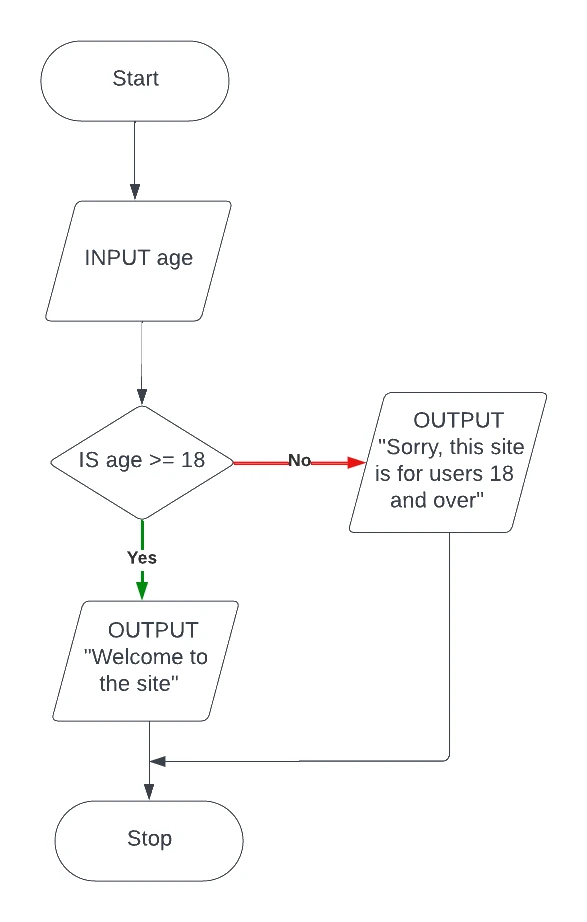
A worked flowchart
The algorithm "ask for an age and welcome the user if they are 18+" puts every shape into action: a START terminator, an INPUT parallelogram for the age, a decision diamond with Yes/No branches, two output rectangles that rejoin, and a STOP terminator.