Internet and Networking
Internet and Its Uses
Devices on a network need an address so that data can be sent to the right one. Two addressing schemes are examined: MAC and IP.
MAC address
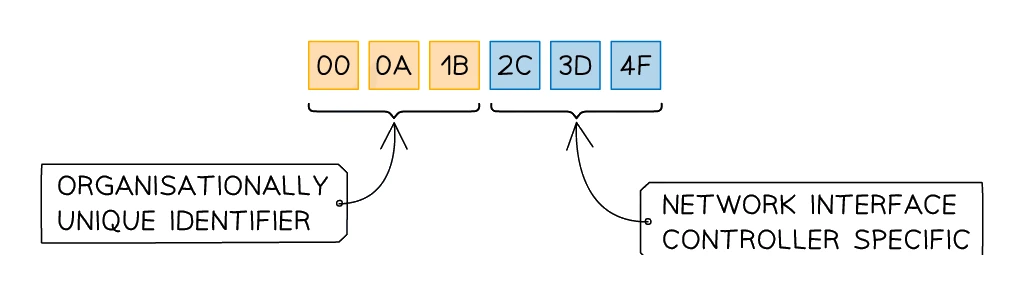
The (short for Media Access Control) acts as a unique identifier for each network card. The manufacturer burns it into the NIC during production, and it is used to recognise the device on a Local Area Network ().
Key facts:
- Static: the MAC address is set at the factory and never changes for the life of the NIC.
- 48 bits long, usually written as 12 hexadecimal digits grouped into six pairs separated by colons: AA:BB:CC:DD:EE:FF.
- The first three pairs identify the manufacturer (Organisationally Unique Identifier, OUI).
- The last three pairs are a serial number assigned by the manufacturer.
- A device's MAC address stays the same even after the device joins a new network.
- The 48-bit address space allows for about 281 trillion different MAC addresses, far more than the number of devices ever made.
IP address
An IP (Internet Protocol) address is a unique identifier assigned to a device when it joins a network, used to identify the device on the internet ().
Key facts:
- Can be static (fixed, used for servers and websites that need a permanent location) or dynamic (changes each time the device joins a network, assigned automatically by a DHCP server).
- A device's IP address typically changes whenever it joins a different network.
- Two versions exist: IPv4 and IPv6.
IPv4
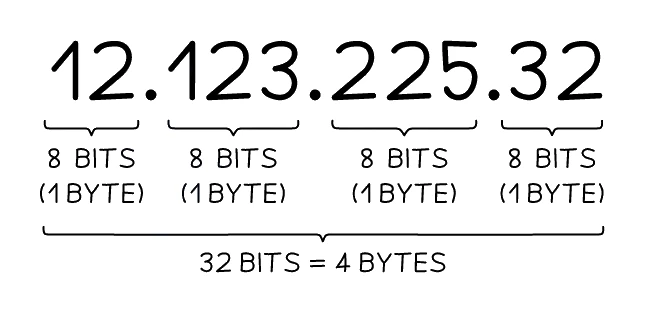
IPv4 is the older version, using 32-bit addresses written as four denary numbers in the range 0 to 255, joined by dots.
Example: 192.168.1.1
- Each block (called an octet) is one byte (8 bits).
- A full IPv4 address occupies 32 bits in total (4 bytes).
- The total number of possible IPv4 addresses is 2³² ≈ 4.3 billion.
- That seemed like plenty in 1983, but with 8 billion+ people, smart phones, IoT devices and servers, the 4.3 billion addresses are now exhausted.
IPv6
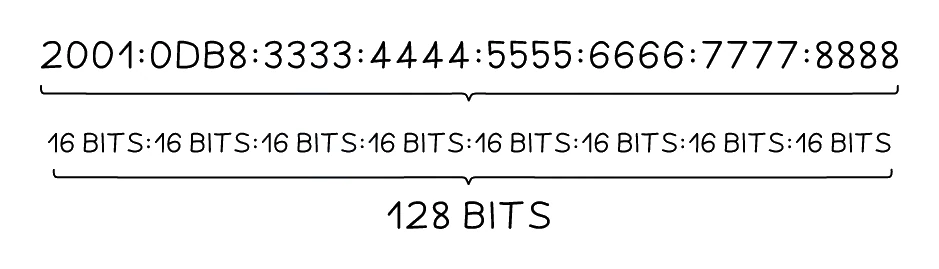
IPv6 is the newer version, using 128-bit addresses written as eight blocks of four hexadecimal digits, separated by colons.
Example: 2001:0db8:85a3:0000:0000:8a2e:0370:7334
- Every block holds 16 bits (2 bytes).
- The full IPv6 address spans 128 bits (16 bytes) overall.
- The total number of possible IPv6 addresses is 2¹²⁸ ≈ 3.4 × 10³⁸, enough to give every person on Earth about 10²⁸ unique addresses.
- IPv6 is now being rolled out worldwide alongside IPv4.
Common exam question
Describing an IPv4 address or comparing it with IPv6
Question: Describe the characteristics of an IPv4 address, or give one similarity and describe two differences between IPv4 and IPv6 (4–5 marks).
Set in 2 of the 17 papers. For IPv4 alone, four format points are the safe answer: written in denary, each number 0 to 255, 32 bits long, four groups separated by dots. General properties (unique, static or dynamic, public or private, a network prefix plus a host number) are capped at two of the four marks.
A similarity is one mark: both identify a device on a network, both can be static or dynamic, both are unique, both can be assigned by a router. Each difference is a linked pair, one point per half, so write both the IPv4 and IPv6 sides: 32-bit against 128-bit, denary against hexadecimal, four groups against eight, dots against colons, 0 to 255 against 0000 to FFFF, fewer addresses against many more, all zeros shown against zeros shortened to a double colon.
Side-by-side comparison
| Feature | MAC address | IP address |
|---|---|---|
| Stands for | Media Access Control | Internet Protocol |
| Assigned by | The NIC manufacturer | The network (router / DHCP server) |
| Static or dynamic? | Static (never changes) | Can be static OR dynamic |
| Length | 48 bits (12 hex digits) | IPv4: 32 bits. IPv6: 128 bits |
| Format | AA:BB:CC:DD:EE:FF | IPv4: 192.168.1.1. IPv6: 2001:0db8::1 |
| Used on | LAN (locally) | WAN / internet (globally) |
| Changes when device moves networks? | No | Yes |
| Used to forward data by | Switches | Routers |
Why both addresses are needed
The two address systems do different jobs:
- The gets a packet from a sender, somewhere on the internet, to the destination network. Routers around the world use it.
- The then delivers the packet within the destination network, from the router to the specific device. Switches use it.
Think of it like postal delivery: the IP address is the street address of the building, while the MAC address is the specific person's name on that floor.
Common exam question
Completing a table of network terms and definitions
Question: Complete a table of network terms, sometimes mixed with internet terms, by filling in each missing term or missing definition (1 mark per gap, 5–6 marks).
Asked in 2 of the 17 papers, with the IP address row in both. One mark per gap, and the two address rows are told apart by who assigns the address and what it identifies. An IP address is given to a device by the network when it connects, and identifies that device on the network or the internet. A MAC address is given by the manufacturer and uniquely identifies the device itself. The NIC is the component inside a device that lets it connect to a network, and the router is the device that sends packets on to their correct destinations.
The same tables carry rows from other topics, each worth its own mark: the World Wide Web, the DNS, the web browser, hacking, and a firewall or proxy server.