Number Systems
Data Representation
Computer science uses three number systems. The key idea is the base: the number of distinct digits the system uses.
| System | Base | Digits used | Example |
|---|---|---|---|
| Denary (decimal) | 10 | 0 to 9 | 3268 |
| Binary | 2 | 0 and 1 only | 1100 |
| Hexadecimal | 16 | 0 to 9 plus A to F | 9C |
Common exam question
Describing a number system by its base and digits
Question: Explain what is meant by a binary number system, or give one similarity and two differences between hexadecimal and binary (2–3 marks).
Asked in 2 of the 17 papers. A number system is defined by its base and by the digits it uses, so give both. Binary has a base of 2 and uses only two values, 1 and 0; any two of those three points earn the two marks. The matching facts for hexadecimal are a base of 16 and the digits 0 to 9 plus the letters A to F.
The one-mark similarity is simply that both are number systems. For the differences, pair the facts: binary is base 2 where hexadecimal is base 16, and binary uses only digits (0 and 1) where hexadecimal also uses letters. Naming the two bases is one difference, so the second must be about the digits.
Denary (base 10)
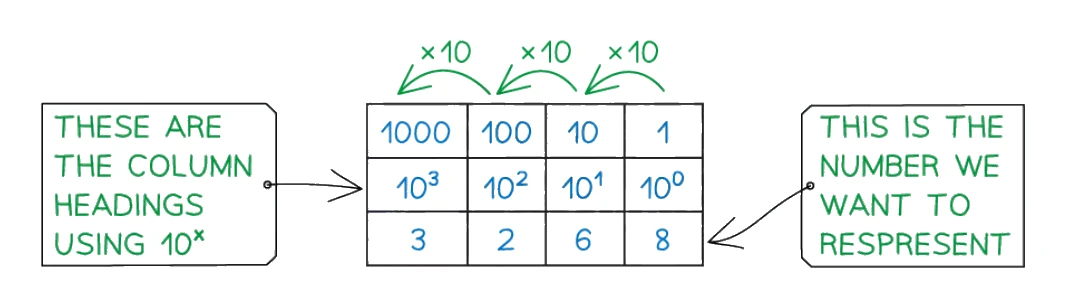
Denary is the everyday number system used by humans. Each digit's value depends on the column it is in. Reading right to left, the columns are powers of 10: 1, 10, 100, 1000 and so on.
For example, the number 3268 breaks down as:
(3 × 1000) + (2 × 100) + (6 × 10) + (8 × 1) = 3268
Binary (base 2)
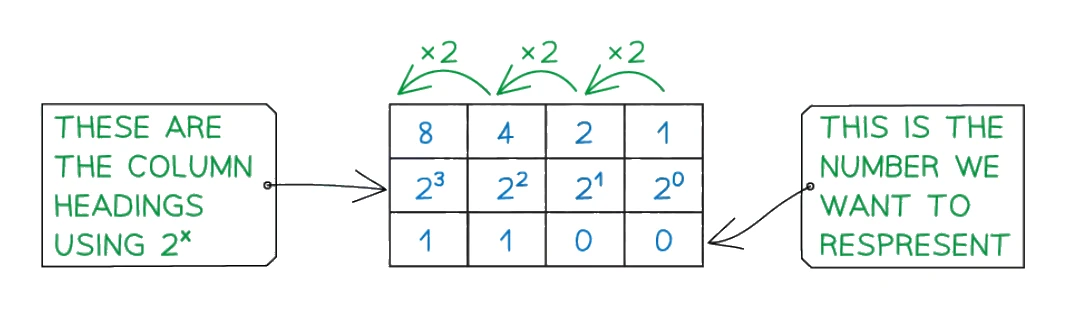
Binary uses only two digits, 0 and 1. Each digit is called a bit (short for binary digit). Each column is a power of 2, doubling as you move left: 1, 2, 4, 8, 16, 32, 64, 128 and so on.
For example, the binary value 1100 breaks down as:
(1 × 8) + (1 × 4) + (0 × 2) + (0 × 1) = 12
The 8-bit place values you must memorise:
| 128 | 64 | 32 | 16 | 8 | 4 | 2 | 1 |
|---|
For 16-bit binary, the columns continue further: 32 768, 16 384, 8 192, 4 096, 2 048, 1 024, 512, 256, 128, 64, 32, 16, 8, 4, 2, 1. The largest denary number that can be stored in 16 bits is 65 535 (binary 1111 1111 1111 1111).
Hexadecimal (base 16)
Hexadecimal needs 16 different symbols, but only ten digits exist (0 to 9), so the next six values are written as letters:
| Denary | 0 | 1 | 2 | 3 | 4 | 5 | 6 | 7 | 8 | 9 | 10 | 11 | 12 | 13 | 14 | 15 |
|---|---|---|---|---|---|---|---|---|---|---|---|---|---|---|---|---|
| Hex | 0 | 1 | 2 | 3 | 4 | 5 | 6 | 7 | 8 | 9 | A | B | C | D | E | F |
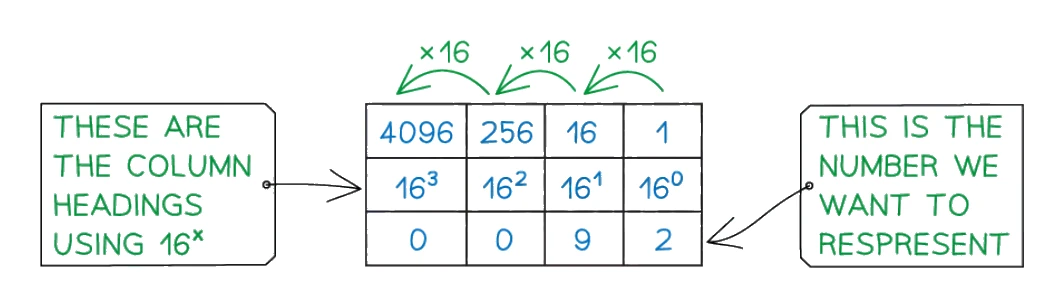
Each column is a power of 16: 1, 16, 256, 4096 and so on. For example, the hexadecimal value 13 in 2-digit form means:
(1 × 16) + (3 × 1) = 19 in denary
The key relationship: one hex digit = one nibble
A group of 4 binary bits is called a (half a byte). The largest 4-bit binary value is 1111, which is 15 in denary, which is F in hexadecimal. So one hex digit covers exactly the same range as one nibble of . This is what makes binary-to-hex conversion fast: split the binary into nibbles from the right, convert each nibble to one hex digit.