1. Algorithms and how we describe them
An algorithm is a precise, step-by-step set of instructions that solves a specific problem or carries out a specific task.
An algorithm can be described in three different ways, all of which appear in exam papers:
| Notation | What it is |
|---|---|
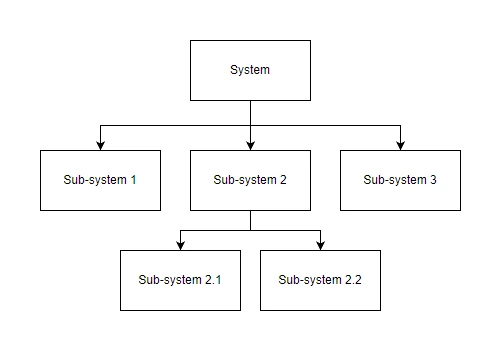
| Structure diagram | A top-down hierarchy showing how a big problem is decomposed into smaller sub-problems (and they in turn into smaller ones) |
| Flowchart | A diagram of boxes and arrows showing the order in which steps are carried out, including decisions and loops |
| Pseudocode | A text-based notation that looks like a programming language but is not tied to any specific one |
Each notation has its own strengths: flowcharts are visual and good for showing branching; pseudocode is compact and easy to translate into real code; structure diagrams help during the design stage. Pseudocode is the most heavily examined of the three.
A structure diagram breaks a system top-down into sub-systems, and those into smaller sub-systems again:
2. CIE pseudocode syntax
CIE pseudocode is its own style. It is not real Python or any other language. The rules are deliberately simple, so any student can read or write it regardless of which language they have learned. When a question asks for pseudocode, use the CIE keywords (OUTPUT, not print(...)): the 15-mark scenario schemes ignore minor syntax errors, but they credit the logic, so write it in the CIE style the examiner expects.
Variables and assignment
Variables hold values. In CIE pseudocode the arrow operator ← is the only assignment operator. A single = is not assignment in CIE pseudocode; it means equality (comparison), so do not use it to give a variable a value.
Total ← 0
Count ← Count + 1
Name ← "Alice"
IsFinished ← FALSE
Variables are also declared with a data type using DECLARE:
DECLARE Score : INTEGER
DECLARE Name : STRING
DECLARE IsFinished : BOOLEAN
DECLARE Price : REAL
Input and output
Two clean keywords, with no brackets:
INPUT Age
OUTPUT "Welcome to the site, ", Name
IF-THEN-ELSE selection
A standard two-branch selection:
IF Age >= 18
  THEN
    OUTPUT "Welcome to the site"
  ELSE
    OUTPUT "Sorry, this site is for over-18s only"
ENDIF
Selections can be nested to test more than two cases:
IF Score >= 70
  THEN
    Grade ← "A"
  ELSE
    IF Score >= 60
      THEN
        Grade ← "B"
      ELSE
        Grade ← "C"
    ENDIF
ENDIF
For more than a handful of branches, CASE OF ... OTHERWISE ... ENDCASE is cleaner:
CASE OF Day
   1 : OUTPUT "Monday"
   2 : OUTPUT "Tuesday"
   3 : OUTPUT "Wednesday"
   4 : OUTPUT "Thursday"
   5 : OUTPUT "Friday"
   OTHERWISE OUTPUT "Weekend"
ENDCASE
Loops
Three loop constructs are tested by the syllabus; they are compared in section 5.
FOR i ← 1 TO 10
   OUTPUT i
NEXT i

WHILE NotFinished = TRUE DO
   INPUT Answer
   IF Answer = "stop"
     THEN
       NotFinished ← FALSE
   ENDIF
ENDWHILE

REPEAT
   INPUT Number
UNTIL Number > 0
Arrays
Arrays hold a list of values of the same type:
DECLARE Scores : ARRAY[1:10] OF INTEGER
Scores[1] ← 75
Scores[2] ← 88
OUTPUT Scores[1]
CIE arrays are usually 1-indexed, with the size given as [1:10]. Some other syntaxes use [10].
Arithmetic operators
| Operator | Meaning |
|---|---|
+ - * / | Plus, minus, multiply, divide |
DIV(a, b) | Integer division: the quotient of a divided by b with the fractional part discarded, so DIV(17, 5) returns 3 |
MOD(a, b) | The remainder of a divided by b, so MOD(17, 5) returns 2 |
Comparison operators
| Operator | Meaning |
|---|---|
= | Equal to |
<> | Not equal to |
< > | Less than, greater than |
<= >= | Less than or equal, greater than or equal |
Logical operators
| Operator | Meaning |
|---|---|
AND | Both conditions are true |
OR | At least one condition is true |
NOT | The single condition is not true |
Useful string functions
| Function | What it does |
|---|---|
LENGTH(s) | Returns the number of characters in s |
SUBSTRING(s, start, length) | Returns part of s starting at position start, for length characters |
UCASE(s) | Returns s with every letter in uppercase |
LCASE(s) | Returns s with every letter in lowercase |
Procedures and functions
PROCEDURE Greet(Name : STRING)
   OUTPUT "Hello, ", Name
ENDPROCEDURE

CALL Greet("Alice")
FUNCTION Square(Value : INTEGER) RETURNS INTEGER
   RETURN Value * Value
ENDFUNCTION

Result ← Square(5)
These are covered in detail in topic 24 (Procedures and Functions).
Common pseudocode pitfalls
- Do not use real-language syntax: avoid
print(),input(),range(). Stick toOUTPUT,INPUT,FOR ... NEXT. - Always close compound statements:
IFneedsENDIF;WHILEneedsENDWHILE;FORneedsNEXT <counter>. - Indent inside compound statements to make the structure clear; examiners reward readable layout.
- Use UPPERCASE for keywords to make them stand out (
IF,THEN,WHILE,DO,NEXT). - Use clear variable names that describe what they store (
StudentScore, notx).
Common exam question
Finding and correcting the errors in a pseudocode algorithm
Question: A numbered pseudocode algorithm and its purpose are given; identify the errors, or their line numbers, and suggest a correction for each (3–5 marks, one per error).
Asked in 6 of the 17 papers. Each mark is for an error and its correction together, so give both.
Check each line against the stated purpose, since the planted errors repeat: a DECLARE with the wrong data type (a counter as STRING); the wrong keyword (IF opening a loop, ENDCASE closing an IF, WHILE for UNTIL); a wrong condition or loop limit (= for <>, OR for AND, > for <, a FOR loop starting at 0 or ending at 1); the wrong variable or array index (a total that adds the counter); and the wrong operator or start value (a total multiplied, a counter starting at 100). One further paper set it on a flowchart: swapped Yes/No labels, OR for AND, a reversed assignment, a wrong symbol.
Worked example
Correcting a faulty counting algorithm
This algorithm is intended to input 20 temperatures, count how many are below zero and output that count. It contains four errors. Identify each error by its line number and suggest a correction.
01 DECLARE Count : STRING
02 Count ← 0
03 FOR Index ← 1 TO 20
04     INPUT Temp
05     IF Temp > 0
06       THEN
07         Count ← Count + 1
08     ENDCASE
09 NEXT Index
10 OUTPUT "Below zero: ", Temp
Solution:
Test each line against the purpose: a count is a whole number, "below zero" is a less-than test, an IF closes with ENDIF, and the output must be the count.
- Line 01:
DECLARE Count : STRINGshould beDECLARE Count : INTEGER, because a count is a whole number - Line 05:
IF Temp > 0should beIF Temp < 0, because below zero means less than zero - Line 08:
ENDCASEcloses a CASE statement, not an IF, so it should beENDIF - Line 10:
OUTPUT "Below zero: ", Tempshould beOUTPUT "Below zero: ", Count, because the count is wanted, not the last temperature
Each line and its correction together earn one mark. The other six lines are correct, so leave them alone: the FOR has its matching NEXT, the INPUT reads into Temp, and the THEN is where it belongs.
3. Flowchart symbols
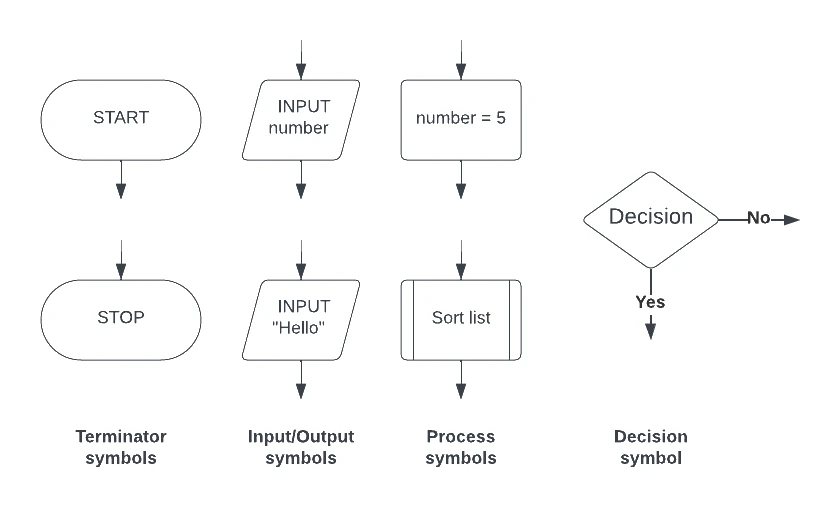
A flowchart describes an algorithm visually. Each step is a labelled shape; arrows show the order steps are carried out in.
| Shape | Name | Used for |
|---|---|---|
| Rounded rectangle (sometimes called a "stadium" or oval) | Terminator | The START and STOP of the program |
| Parallelogram | Input / Output | Reading data from the user, or printing it back to them |
| Rectangle | Process | A calculation, an assignment, or any other action that is not an input, output or decision |
| Diamond (rhombus) | Decision | An IF-style yes/no question that splits the flow into two branches |
| Arrow | Flow line | Shows the order in which steps run; arrows always have an arrowhead pointing in the direction of flow |
| Sub-routine box (rectangle with two extra vertical bars) | Sub-routine | A call to a procedure or function defined elsewhere |
| Small circle | Connector | Joins two parts of a long flowchart without crossing lines |
Rules for a well-formed flowchart
- Always start with a START terminator and end with a STOP terminator.
- Every shape (except terminators) has exactly one arrow in and exactly one arrow out, except for decisions, which have one arrow in and two arrows out (labelled
Yes/NoorTrue/False). - Loops are drawn by having an arrow loop back to an earlier point. A decision diamond inside the loop ends it.
- Arrows should not cross if it can be avoided; use circles to jump across long distances.
Common exam question
Drawing or completing a flowchart from a description
Question: A short program's requirements are listed (inputs, a check, a calculation or total, an output); draw a flowchart, or complete one whose START and STOP are printed, that carries them out (6 marks).
Asked in 3 of the 17 papers, always 6 marks, awarded point by point: correct symbols throughout, flow lines that are complete and work (both exits of every decision labelled Yes and No), the inputs, a decision for each required check, any calculation or totalling, and the output with its message. One scheme makes the prompt part of the input mark, so an OUTPUT asking for the value precedes each INPUT.
A count-controlled loop needs three visible parts: the counter set before the loop, increased inside it, and a decision that ends it, with an arrow looping back. Set a total to 0 before its loop. Symbol knowledge was also tested once on its own, by linking four symbols to their purposes.
A worked flowchart
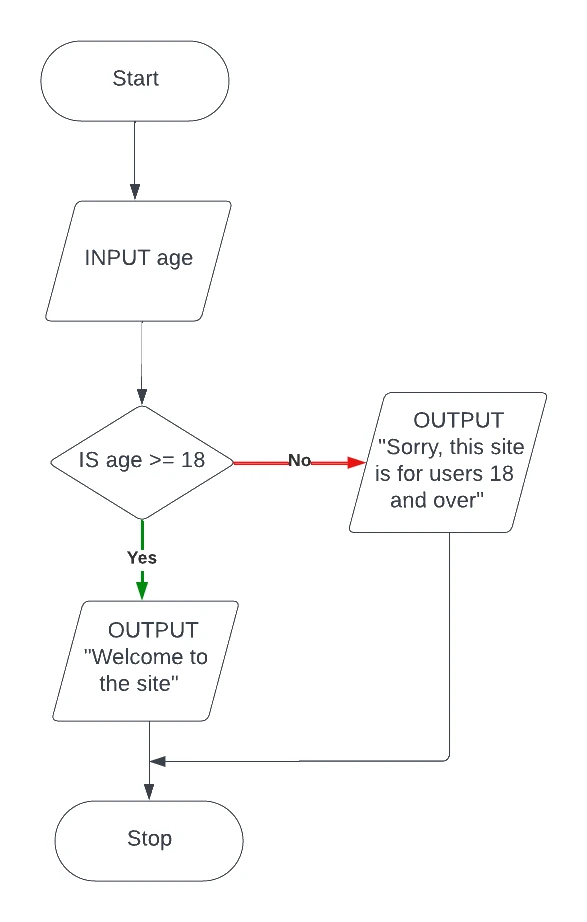
The algorithm "ask for an age and welcome the user if they are 18+" puts every shape into action: a START terminator, an INPUT parallelogram for the age, a decision diamond with Yes/No branches, two output rectangles that rejoin, and a STOP terminator.
4. Trace tables
A trace table is a table used to record the value of each variable at every step of an algorithm, so that the algorithm can be hand-executed and checked for correctness.
Trace tables are essential for finding logic errors, where a program runs without crashing but produces the wrong output. By stepping through the algorithm with specific test data, the programmer can spot the exact step where the variables go wrong.
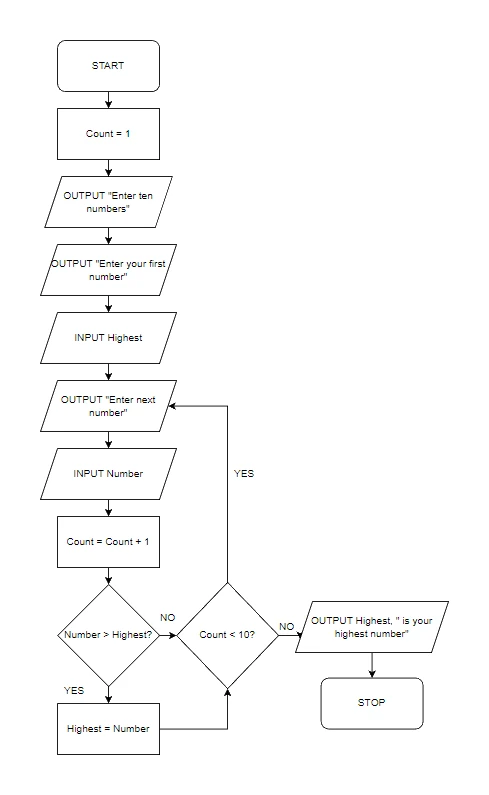
An algorithm like the "find the highest of ten numbers" flowchart below, with a counter and a decision inside a loop, is a typical candidate for a trace table:
How to set up a trace table
- List the variables the algorithm uses as column headings. Include any output as the last column.
- Number the rows (optional, but useful for long algorithms).
- Walk through the line by line, updating the relevant column whenever a variable changes.
- Note any output in the OUTPUT column when an
OUTPUTstatement is reached. - Continue until the algorithm finishes (the loop terminates or the program reaches END).
Common exam question
Completing a trace table
Question: A flowchart or pseudocode algorithm is given with its input data or an array's contents; complete the trace table whose headings are printed (2–7 marks, usually 5 or 6).
Asked in 7 of the 17 papers, every Paper 2 but one. Marks go column by column: each entirely correct column usually earns a mark, OUTPUT included, though related columns sometimes share one; in one scheme, array columns with a single error kept one of two marks. Fill a cell wherever the algorithm assigns that variable, even to the same value, and leave the rest blank.
Most of these algorithms stop on a terminating value such as −1, and the data continues past it: the trace ends when that value is read. Record each OUTPUT in the row where it happens, even a message printed inside the loop. One paper asked only for the headings: every variable plus OUTPUT, nothing else, since an extra heading costs the final mark.
Why trace tables are useful
- Finding logic errors: if
Highestdoes not update when it should, the trace table reveals the exact step where the bug is. - Verifying loop termination: walking through the loop counter line by line shows that the loop ends when it is meant to.
- Understanding unfamiliar algorithms: a trace table forces a careful, step-by-step reading and often makes the purpose of the algorithm obvious.
- Picking suitable test data: tracing with boundary and abnormal data (topic 18) checks the program's edge cases.
Worked example
Tracing a loop that stops on a terminating value
The algorithm below reads values until −1 is entered. Draw up a trace table with the columns Total, Count, Value, Tens, Units and OUTPUT, and trace the algorithm for the inputs 33, 7, 50, 44, −1, 88, 12.
Total ← 0
Count ← 0
REPEAT
    INPUT Value
    IF Value <> -1
      THEN
        Tens ← DIV(Value, 10)
        Units ← MOD(Value, 10)
        IF Tens = Units
          THEN
            OUTPUT "Double"
            Count ← Count + 1
        ENDIF
        Total ← Total + Value
    ENDIF
UNTIL Value = -1
OUTPUT "Total ", Total
OUTPUT "Doubles ", Count
Solution:
- Before the loop, Total and Count are 0: that is the first row.
- 33: DIV(33, 10) = 3 and MOD(33, 10) = 3, so Tens = Units, "Double" is output and Count becomes 1; Total becomes 33.
- 7: Tens = 0 and Units = 7, no output; Total becomes 40.
- 50: Tens = 5 and Units = 0, no output; Total becomes 90.
- 44: Tens = 4 = Units, "Double" is output and Count becomes 2; Total becomes 134.
- −1: the IF is skipped, the UNTIL condition is true and the loop ends. 88 and 12 are never read.
- The two final OUTPUT lines print Total 134 and Doubles 2.
| Total | Count | Value | Tens | Units | OUTPUT |
|---|---|---|---|---|---|
| 0 | 0 | ||||
| 33 | 1 | 33 | 3 | 3 | Double |
| 40 | 7 | 0 | 7 | ||
| 90 | 50 | 5 | 0 | ||
| 134 | 2 | 44 | 4 | 4 | Double |
| −1 | Total 134 | ||||
| Doubles 2 |
Count stays blank on the rows for 7 and 50 because it does not change there.
Common exam question
Stating the purpose of a traced algorithm
Question: Usually after the trace table: state or describe the purpose of the algorithm, or outline the processes it carries out (1–3 marks).
Asked in 6 of the 17 papers. Say what the algorithm achieves, not what each line does; your trace shows the pattern. Credited answers read like "sorts the array into ascending order", "finds the total and average of each batch of numbers and outputs them when 0 is entered", "checks whether an input is divisible by 10 and totals those that are" or "multiplies the input by every smaller number down to 1".
For two marks make two separate points: what is calculated or checked, and what is output or happens at the end (the result is printed, a new batch starts). Naming a standard algorithm counts when there is one: "bubble sort" was credited beside the description. For "outline the processes", give the stages in order: values input and stored, sorted, middle value output.
5. The three kinds of loop
CIE pseudocode supports three loop constructs. Each one fits a different situation; getting the right loop for the job makes algorithms cleaner and easier to read.
FOR loop
A runs a block of code a fixed number of times, with a counter that takes each value in a stated range.
Syntax:
FOR i ← 1 TO 10
   OUTPUT i
NEXT i
Use a FOR loop when:
- You know in advance how many times the loop should run.
- A counter is naturally needed for the work (e.g. processing each element in an array).
Variations:
FOR i ← 1 TO 10 STEP 2advances the counter by 2 each iteration (1, 3, 5, 7, 9).FOR i ← 10 TO 1 STEP -1counts down.
WHILE loop
A runs a block of code as long as a condition is true. The condition is checked at the top before each iteration.
Syntax:
WHILE Answer <> "stop" DO
   INPUT Answer
ENDWHILE
Use a WHILE loop when:
- You do not know in advance how many iterations will be needed.
- It may be appropriate to run the loop zero times if the condition is already false at the start.
REPEAT-UNTIL loop
A runs a block of code repeatedly until a condition becomes true. The condition is checked at the bottom after each iteration.
Syntax:
REPEAT
   INPUT Number
UNTIL Number > 0
Use a REPEAT-UNTIL loop when:
- You do not know in advance how many iterations will be needed.
- The loop body must run at least once.
Side-by-side comparison
| Feature | FOR | WHILE | REPEAT-UNTIL |
|---|---|---|---|
| Number of iterations | Known in advance | Not known | Not known |
| Condition checked | n/a (counter-controlled) | Before each iteration (top of loop) | After each iteration (bottom of loop) |
| Will it run at least once? | Only if the counter range is non-empty (start ≤ end for a STEP +1 loop; start ≥ end for a negative step) | No (zero iterations possible) | Yes (always at least one iteration) |
| Counter variable | Yes, the counter | Optional; the programmer manages it | Optional; the programmer manages it |
| Typical use | Traversing an array of known size; printing N lines; counting | Processing input until a sentinel value arrives; waiting for a condition | Validating user input; menu loops that should always run once |
Exam tip
A WHILE condition keeps going, an UNTIL condition stops
WHILE gives the condition for continuing, so a loop that re-asks for an out-of-range length reads WHILE Length < 10 OR Length > 50 DO; REPEAT … UNTIL gives the condition for stopping, so the same loop ends UNTIL Length >= 10 AND Length <= 50. The scheme accepted either loop and gave a separate mark for a correct exit condition. Out-of-range tests join with OR, in-range tests with AND; swap the keyword without flipping the condition and the loop rejects valid values and accepts an invalid one. Error-finding questions plant exactly this: WHILE for UNTIL, OR for AND.
Choosing the right loop
Two questions decide which loop fits a given task:
- Is the number of iterations known before the loop starts? Yes → use
FOR. No → continue to question 2. - Should the loop body always run at least once? Yes → use
REPEAT-UNTIL(the condition is checked at the bottom). No → useWHILE(the condition is checked at the top, and zero iterations are allowed).
Two quick examples of the pattern in everyday programming. Printing the first twenty multiples of three has a known iteration count, so a FOR loop is the right pick. Asking the user to type a positive number and re-prompting if they type a negative one needs the input to be read at least once before any check happens, so REPEAT-UNTIL fits. Waiting for a sensor reading to drop below a threshold has unknown duration and may already be below at the start, so WHILE fits.
Common exam question
Describing changes to an algorithm without rewriting it
Question: Describe or explain how to change a corrected algorithm to use a count-controlled loop, validate its inputs or filter its output, without rewriting it (4–5 marks).
Asked in 3 of the 17 papers, one mark per change described: where (which line to replace or insert between), which construct (FOR, REPEAT, WHILE or IF), its condition or limits and the tidy-up.
Making a WHILE loop count-controlled earned a mark each for replacing the WHILE line, for FOR, for its limits, for removing the counter update and for swapping ENDWHILE for NEXT; and because a FOR loop runs a fixed number of times, an input the WHILE version skipped must now be validated and re-input inside the loop. For a range check, either insert a WHILE loop after the INPUT (repeating while out of range, with an error message and re-input) or wrap the prompt and INPUT in REPEAT … UNTIL the value is in range; both were credited.
Avoiding common loop pitfalls
- Off-by-one errors: forgetting that
FOR i ← 1 TO 10runs 10 times, not 9 or 11. - Infinite loops: forgetting to update the variable in the loop's condition (e.g. forgetting to read fresh input inside a
WHILE Answer <> "stop"loop). - Wrong loop choice: using a
REPEAT-UNTILwhen zero iterations should be possible, or aWHILEwhen at least one iteration is mandatory. - Counter inside the loop body: in CIE pseudocode, you generally should not modify the FOR loop's counter from inside the loop body.