1. Two kinds of computer memory
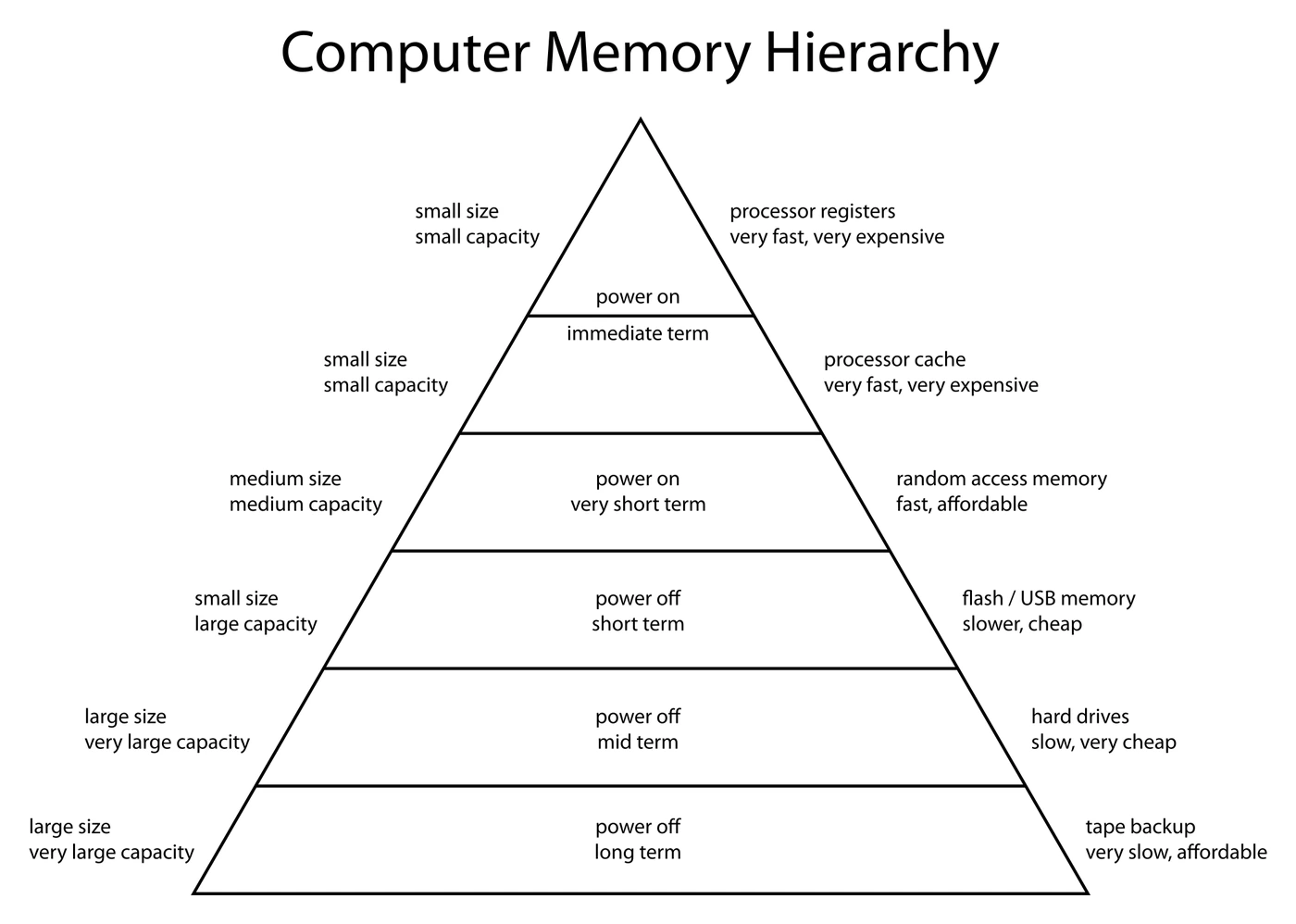
Every working computer keeps data in two distinct places:
- Primary storage: the fast, working memory directly accessible to the CPU. Used while the program is running.
- Secondary storage: the slower, long-term storage that holds programs and files when they are not in use, and that keeps its contents when the power is off.
A useful first comparison:
| Feature | Primary storage | Secondary storage |
|---|---|---|
| Speed | Very fast | Much slower |
| Capacity | Small (typically gigabytes) | Large (often terabytes) |
| Cost per gigabyte | High | Low |
| Volatile? | RAM is volatile; ROM is not | Always non-volatile |
| Directly accessible by CPU? | Yes (the CPU reads from and writes to primary storage every cycle) | No (data must be loaded into primary storage first) |
| Typical examples | RAM, ROM, cache, CPU registers | Hard disk drives, SSDs, USB flash drives, CDs, DVDs, Blu-rays |
Common exam question
Comparing primary and secondary storage
Question: Give an example or characteristic of primary storage, pick it out of a list of devices, or explain two differences between primary and secondary storage (1–4 marks).
Asked in 4 of the 17 papers. The credited examples are RAM and ROM (one scheme also takes cache); the distractors (CD, DVD, HDD, SSD, USB flash drive) are all secondary storage. Explaining the example earns two more marks for its purpose: the RAM and ROM points in the next section. The one-mark characteristic is direct access by the CPU, or having both volatile and non-volatile parts.
Each difference is two listed points, the primary half and a whereas-secondary-storage half, so two full differences earn four marks: directly accessible to the CPU or not; holds what is in use now or holds user files, the operating system and applications; small or larger capacity; partly volatile or non-volatile; partly unchangeable or writable; faster or slower access.
Computers need both. Primary storage is fast enough to keep up with the CPU, but it is too expensive (and usually too volatile) to hold everything forever. Secondary storage is cheap and persistent, but too slow for the CPU to use directly during the fetch-decode-execute cycle.
Common exam question
Why a device needs secondary storage
Question: Explain the purpose of the secondary storage in a device such as a smartphone, or state which component keeps the installed software when the power is turned off (1–2 marks).
Set in 2 of the 17 papers. The one-mark answer is secondary storage; HDD or SSD is accepted instead. For two marks, give two separate points from the scheme's list: it stores data and files permanently, so that programs and data do not have to be downloaded, installed or entered again every time the device is switched on (the scheme lists that consequence as a separate point, so the two together earn both marks); it lets software be downloaded and installed; it holds the user's own files; and it provides the space in which virtual memory is created. The points are specific, saying what is stored or why it must survive the power going off, so add that detail to a bare "it stores data".
2. RAM and ROM
The two primary-storage chips you must know are and .
RAM (Random Access Memory)
RAM is that holds whatever data and instructions a running program needs right now. The CPU reads and writes RAM directly during the fetch-decode-execute cycle.
Key properties:
- . Everything stored in RAM disappears the moment power is removed.
- Read/write. The CPU can both read from and write to any RAM location.
- Fast. Much faster than any secondary storage, though slower than cache.
- Large compared to ROM. A modern PC has 8 GB to 64 GB of RAM.
When you launch a program, its instructions are copied from into RAM so the CPU can run them. When you save a file, the data is copied from RAM out to secondary storage so it survives the power being switched off.
ROM (Read-Only Memory)
ROM is primary storage that holds the very first instructions the computer needs at start-up, including the bootstrap loader and the BIOS.
Key properties:
- . Contents survive the power being turned off, which is essential because the computer needs ROM's contents in order to boot.
- Read-only. The contents are written once at the factory and (in basic ROM) cannot be changed by the running computer.
- Fast (faster than secondary storage but slower than RAM).
- Small. Only a few hundred kilobytes; just enough to hold the start-up code.
ROM contains the bootstrap: the small program that runs the moment the computer is switched on. Its job is to test the hardware, find the operating system on secondary storage, and load enough of it into RAM for the system to take over. After that point, the running computer mostly uses RAM rather than ROM.
Side-by-side
| Feature | RAM | ROM |
|---|---|---|
| Stands for | Random Access Memory | Read-Only Memory |
| Stores | Active program data and instructions | Bootstrap / BIOS / start-up instructions |
| Volatile? | Yes (lost when power is off) | No (kept when power is off) |
| Read/write? | Read and write | Read only (in basic ROM) |
| Speed | Very fast | Fast |
| Typical size | Many GB | Few hundred KB |
Common exam question
Describing RAM and explaining why a device needs ROM
Question: Describe what is meant by RAM, explain why a device such as a smartwatch needs ROM, or identify one item of data that is kept in ROM (1–2 marks).
Asked in 2 of the 17 papers. For RAM, any two of three points score: it is volatile; the CPU accesses it directly, so quickly; and it holds the data and instructions currently running. For ROM, any two from: it stores the BIOS; it stores the bootstrap loader; it holds the start-up instructions so the device can boot; it stores the firmware; it is non-volatile, so its contents are kept permanently; and it holds data and instructions that must not change. Non-volatile and unchangeable are separate points in that list, so write both rather than treating them as one idea. For the one-mark item of data stored in ROM, the BIOS or bootstrap, the firmware, or parts of the operating system are accepted.
3. Virtual memory
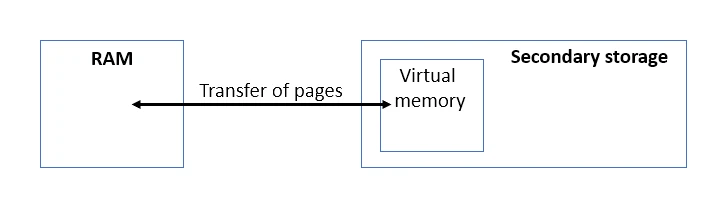
Virtual memory is an area on secondary storage that the operating system uses as an extension of when RAM is full.
Imagine a computer running so many programs that physical RAM fills up. Without some way to free RAM, the system would have to refuse to launch any new program. Virtual memory solves this by temporarily moving inactive data and instructions out of RAM and onto , freeing space in RAM for whatever is currently active.
How it works
The operating system breaks RAM and virtual memory into fixed-size chunks called pages.
- RAM becomes full while several programs are running.
- The OS picks pages that have not been used recently (e.g. a video editor that the user has minimised).
- Those pages are copied out of RAM onto secondary storage, into the virtual-memory area.
- The space they used to occupy in RAM is now free for new active data.
- If the user goes back to the minimised program, its pages are copied back from into RAM (and, if necessary, some other inactive pages are sent out to make room).
Effects on performance
Virtual memory lets the computer keep working when RAM is full, but it has a cost:
- Secondary storage is much slower than RAM. Whenever the CPU needs a page that is currently in virtual memory rather than RAM, the system has to fetch it from disk first. This causes a noticeable pause.
- Moving pages back and forth uses CPU time and adds disk wear.
- If the OS spends more time shuffling pages than running programs, the system is said to be thrashing, and performance collapses.
The fix is straightforward: add more physical RAM so the system rarely needs to fall back on virtual memory.
Common misconception: virtual memory does NOT add to the physical capacity of RAM. It simply borrows space on secondary storage as a slow stand-in, used only when the real RAM is exhausted.
Common exam question
Explaining how virtual memory is used
Question: State the purpose of virtual memory, explain how it is used when RAM is full and another page is needed, or complete a description of it from a list of terms (1–5 marks).
Asked in 3 of the 17 papers. The one-mark purpose takes either credited idea: programs can run when there is not enough RAM, or RAM can hold more data when required. For the four-mark explanation, give the scheme's sequence: secondary storage is partitioned to create the virtual memory; the page not needed now is sent to it; that frees space in RAM for the new page; once a page in RAM has been processed, the stored page is sent back to RAM when needed. Write in pages throughout. The fill-in-the-gaps version is one mark per term, and every gap is one of RAM, hard disk drive, pages and virtual memory; the other terms offered (binary, hexadecimal, ROM, tracks, sectors, software, operating system) are distractors.
4. Three families of secondary storage
Secondary storage falls into three families, each using a completely different physical principle to store binary 1s and 0s.
| Family | Physical principle | Examples |
|---|---|---|
| Magnetic | Polarity of tiny iron particles on a spinning platter | Hard disk drive (HDD), magnetic tape |
| Solid-state (flash) | Trapped charge in tiny transistor cells | SSD, USB flash drive, SD card |
| Optical | Reflective pits and lands burned into a disc and read by a laser | CD, DVD, Blu-ray |
Common exam question
Features of magnetic, solid-state and optical storage
Question: Give two features of magnetic storage and three of solid-state storage, give one example of each type, or write the type of storage that fits each statement about how data is stored (2–5 marks).
Set in 2 of the 17 papers, one mark per feature, example or statement. Magnetic: data is held on platters divided into tracks and sectors; the parts spin; a read/write arm reads and writes using electromagnets; the magnetic field determines the binary value; non-volatile is also accepted. Solid-state: data is flashed onto chips of transistors using NAND or NOR technology, with control gates and floating gates controlling the flow of electrons. Optical: a laser reads pits and lands. In the matching table a type can be used more than once, so two statements can both be optical and two both magnetic.
Credited examples: HDD, magnetic tape, floppy disk or magnetic strip; SSD, USB drive or SD card; CD, DVD or Blu-ray.
Each family has its strengths and weaknesses. The right choice depends on capacity, speed, cost, portability, durability and the use case.
5. Magnetic storage
stores binary data as the magnetic polarity of tiny regions on a metal platter, which spins at high speed inside a sealed enclosure.
How a hard disk drive (HDD) works
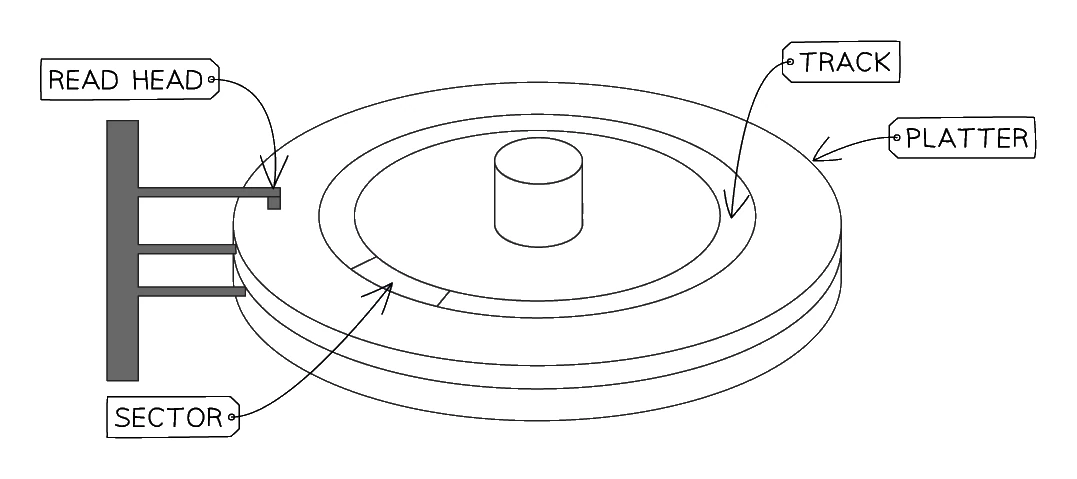
- The drive contains one or more circular metal platters coated with a magnetic material.
- The platters spin at high speed (typically 5400 or 7200 RPM).
- A movable read/write arm holds an electromagnetic head close to the platter surface, but never touching.
- To write a 1 or 0, the head magnetises the region beneath it to one polarity or the other.
- To read, the head detects the polarity of the region as the platter spins past.
- Data is organised in concentric tracks, and each track is divided into sectors.
Advantages and disadvantages
| Advantages | Disadvantages |
|---|---|
| Very large capacity (multi-terabyte) | Moving parts are fragile; easily damaged by drops |
| Low cost per gigabyte | Heavy and bulky compared to SSDs |
| Moderate read/write speed | Slower than SSDs |
| Prone to mechanical failure over time | |
| Audible (spinning platter, head movement) |
Magnetic disks remain popular for bulk storage (backups, archives, large media collections) where price per terabyte matters more than speed.
6. Solid-state storage (flash memory)
Solid-state storage has no moving parts. It stores binary data as electrical charge trapped in tiny transistor cells on a flash-memory chip.
How a solid-state drive (SSD) works
- The drive is a chip (or several chips) containing millions of tiny memory cells.
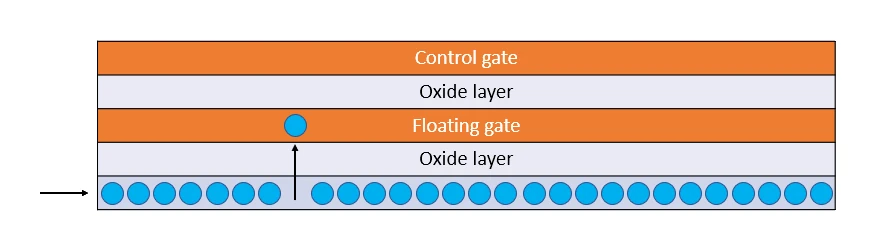
- Each cell contains a special transistor with a floating gate: a small conductor sandwiched between insulating layers that can hold an electrical charge. The charge stays in place even after the power is removed, which is what makes flash memory non-volatile.
- An erased cell holds no trapped charge on its floating gate, and the cell reads as a 1.
- To store a 0, a high voltage pushes electrons through the insulator and traps them on the floating gate; a cell with trapped charge reads as a 0.
- To read, the cell is checked for whether the floating gate is charged: no charge gives a 1, trapped charge gives a 0.
Because there are no moving parts, the drive can be small, silent, and resistant to shock. Reading and writing also happens entirely electronically, which is much faster than mechanically moving a head over a spinning disc.
Common solid-state devices:
- (solid-state drives) inside laptops and desktops, replacing magnetic HDDs as the primary internal drive
- USB flash drives
- SD cards in cameras and phones
- Internal storage of smartphones and tablets
Advantages and disadvantages
| Advantages | Disadvantages |
|---|---|
| Very fast read/write | Expensive per gigabyte compared to HDDs |
| No moving parts: durable, shock-resistant, silent | Limited number of write cycles (each cell wears out after a limited number of writes, typically thousands) |
| Small, light, portable | Smaller maximum capacities than the biggest HDDs |
| Low power use (good for laptops) |
7. Optical storage
uses a laser to read (and sometimes burn) microscopic pits and lands on a reflective disc to represent binary data.
How a CD, DVD or Blu-ray works
- The disc is a thin layer of reflective metal sandwiched in plastic.
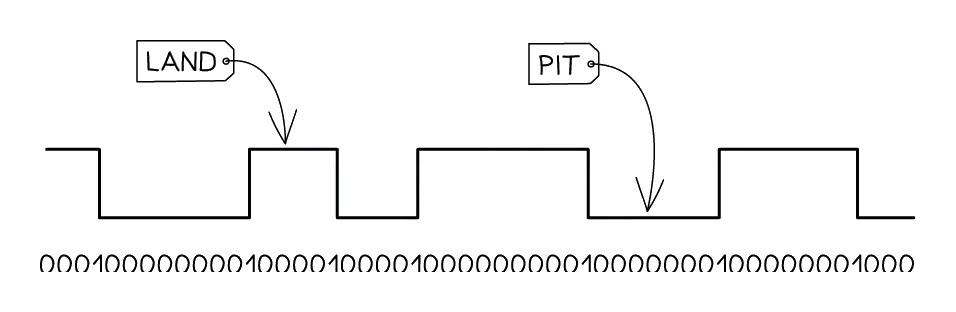
- Data is recorded as a long spiral track of pits (tiny depressions) and lands (the flat regions between pits).
- To read, a laser shines on the spinning disc; the reflection is bright over a land and dimmer over the transition between pit and land.
- A sensor detects the changes and the drive translates them into 1s and 0s.
- On writable discs (CD-R, DVD-R, BD-R), the laser also burns new pits into a dye layer, but this can normally only be done once. Rewritable formats (CD-RW, DVD-RW) use a special phase-change material that can be erased and rewritten many times.
Capacities
| Disc | Capacity |
|---|---|
| CD | ~700 MB |
| DVD | ~4.7 GB (single layer) |
| Blu-ray | ~25 GB (single layer), 50 GB (dual layer), up to 100+ GB (XL) |
Advantages and disadvantages
| Advantages | Disadvantages |
|---|---|
| Very cheap per disc | Very small capacity compared to HDD or SSD |
| Small and lightweight; easy to post or carry | Slow read/write speed |
| Discs are removable, so they can be archived | Prone to scratches and surface damage |
| No physical contact between laser and disc surface | Modern laptops often have no optical drive at all |
Optical storage is now mostly used for legacy distribution (older software, music albums, films on Blu-ray) and archival: a properly-stored disc can outlast many digital drives.
8. Choosing the right storage type
An exam question can give a scenario and ask which storage type fits best. The five questions to ask:
| Question | Magnetic (HDD) | Solid-state (SSD) | Optical (CD/DVD/Blu-ray) |
|---|---|---|---|
| Need large capacity at low cost? | ✓ Best | Costly per GB | Limited capacity |
| Need fast read/write? | OK | ✓ Best | Slow |
| Need physical durability? | Worst (moving parts) | ✓ Best | Discs scratch easily |
| Need to be portable? | Heavy | ✓ Best | Light but fragile |
| Need very low cost per copy for distribution? | No | No | ✓ Best |
Storage choice by scenario
| Scenario | Best storage |
|---|---|
| The internal main drive of a modern laptop | SSD (fast, durable, silent, low-power) |
| A 12 TB backup drive for a server room | HDD (cheapest per TB, capacity matters more than speed) |
| A music album for sale in a record shop | CD (low cost per disc, well-supported format) |
| A 4K film for retail | Blu-ray (high capacity, established format) |
| A removable storage stick for moving files between computers | USB flash drive (solid-state) |
| The internal storage of a phone | SSD-type flash (no moving parts, small, durable) |
| A games console with a huge installed library | A combination: fast SSD for currently-played games, large HDD for older titles |
Exam tip
Pair each feature with its benefit for the device
When a question asks for the most suitable secondary storage for a smartphone and an explanation (set once in the 17 papers), the name (solid-state) is one mark and the explanation three, from a list in which a feature and its consequence are separate points. So "no moving parts" is one point and "so the data survives the phone being dropped" a second; "fast read and write speeds" one and "so files load quickly" another. Other credited pairs: small and thin, so it fits the phone; lightweight; needs little power, so the battery lasts; runs cool and quiet.
9. Cloud storage
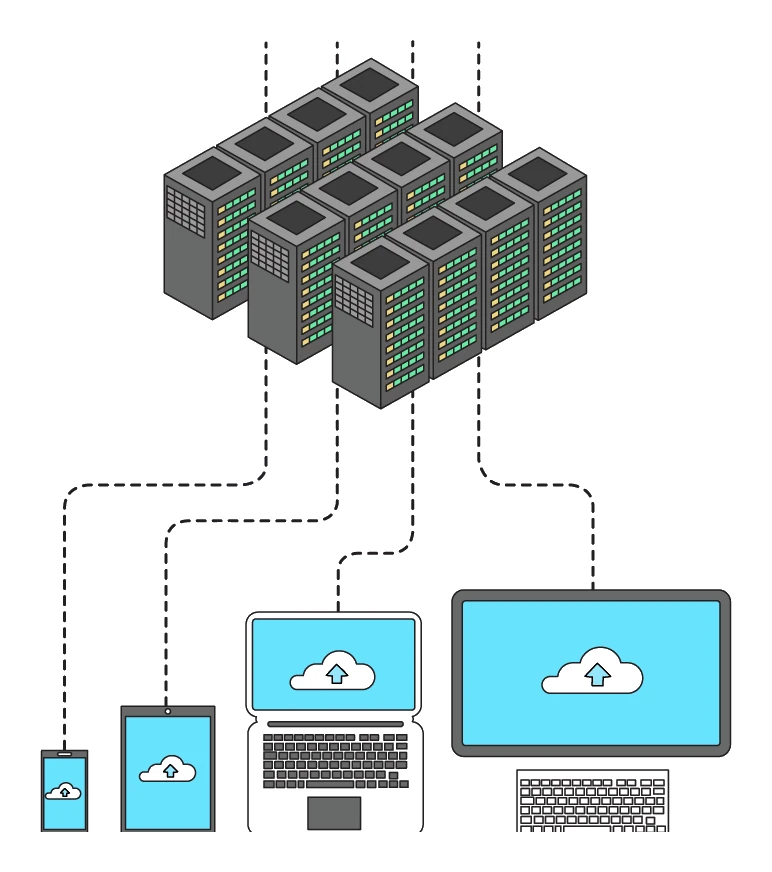
Cloud storage is that lives on remote servers owned by a third-party provider, accessed over the internet rather than from a local drive.
Files saved to "the cloud" are actually written to physical drives (usually HDDs or SSDs) in a data centre. The user never sees or touches those drives directly; the cloud provider handles the hardware, backups, security and maintenance.
Common cloud storage services: Google Drive, OneDrive, Dropbox, iCloud, Amazon S3.
Common exam question
Describing cloud storage
Question: Describe what is meant by cloud storage, or tick the statement that is not a characteristic of it (1–2 marks).
Asked in 3 of the 17 papers. Two marks need two separate points: it is a collection of servers; the data is stored in a remote location, so it can be accessed remotely; it is accessed over the internet; and, in one scheme, the hardware is owned and managed by a third party. Naming a service such as Google Drive earns nothing, because the schemes' standing note gives no marks for brand names. In the odd-one-out version, the statement that does not describe cloud storage is that data is stored locally: data accessed through a network, stored remotely and held on physical servers all do.
Advantages of cloud storage
- Reach your files from anywhere that has an internet connection, on any compatible device.
- Automatic backups: the provider replicates each file to several physical drives, so a single drive failure does not lose data.
- Easy sharing and collaboration: multiple users can read and edit the same file at once.
- Effectively unlimited capacity (subject to subscription).
- No need to buy or maintain local storage hardware.
- One data centre is more energy-efficient than millions of personal drives.
Disadvantages of cloud storage
- Needs a working internet connection; if the link drops, the files become unreachable.
- Ongoing cost: cloud storage is usually a monthly or annual subscription. For large datasets, this can be expensive over time.
- Transferring large amounts of data is slow and may use a lot of bandwidth.
- Privacy and security concerns: data sits on someone else's servers; if the provider is hacked, files could be exposed.
- Legal responsibility for personal data still sits with the user, even though the data lives at the provider.
- No control over physical security: the user must trust the provider's procedures.
Common exam question
Advantages and disadvantages of cloud storage
Question: Explain two advantages of storing a company's or an app's data in cloud storage, or one disadvantage of it (1–4 marks).
Asked in 3 of the 17 papers. Two advantages earn any four points from a list, an advantage plus its consequence scoring two: data can be accessed from any location, so staff can work wherever they have a connection; a third party owns and maintains the hardware, so the company need not maintain or secure it; storage can be increased on demand, so no new hardware is needed; the provider backs up the data; a small device needs less storage of its own, so it can stay small; and data reached from any device is still there if the device is lost. Credited disadvantages: an internet connection is needed, so without one the data cannot be reached; the data may be less secure; and staff can be pressured to work outside hours since it is always reachable.