1. The CPU
The Central Processing Unit (CPU) is the part of a computer that runs every program. It is the chip that takes a stream of binary instructions and acts on them, one at a time, billions of times per second.
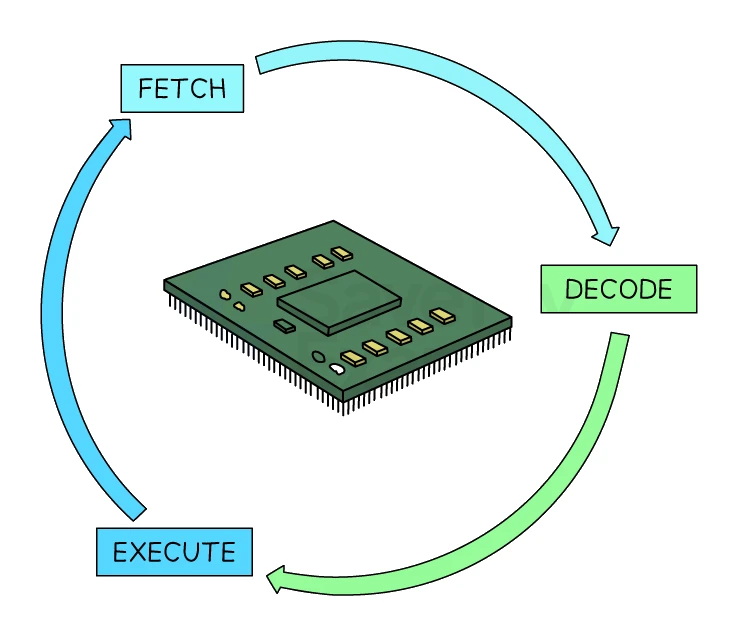
The job of the CPU is to fetch, decode and execute instructions. Everything else a computer does (showing text on a screen, playing audio, running a game, opening a web page) is built from these three steps.
The CPU sits between the input devices (keyboard, mouse, sensors) that feed it data, and the output devices (monitor, speakers, printer) that show the results. Memory (RAM) and storage (SSD or hard drive) hold the data and instructions the CPU works on.
CPU and microprocessor
These two terms get confused often:
- The CPU is the part of a chip that does the actual fetching, decoding and executing.
- A microprocessor is the physical chip itself. It contains the CPU, and often other circuitry such as memory controllers, cache, and input/output interfaces.
A modern laptop has one microprocessor chip containing several CPU cores plus a lot of supporting hardware. For exam purposes, treat "CPU" as the logical processing unit and "microprocessor" as the physical chip.
The instruction set
A CPU's instruction set is the complete set of all the commands (operations) that the can execute, expressed in machine code.
Every program a CPU runs is ultimately built from commands chosen out of its instruction set. A CPU can only carry out the operations its instruction set defines, so two CPUs with different instruction sets cannot run the same machine-code program directly.
Embedded systems
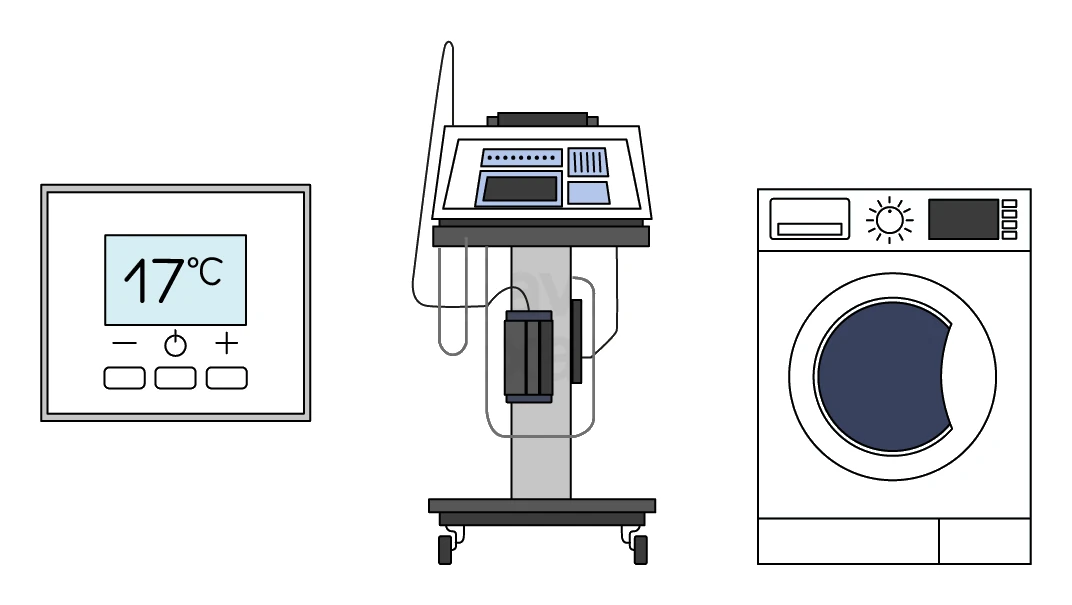
An embedded system is a computer system built into a larger device to perform one dedicated function, rather than the many general-purpose tasks of a PC or laptop.
The embedded computer is part of the product and usually cannot run arbitrary new software. Everyday examples include the controller in a washing machine, a car's engine-management system, the system inside a pacemaker, and the controllers in lighting systems, security systems and vending machines. This is different from a general-purpose computer (a PC or laptop), which is built to perform many different functions.
Common exam question
Defining an embedded system and giving examples
Question: State what is meant by an embedded system, give two characteristics, pick the embedded systems from a list of devices, or explain why a single-purpose device is not a general-purpose computer (1–3 marks).
Asked in 3 of the 17 papers, one mark per point. The credited definition is a computer system built into a larger device to perform a single, dedicated function, using a microprocessor and dedicated hardware. Also creditable as characteristics: runs firmware, not normally reprogrammable by the user, works automatically and in real time, small, cheap and low-power.
From a list of devices, pick the security light system, freezer and vending machine; a laptop, PC, smartphone or web server runs many programs, so it is general-purpose. For a single-purpose gadget wrongly called a general-purpose computer, contrast its few dedicated functions with the many a general-purpose computer performs, so it is an embedded system, and add that no other software can be installed and no peripherals plugged in.
2. Von Neumann architecture
Almost every general-purpose computer in use today is built around the , proposed by mathematician John von Neumann in the 1940s. Two design ideas define it:
- Stored-program concept. Both data and instructions are held together in the same memory. The CPU does not need separate memories for code and data.
- Sequential fetch-decode-execute. The CPU runs one instruction at a time, fetching each from memory in order.
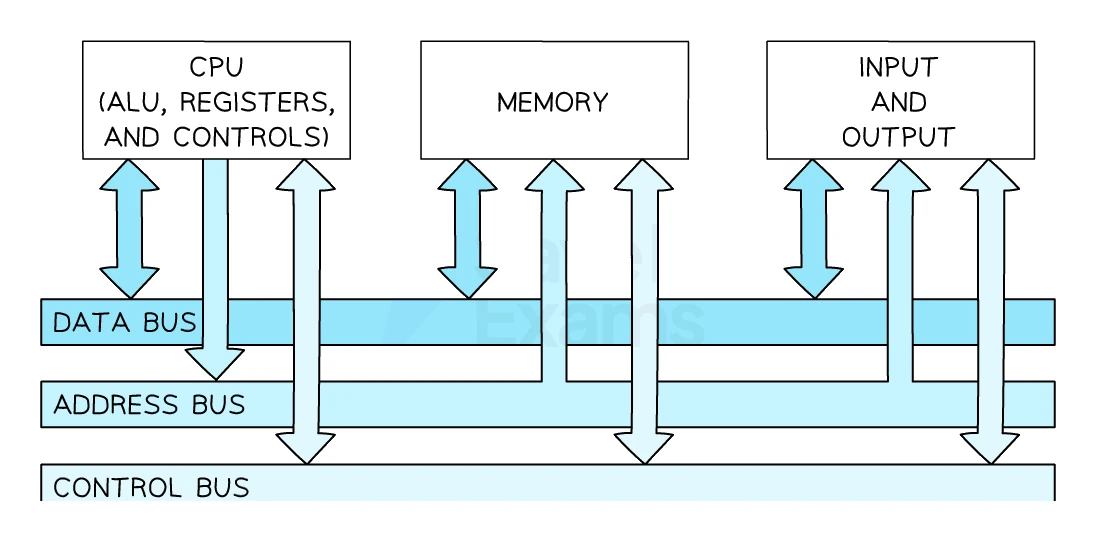
The four building blocks of a Von Neumann CPU:
- The Arithmetic Logic Unit ()
- The (CU)
- A set of
- A set of buses connecting everything
Common exam question
Naming a CPU component from its description
Question: State the name of a CPU component from a one-line description of its job, or circle the components built into the CPU (1 mark each).
Asked in 3 of the 17 papers, one mark per name, acronym accepted. Signals that manage the fetch-decode-execute cycle come from the control unit (CU); the arithmetic and logical operations are done by the arithmetic logic unit (ALU); the number of cycles performed each second is set by the clock. Circling the components built into the CPU means the accumulator, the control unit and the program counter, not the graphics card, hard disk drive, motherboard, RAM or ROM.
In the table version each correct name is a mark: signals managing the flow of data mean the control unit, the address of the data about to be fetched is held in the MAR, and an instruction being decoded sits in the CIR.
3. The Arithmetic Logic Unit (ALU)
The carries out every arithmetic operation and every logical comparison required by the program.
Arithmetic operations include:
- Addition, subtraction, multiplication, division
- Increment (add 1), decrement (subtract 1)
Logical operations include:
- Comparisons such as "is X greater than 5?", "is A equal to B?"
- Bitwise operations such as AND, OR, NOT
A modern ALU can perform billions of these basic operations per second, and the result of each one is usually stored in the register (covered in section 5).
4. The Control Unit (CU)
The Control Unit is the conductor of the CPU. It decodes instructions and coordinates the movement of data between the ALU, registers and main memory.
The CU sends out control signals along the control bus that tell every other part of the system what to do at each step of the fetch-decode-execute cycle:
- Tell main memory whether the CPU wants to read or write at the current moment.
- Tell the ALU which arithmetic or logic operation to perform.
- Tell each register when to load a new value or pass its current value somewhere else.
- Keep all the components in step using a clock signal.
The Control Unit itself does not do any arithmetic. It just orchestrates the other components.
5. The registers
A register is a tiny, extremely fast storage location built directly into the CPU. Each register holds a small amount of data needed during one step of the fetch-decode-execute cycle.
Registers are much faster than RAM but only hold a handful of bytes. Each register has a specific job. The five you must know:
| Name | Acronym | Purpose |
|---|---|---|
| Program Counter | PC | Holds the memory address of the next instruction to be fetched. Increments by 1 each time an instruction is fetched, so the CPU naturally walks through the program in order |
| Memory Address Register | MAR | Holds the memory address that the CPU is about to read from or write to. The CPU puts the MAR's contents onto the address bus |
| Memory Data Register | MDR | Holds the data or instruction that has just been read from (or is about to be written to) the address in the MAR. The MDR is the staging area for the data bus |
| Current Instruction Register | CIR | Holds the instruction currently being decoded or executed. The CPU copies the instruction from the MDR into the CIR so the rest of the CPU can act on it |
| Accumulator | ACC | Holds the result of the most recent ALU operation (or an operand being fed to the ALU). Almost every arithmetic result ends up in the ACC |
Common exam question
Naming the registers used in each stage of the cycle
Question: Give the name of two registers used in the fetch stage, one register used in the execute stage, or three other registers in the CPU besides the one already named (1 mark per register).
Asked in 3 of the 17 papers, marked one mark per correct register from a list, with the full name or the acronym accepted. For the fetch stage the credited registers are the program counter (PC), the memory address register (MAR), the memory data register (MDR) and the current instruction register (CIR); when the stem has already placed the instruction in the MDR, "two other registers" means two of the remaining three. For the execute stage the credited registers are the accumulator (ACC), the MAR and the MDR. Asked for three registers other than the MDR with no stage given, any three of the PC, MAR, CIR and ACC score.
How to memorise their roles
A useful one-line answer template for register questions:
"The [] stores [what value]. The then uses it to [purpose during the cycle]."
For example: "The MAR holds the memory address of the next instruction, which is sent to memory along the address bus so the instruction can be fetched."
Common exam question
Describing the role of a register
Question: Describe the role of the MDR, the MAR or a register in the fetch-decode-execute cycle, or correct wrong statements about what each register stores (2–4 marks).
Asked in 5 of the 17 papers. Two-mark descriptions are a point plus a development: what the register stores, then the detail. The MAR stores an address: of the next instruction or data to fetch, or where data will be written. The MDR stores data or an instruction fetched from memory or about to be written to it. A register holds data, an address or an instruction temporarily. Table descriptions are one mark each: the PC holds the address of the next instruction to fetch; the accumulator holds the interim result of a calculation.
The correction question gives a mark per wrong statement spotted and one per correction: the MAR stores addresses, not instructions, and the MDR's data arrives along the data bus from the address in the MAR, not from the PC.
6. The buses
Components inside a computer are connected by buses: bundles of parallel wires that carry binary signals from one place to another. There are three buses you need to know.
Address bus
The carries memory addresses from the CPU to main memory.
Important features:
- Unidirectional. Information only flows from the CPU to memory (the CPU specifies which address it wants).
- The width of the address bus sets the maximum amount of memory the CPU can use. A 32-bit address bus can address up to 2³² = 4 billion locations; a 64-bit address bus can address far more.
Data bus
The carries data and instructions between the CPU and main memory, and to and from input/output devices.
Important features:
- Bidirectional. Data can flow either way: into the CPU when reading from memory, out of the CPU when writing to memory.
- The width of the data bus sets how many bits can be transferred in a single step (e.g. 32-bit or 64-bit data bus).
Control bus
The control bus carries control signals from the Control Unit to every other component, and status signals back from those components.
Important features:
- Bidirectional. Different wires within the bus carry different signals in different directions.
- Typical signals include "memory read", "memory write", "interrupt", "clock pulse", and "reset".
Side-by-side
| Bus | Carries | Direction |
|---|---|---|
| Address | Memory addresses (locations) | Unidirectional (CPU → memory) |
| Data | Data values and instructions | Bidirectional |
| Control | Control signals and timing | Bidirectional |
Common slip: mixing up the address bus and the data bus. The address bus only ever carries the location of the data. The data bus carries the value stored at that location.
Common exam question
Naming a bus and what it carries
Question: Circle the three buses used in the CPU, identify one bus and explain its purpose in the fetch-decode-execute cycle, or name the component that moves data between RAM and the CPU (1–3 marks).
Asked in 3 of the 17 papers. The three buses are the address bus, the data bus and the control bus, one mark each when you circle them; the other words offered, such as "fetch", "decode", "execute", "register" and "value", are not buses. The identify-and-explain version gives one mark for the name and two for a matching purpose, as a point and its development: the address bus carries addresses between the components in the CPU; the data bus carries data (instructions included) between the components; the control bus carries control signals from the control unit to the other components. In a table, the component described as transferring data between RAM and the CPU is the data bus.
7. The fetch-decode-execute cycle
The CPU runs the same three-step cycle, over and over, billions of times per second.
Stage 1: Fetch
The CPU pulls the next instruction from memory.
- The PC holds the address of the next instruction.
- The address in the PC is copied into the .
- The address is placed on the and sent to memory.
- The sends a "memory read" signal along the control bus.
- Main memory responds by placing the instruction at that address onto the .
- The instruction travels along the data bus into the .
- A copy of the instruction is transferred from the MDR into the .
- The PC is incremented by 1 so it now points to the next instruction in sequence.
Stage 2: Decode
The CPU works out what the instruction means.
- The Control Unit takes the instruction from the CIR.
- The instruction is split into two parts:
- Opcode: which operation to perform (e.g. ADD, SUB, LOAD, STORE)
- Operand: what value or address to operate on
- The CU works out what control signals will be needed for the execute stage.
Stage 3: Execute
The CPU carries out the instruction.
Depending on the opcode, this might involve:
- The ALU performing an arithmetic or logical operation (the result goes into the ACC).
- Reading data from memory (using the MAR, MDR and the buses again).
- Writing data to memory.
- Jumping the PC to a different memory address (changing the order of execution, e.g. for an
IFstatement or a loop).
After the execute stage, the cycle starts again with the fetch stage, using the new value of the PC.
The cycle in one line
Fetch (PC → MAR → address bus → memory → data bus → MDR → CIR; PC++)
Decode (CIR → CU splits into opcode + operand)
Execute (, memory, or PC jump; results often in ACC)
Common exam question
Describing the decode stage
Question: Describe what happens at the decode stage of the cycle, or complete and annotate a diagram to show how an instruction is decoded once it has reached the MDR (3–4 marks).
Asked in 2 of the 17 papers, one mark per point, so give three or four ideas: the instruction is sent from the MDR to the CIR, which is built into the control unit; it travels along the data bus; it is split into an opcode and an operand; the control unit decodes it; and it does so using the instruction set. In the diagram version only the MDR is printed: add the CIR, an arrow from MDR to CIR labelled with the data bus, and labels saying the control unit decodes the instruction using the instruction set; each correct labelled part is a mark. The full list of machine-code commands a CPU can process is its instruction set, itself a one-mark naming question.
8. CPU characteristics that affect performance
Three characteristics of a CPU set how quickly it can process work: , cache size, and number of .
Clock speed
Clock speed is the number of fetch-decode-execute cycles the CPU can complete in one second, measured in hertz (Hz).
- 1 Hz = 1 cycle per second.
- 1 GHz (gigahertz) = 1 billion cycles per second.
- A typical modern CPU runs at 2 to 5 GHz.
Common exam question
What a clock speed in gigahertz means
Question: State what is meant by clock speed, or by a clock speed or processor of a given number of gigahertz (1–2 marks).
Asked in 3 of the 17 papers. Clock speed is the number of fetch-decode-execute cycles (or instructions) the CPU can carry out in one second, so a figure in gigahertz is billions of cycles per second: a 4 GHz processor runs 4 billion cycles, or executes 4 billion instructions, every second. When the definition is worth two marks the number and the unit are the two points: one for the correct billions figure, the other for saying they are cycles, or clock pulses, per second. Give both even for one mark; a bare "it is how fast the processor works" names neither.
A higher clock speed means the CPU completes more cycles per second, so it processes more instructions per second. Doubling the clock speed roughly doubles the rate of instructions (assuming nothing else becomes a bottleneck).
Why not just push the clock speed to 100 GHz? Higher clock speeds:
- Use more electrical power
- Generate more heat
- Require more advanced cooling
- Hit physical limits in the silicon
So modern CPUs balance clock speed against power and heat, often around 3 to 5 GHz.
Cache size
Cache is a small, high-speed memory built into (or sitting beside) the CPU. It holds copies of frequently-used instructions and data so the CPU can grab them without making a slow trip out to main memory (RAM).
- The CPU can access cache much faster than RAM.
- A larger cache holds more frequently-used data, so more requests can be served by the cache and fewer slow trips to RAM are needed.
- Typical sizes: from a few kilobytes (L1 cache, the fastest level) up to tens of megabytes (L3 cache, the slowest of the cache levels but still faster than RAM).
A larger cache size means better performance, because the CPU spends less time waiting for data to arrive from main memory.
Number of cores
A core is a complete processing unit within a CPU chip, with its own Control Unit, ALU, registers and accumulator. A modern chip usually has multiple that can each fetch, decode and execute instructions at the same time.
- A single-core CPU handles one instruction stream at a time.
- A dual-core CPU has 2 cores and can handle 2 instruction streams in parallel.
- A quad-core CPU has 4 cores; an 8-core CPU has 8; modern server CPUs may have 64 or more cores.
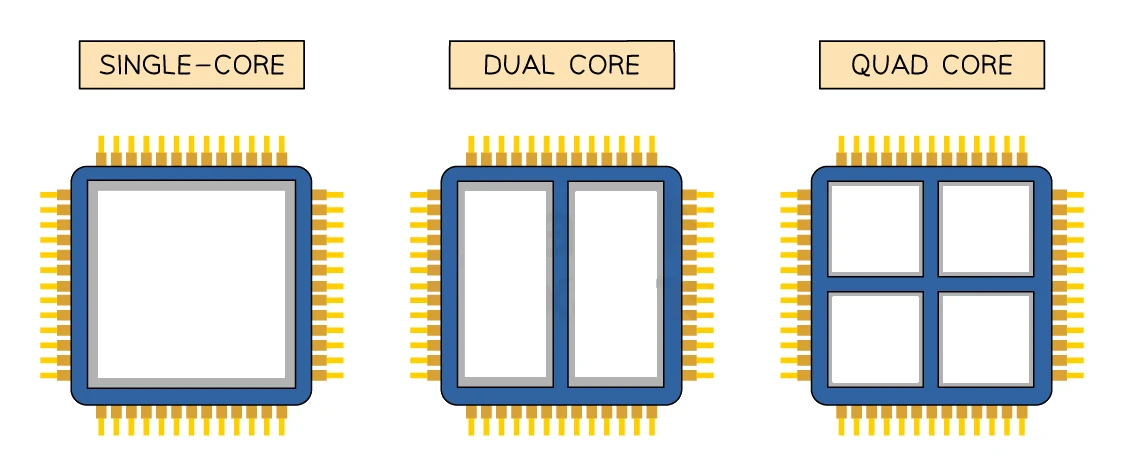
For tasks that can be split across cores (video encoding, scientific computation, running many apps at once), more cores means more work done per second.
Side-by-side summary
| Characteristic | If increased | Why performance improves |
|---|---|---|
| Clock speed | More cycles per second | More instructions executed per second |
| Cache size | More frequently-used data stays close to CPU | Fewer slow trips to main memory |
| Number of cores | More instruction streams run at once | Parallel work finishes in less wall-clock time |
Common exam question
Explaining how a CPU change affects performance
Question: Explain the effect on performance of a higher clock speed, more cores or a larger cache, or explain the purpose of cache (2 marks).
Asked in 5 of the 17 papers. Two marks, the effect and the reason: write "performance improves because…" then the reason. Higher clock speed: more fetch-decode-execute cycles, and so more instructions, each second. More cores: each core runs a cycle simultaneously, so more instructions are processed each second. Larger cache: more frequently used data and instructions are accessed quickly from the cache rather than from the slower RAM. The purpose-of-cache question credits the same ideas, storage for frequently used data and instructions that is faster to access than RAM, plus its levels, L1 to L3.
Check what changed: when the CPU stays dual-core and only the clock speed rises, the marks are for cycles per second, not cores. The one-mark purpose of a core: to perform the fetch-decode-execute cycle, or to process an instruction.
Trade-offs and the headline number
Manufacturers usually advertise the clock speed first, but cache and cores often matter just as much. A 4 GHz quad-core with a large cache will usually outperform a 5 GHz single-core with a tiny cache on real-world workloads. When comparing two CPUs, you need to look at all three characteristics.