Programming Languages and Translators
Software · 4 question types
An Integrated Development Environment (IDE) is a single piece of software that combines all the tools a programmer needs to write, test, debug and run programs.
Without an IDE, a programmer would have to switch between a text editor, a translator (compiler or interpreter) and a debugger as separate programs. An IDE bundles everything into one application.
Common IDEs: PyCharm (Python), IntelliJ IDEA (Java), Visual Studio, Visual Studio Code, Eclipse, Thonny, IDLE, NetBeans.
The four common IDE features named in the syllabus
1. Editor
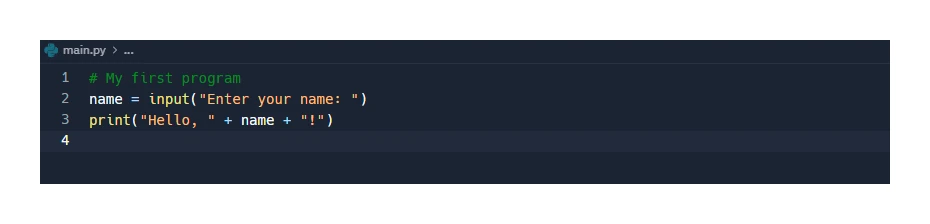
A specialised text editor for writing source code. Useful features include:
- Syntax highlighting (pretty-print): keywords, strings and comments are shown in different colours to make code easier to read.
- Auto-completion: the editor suggests the rest of a variable, function or keyword as the programmer types.
- Auto-indentation: nested blocks line up automatically.
- Bracket matching: shows which opening bracket pairs with which closing bracket, catching unmatched brackets early.
- Comment toggling: a keyboard shortcut comments out (or uncomments) several lines at once.
2. Error diagnostics
Tools to spot, locate and fix errors:
- Syntax checking in the background as the programmer types, underlining typos and missing punctuation in real time.
- Specific error messages that name the line and the kind of error.
- Suggested fixes for common mistakes.

3. Run-time environment
The IDE can run the program from inside itself and show its output in a panel beside the source code. The programmer does not have to leave the IDE to test changes.

4. Translator (built-in compiler or interpreter)
A built-in translator means the programmer can press a button or use a keyboard shortcut to compile and run (for compiled languages) or simply run (for interpreted languages), without having to install the translator separately.
Giving common functions of an IDE
What comes up: A question states one function of an IDE (often the built-in translator) and asks for two or three other functions — worth 2–3 marks, sometimes 6 marks with descriptions.
Write: Name any of the following, and if a description mark is also available, add the paired explanation: (1) Code editor — lets the programmer enter and modify the source code. (2) Run-time environment — allows the program to be executed inside the IDE so the programmer can see its output. (3) Error diagnostics — shows the programmer where errors occur in the code. (4) Auto-completion — offers suggestions for commands or identifiers as the programmer types. (5) Auto-correction — corrects a command that has a minor spelling mistake. (6) Prettyprint — colours keywords and other elements so the code is easier to read.
Watch out: Each mark typically requires a feature name plus a description of what it does for the programmer — naming the feature alone may score only half the available marks. The mark scheme caps marks for feature names without explanation, so always add what the feature does.
Other useful IDE features
The syllabus only names the four above, but real IDEs include many more useful features:
- Debugger with breakpoints, step-through execution, watch windows and variable inspection. Essential for finding logic errors.
- Version control integration (Git, SVN) so changes can be saved and shared.
- Refactoring tools that rename variables across a project or restructure code safely.
- Project management: lets the programmer organise files into projects and folders.
- Plug-ins and extensions that add support for new languages or frameworks.