1. Character sets
Every computer stores text as patterns of binary digits. A character set is the agreed table that maps each character (a letter, a digit, a punctuation mark, an emoji) to a unique binary code. Without a shared character set, a binary value like 01000001 might be interpreted as the letter A on one machine and as a different symbol on another.
A few key ideas about character sets:
- Each character has a unique binary code. No two characters share the same code.
- The codes follow a logical sequence. Consecutive letters (A, B, C) and consecutive digits (0, 1, 2) get consecutive numbers, so the difference between any two adjacent characters is always 1.
- The number of bits decides how many characters can be represented. With n bits there are 2ⁿ possible codes.
The two character sets you must know for the exam are and .
Common exam question
Describing how text is stored using a character set
Question: Describe how text typed at a keyboard is converted to binary, explain how a word is represented using a character set, or name a character set other than ASCII (1–3 marks).
Asked in 4 of the 17 papers. The marks are one per idea: a character set is used, ASCII or Unicode is an example of one, and each character has its own unique binary code. For a whole word, add that the code for each letter is stored in turn, in the order the letters appear. The one-mark versions want only a name: the character set other than ASCII is Unicode, and Unicode is itself an example of a character set.
The point credited in both describe versions is the unique code for each character, so make sure that sentence is in your answer rather than just "the text is turned into binary", which repeats the question.
2. ASCII
(American Standard Code for Information Interchange) was the first widely-used character set, dating from the 1960s.
| Feature | Standard ASCII | Extended ASCII |
|---|---|---|
| Bits per character | 7 bits | 8 bits |
| Number of characters | 2⁷ = 128 | 2⁸ = 256 |
| Covers | English letters (A-Z and a-z), digits 0-9, basic punctuation, control codes | Standard ASCII plus extra symbols like ©, ±, accented letters |
Limitations of ASCII
Even extended ASCII has serious limits:
- Cannot represent characters from non-Latin alphabets (no Chinese, Arabic, Hindi, Cyrillic, Greek, etc.)
- Cannot represent modern symbols such as emoji
- Different "extended" versions disagreed about which extra symbols belonged where, causing compatibility problems
Part of the ASCII table:
| Character | Denary code |
|---|---|
| P | 80 |
| Q | 81 |
| R | 82 |
| S | 83 |
If you are given P = 80 and the question asks for the code for W, count forward four letters: Q = 81, R = 82, S = 83, T = 84, U = 85, V = 86, W = 87. The same trick works for finding a character from its code: ASCII 78 must be 80 − 2 = N.
3. Unicode
was developed in the 1990s to fix the limitations of ASCII. The key change is that Unicode uses far more bits per character.
| Feature | Unicode |
|---|---|
| Bits per character | A minimum of 16 bits (and up to 32 in some encodings) |
| Number of characters | At least 2¹⁶ = 65 536 |
| Covers | Every major writing system in the world: Latin, Greek, Cyrillic, Chinese, Japanese, Korean, Arabic, Hebrew, Hindi, Thai, and many more. Also includes mathematical symbols, technical symbols, and emoji |
A nice piece of design: the first 128 Unicode code points are identical to ASCII. This means any text written in plain ASCII is already valid Unicode, so Unicode is backwards-compatible with ASCII for English text.
4. ASCII vs Unicode comparison
This comparison has been set for up to 4 marks, and the mark scheme wants precise statements.
| Feature | ASCII | Unicode |
|---|---|---|
| Bits per character | 7 (or 8 for extended) | 16+ |
| Number of characters | 128 (or 256) | 65 536+ |
| Storage space per character | Small | Large |
| Languages covered | English only | All major world languages |
| Emoji and modern symbols | No | Yes |
| Best use | English text on systems with limited memory | International text, web pages, modern software |
Trade-offs in a single sentence
- Unicode stores more characters but uses more memory per character.
- ASCII uses less memory but cannot represent international text or emoji.
Mark-scheme language: when comparing, mention the number of bits, the number of characters, and what each can represent. The mark schemes list precise points like these, and a vague verdict like "Unicode is bigger" or "Unicode is better" matches none of them.
Common exam question
Comparing ASCII with Unicode
Question: Explain the differences between the ASCII and Unicode character sets, or give two advantages and one disadvantage of using Unicode rather than ASCII (1–4 marks).
Asked in 2 of the 17 papers. Each mark is one precise point about either set, with a figure where there is one, so each of these pairs can earn two marks: ASCII uses 7 or 8 bits per character, Unicode up to 16 or 32; ASCII has 128 or 256 characters, Unicode 65 536 or over 4 billion; ASCII covers few languages, Unicode many languages and emojis. In the four-mark version at most three marks can come from points about one character set alone, so make at least one point about each of them.
Asked for advantages of Unicode, give any two of more characters, more languages, and emojis or symbols. Its one disadvantage is that each character needs more storage space.
5. How sound is represented
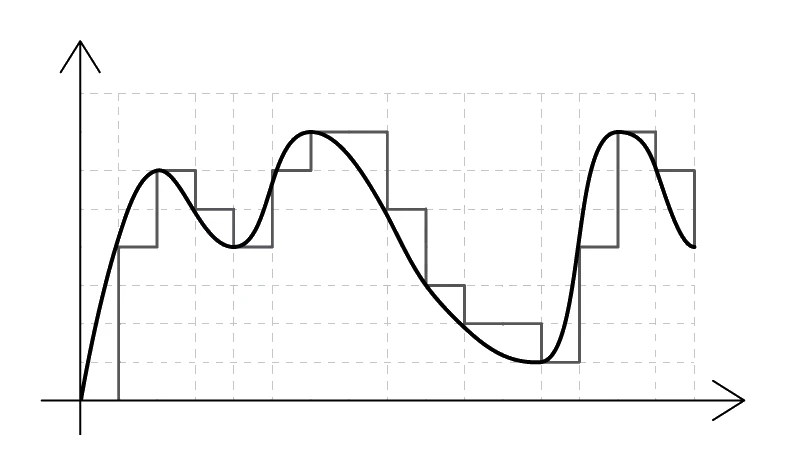
Sound in the real world is an analogue signal: a continuous wave of air pressure varying in time. A microphone turns the pressure into a continuous voltage. But a computer can only store digital values (discrete binary numbers), so the analogue signal has to be sampled before it can be stored.
Analogue-to-digital conversion
The process is called A/D conversion (or A2D):
- The continuous analogue wave is measured at regular intervals. Each measurement is called a sample, and it records the wave's amplitude (height) at that moment.
- Each sample's amplitude is rounded to the nearest value that can be stored in the available number of bits. The result is a binary number.
- The binary numbers are stored on secondary storage in order.
- To play the sound back, the binary numbers are read back and used to drive a speaker.
Exam tip
Explaining analogue-to-digital sound conversion step by step
Asked to explain how an analogue sound is recorded and turned into digital (5 marks), you score any five of nine points, so write the process in order: a microphone records the sound, the wave is sampled, each sample measures the amplitude of the wave, each amplitude gets a unique binary value, and every sample is converted to binary. Four of the nine points are the two settings: the sample rate is set (how many samples are taken each second) and the sample resolution is set (how many bits each sample uses), so include both definitions.
Two parameters control the quality of the digital recording: and .
Sample rate
Sample rate is the number of samples taken per second, measured in hertz (Hz).
1 Hz means one sample per second. 1 kHz means 1000 samples per second.
Common sample rates:
- 8 kHz: telephone-quality voice. The reason phone calls used to sound thin and tinny.
- 22 kHz: low-quality compressed audio.
- 44.1 kHz: standard audio CD quality (44 100 samples per second).
- 48 kHz: standard for video soundtracks.
- 96 kHz or higher: studio recording.
The higher the sample rate, the more closely the digital version follows the original analogue wave, and the higher the maximum frequency that can be captured.
Sample resolution (bit depth)
Sample (also called bit depth) is how many bits are allocated to record one sample.
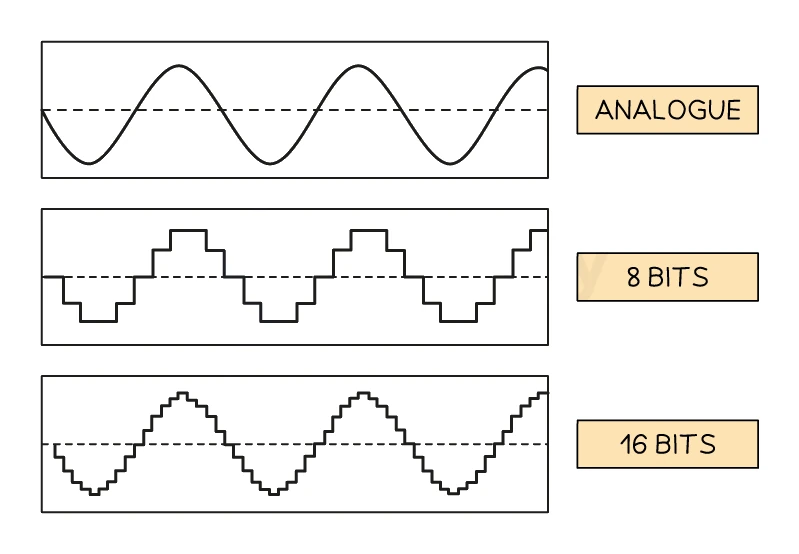
With n bits per sample, there are 2ⁿ different amplitude levels that each sample can be rounded to:
- 8-bit audio has 256 amplitude levels per sample.
- 16-bit audio (the CD standard) has 65 536 levels.
- 24-bit audio (studio quality) has over 16 million levels.
A higher sample resolution means each sample is closer to the true amplitude of the original wave, so the recording sounds cleaner.
Effect on quality and file size
| Parameter | If increased | Effect on quality | Effect on file size |
|---|---|---|---|
| Sample rate | More samples per second | Higher; captures higher frequencies | Larger |
| Sample resolution | More bits per sample | Higher; finer amplitude detail | Larger |
Both improve quality but both also increase file size. Audio engineers choose the lowest values that give acceptable quality for the use case (phone calls can get away with 8 kHz; concert recordings need 44.1 kHz or higher).
Common exam question
How sample rate and sample resolution affect a recording
Question: Give a benefit and a drawback of a higher sample rate, describe sample resolution, explain why a higher sampling resolution is more accurate, or state two ways to make a recording more accurate (1–2 marks per part).
Asked in 3 of the 17 papers. Raising either setting makes the recording more accurate, closer to the original; the drawback is a larger file needing more storage space. The two ways to increase accuracy are exactly those: increase the sample rate and increase the sample resolution. Describing sample resolution earns one mark for the number of bits used per sample and a second for what that controls: how many different amplitudes can be recorded, or how quiet and loud the sounds can be (an example like 16-bit also counts).
For why higher resolution is more accurate, give two of: more bits are allocated to each amplitude, amplitudes are recorded more precisely, and a wider range of amplitudes is captured.
6. Sound file-size calculations
The standard exam formula for the size of an uncompressed sound file is:
file size (bits) = × × duration
where:
- sample rate is in hertz (samples per second)
- sample resolution is in bits per sample
- duration is in seconds
To convert to bytes, divide by 8 (since 1 byte = 8 bits). To convert to kibibytes (KiB), divide the bytes by 1024 (or the bits by 8 × 1024 = 8192): the syllabus says file-size calculations use 1024, never 1000, and the answer goes in the units the question asks for.
7. How images are represented (bitmaps)
A bitmap image is built from a rectangular grid of tiny coloured squares called (short for "picture elements"). Every pixel stores a single binary code that names its colour.
A typical photograph is a bitmap. So is the screenshot of a screen, or a saved image file in .png or .bmp format.

Two parameters control the quality of a bitmap image: and .
Resolution
Resolution is the total count of pixels that make up an image, usually quoted as width × height.
- An image of resolution 800 × 600 contains 480 000 pixels.
- A modern phone camera might capture 4032 × 3024 = 12 million pixels (12 megapixels).
- A 4K TV displays 3840 × 2160 = about 8.3 million pixels per frame.
A larger pixel count means finer detail in each picture and more bits needed for storage.
Note on display jargon: displays are commonly labelled by their vertical pixel count, so "1080p" means 1080 pixels vertically (1920 × 1080) and "4K" refers to roughly 4000 pixels horizontally (3840 × 2160). For exam calculations, always use both dimensions.
Colour depth
Colour depth is the count of bits assigned to record one pixel's colour.
With n bits per pixel, the image can contain 2ⁿ different colours:
| Colour depth (bits) | Number of colours | Typical use |
|---|---|---|
| 1 | 2 | Black-and-white (1 = white, 0 = black) |
| 2 | 4 | Very simple icons |
| 4 | 16 | Older indexed-colour formats |
| 8 | 256 | GIF; older video games |
| 16 | 65 536 | "High colour" |
| 24 | 16 777 216 | "True colour"; standard for photographs |
A higher colour depth means the image can store more subtle shades and gradients, but each pixel takes more storage space.
Effect on quality and file size
| Parameter | If increased | Effect on quality | Effect on file size |
|---|---|---|---|
| Resolution | More pixels | Sharper; more detail | Larger |
| Colour depth | More bits per pixel | More distinct colours | Larger |
Exam tip
Define resolution and colour depth in pixels and bits
Asked what is meant by image resolution, give the dimensions: the number of pixels wide by the number of pixels high. The mark scheme accepts either that or "the dimensions of the image". Colour depth is how many bits are used to represent each colour, which is the number of bits each pixel stores. A benefit of increasing the colour depth is a greater range of colours, so the image is closer to the real scene and shows more detail; the cost is a bigger file. Keep the two apart: resolution is about pixels, colour depth is about bits.
8. Image file-size calculations
The standard exam formula for the size of an uncompressed bitmap is:
file size (bits) = image width () × image height (pixels) × (bits per pixel)
To convert to bytes, divide by 8.