Sorting and Searching Algorithms
Computer Science revision notes · Cambridge (CIE) · 0984
1. Why sorting and searching matter
Almost every program ends up doing one of two operations on data:
- Sorting: putting a collection of values into order (alphabetical, numerical, by date, etc.).
- Searching: finding a particular value within a collection.
Two standard algorithms cover these jobs:
| Job | Algorithm |
|---|---|
| Sorting | Bubble sort |
| Searching | Linear search |
You should be able to describe how each one works and trace through a worked example.
2. Linear search
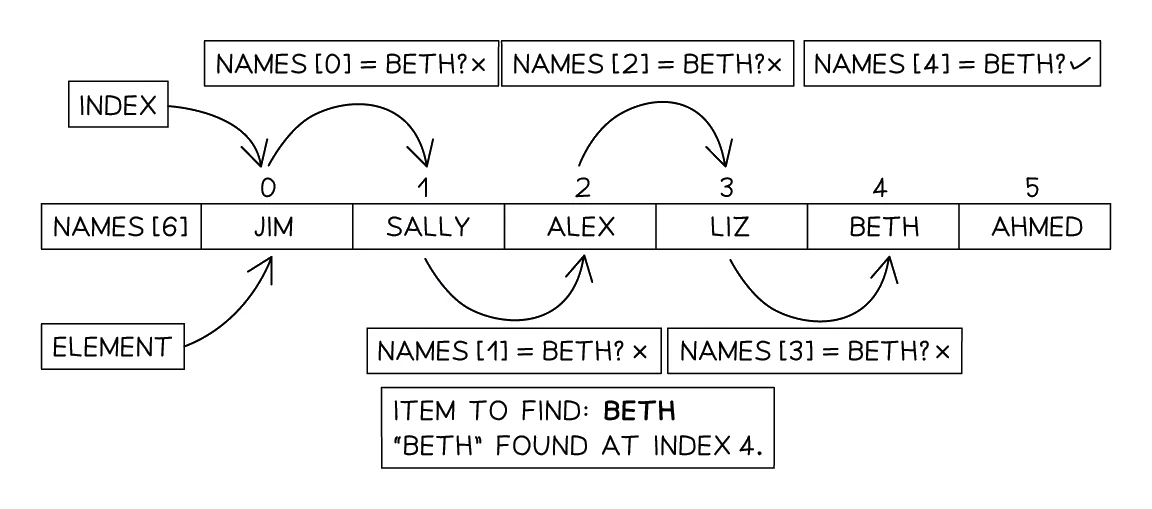
A examines every item in a list one at a time, in order, until it either finds the target value or runs out of items.
The algorithm is the obvious approach: start at the beginning, check each value, stop when you find a match. It is sometimes called a sequential search.
Step-by-step algorithm
| Step | What it does |
|---|---|
| 1 | Start at the first value in the list |
| 2 | If this value is the target, stop and report found |
| 3 | Otherwise, move to the next value |
| 4 | Repeat steps 2-3 |
| 5 | If the end of the list is reached without finding the target, report not found |
The algorithm works on any list, sorted or unsorted. This is its biggest advantage.
Pseudocode
DECLARE Data : ARRAY[1:10] OF INTEGER
Found ← FALSE
FOR Index ← 1 TO 10
   IF Data[Index] = Target
     THEN
        Found ← TRUE
        OUTPUT "Target found at position ", Index
   ENDIF
NEXT Index

IF Found = FALSE
  THEN
     OUTPUT "Target not found"
ENDIF
Exam tip
A linear search is set as a loop with an IF inside it
The papers set the linear search without naming it: a loop over every item with an IF inside comparing each element with the value wanted. When amending an algorithm to search, the credited steps are an input for the value to find before the loop, an IF inside the loop testing whether the array element matches it, the output moved inside that IF, and the loop continuing to the next element otherwise. To stop at the first match use a Found flag: FALSE before the loop, TRUE on a match, and loop while it is FALSE and items remain.
Advantages and disadvantages
| Advantages | Disadvantages |
|---|---|
| Works on any list, sorted or unsorted | Slow on large lists: must check up to every item |
| Simple to write | If the target is near the end (or not present), every item is checked |
| No setup cost (list does not need to be sorted first) |
How long can a linear search take?
For a list of n items:
- Best case: target is the first item; only 1 comparison needed.
- Worst case: target is the last item, or not in the list; n comparisons needed.
- Average case: roughly n/2 comparisons.
For 1 000 items, that is up to 1 000 comparisons. For 1 000 000 items, up to 1 000 000. Linear search does not scale well.
3. Bubble sort
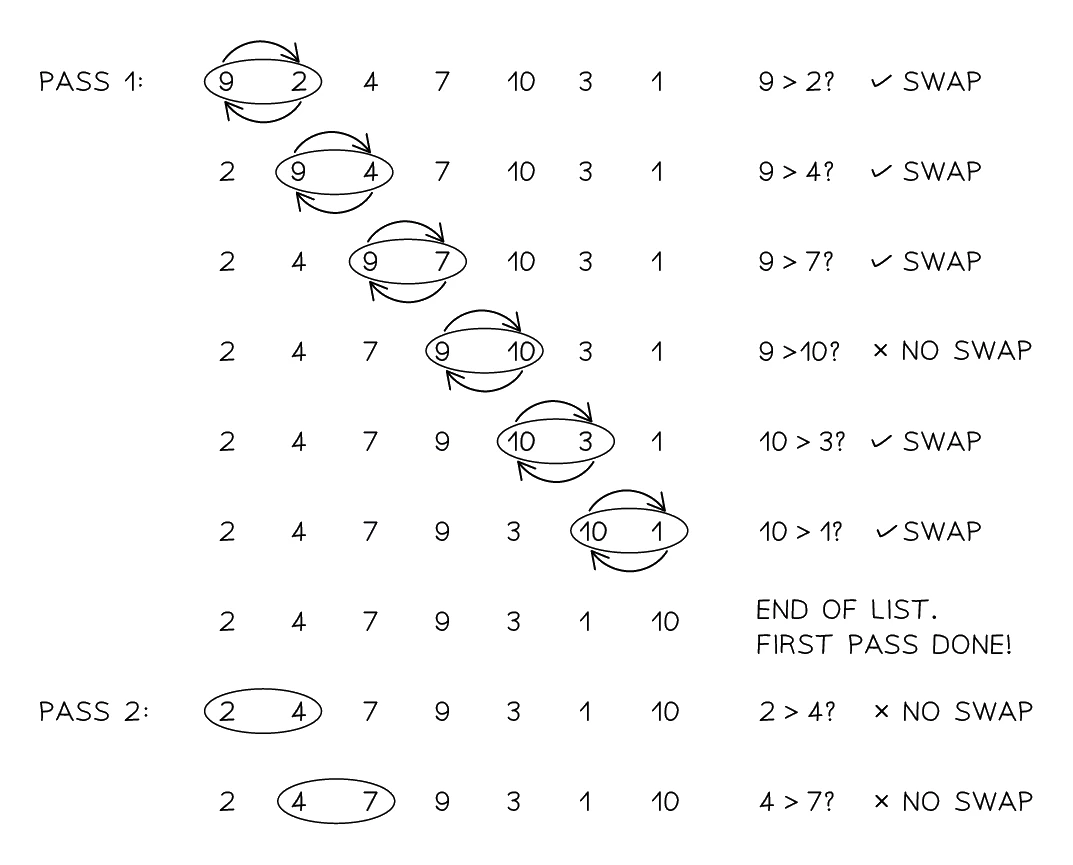
A walks through a list over and over, comparing each pair of neighbouring values and swapping any pair that is out of order. The list is sorted as soon as a complete pass finishes without making any swaps.
The name comes from the way larger values "bubble" to the end of the list (or smaller values bubble to the beginning, depending on the sort direction).
Step-by-step algorithm
| Step | What it does |
|---|---|
| 1 | Look at the pair of values sitting at positions 1 and 2 |
| 2 | If that pair is out of order, swap the two values |
| 3 | Slide one position to the right (positions 2 and 3, then 3 and 4, and so on) |
| 4 | Keep applying steps 2 and 3 until the last pair has been processed. That whole sweep counts as one pass |
| 5 | If any swaps were made during the pass, start a new pass from the beginning |
| 6 | If no swaps were made during a pass, the list is sorted; stop |
After each pass, the largest unsorted value is in its correct position at the end of the list. This means you only need to compare up to one fewer position on each subsequent pass, although exam answers usually keep it simple and pass over the whole list each time.
Common exam question
Describing what a bubble sort algorithm does
Question: Given a flowchart or pseudocode that compares neighbouring elements of an array and swaps them, state its purpose, describe what it does, or outline its processes (1–4 marks).
Asked in 3 of the 17 papers. Recognise the sort from its parts: each element compared with the next, a swap through a temporary variable, and repeated passes, ended by a flag showing no swap or fixed in number. For the purpose or description give both ideas: the data in the array is sorted, and the order it is put into (ascending, or alphabetical for names); the two-mark version credits them separately. Swapping when the left value is the greater gives ascending order.
When the processes are asked for, each stage is a point: inputting the values, storing them in an array, sorting them with a bubble sort into ascending order, and outputting them (or finding the middle value, if the algorithm does). Initialisation and iteration are also credited as processes.
Pseudocode
DECLARE Data : ARRAY[1:10] OF INTEGER
DECLARE Swapped : BOOLEAN
DECLARE Count : INTEGER
Count ← 10
Swapped ← TRUE

WHILE Swapped = TRUE DO
   Swapped ← FALSE
   FOR i ← 1 TO Count - 1
      IF Data[i] > Data[i + 1]
        THEN
           // Swap the two values
           Temp ← Data[i]
           Data[i] ← Data[i + 1]
           Data[i + 1] ← Temp
           Swapped ← TRUE
      ENDIF
   NEXT i
ENDWHILE
Common exam question
Completing a trace table for a bubble sort
Question: Complete the trace table for a bubble sort given as a flowchart or pseudocode, using the values stored in the array (5–7 marks).
Set in 2 of the 17 papers. The marks are per column: one each for the flag, the counter and the temporary variable, and two for the array columns (one with a single error); the longer version also marks the input stage and the output separately. Write every value the algorithm assigns, even a repeat: the schemes write the flag and the temporary variable again on each swap. When a pass ends with the flag set, reset it and start the counter from the first pair again. Carry on until a complete pass makes no swap; that final pass must appear in your table even though the list already looks sorted.
In both papers the flowchart adds 1 to the counter before testing it, so write the value that stops each loop as well.
Worked example
Tracing a bubble sort to the pass with no swaps
The array Data[1:4] holds 3, 9, 6, 4. Complete a trace table for this algorithm.
REPEAT
   Swapped ← FALSE
   FOR Count ← 1 TO 3
      IF Data[Count] > Data[Count + 1]
        THEN
          Temp ← Data[Count]
          Data[Count] ← Data[Count + 1]
          Data[Count + 1] ← Temp
          Swapped ← TRUE
      ENDIF
   NEXT Count
UNTIL Swapped = FALSE
Solution:
- Give the array its starting values in the first row, then add a row for each value of Count, filling in only what that trip round the loop assigns.
- Each pass begins by setting Swapped to FALSE; a swap writes Temp and the two array elements and sets Swapped to TRUE.
| Swapped | Count | Data[1] | Data[2] | Data[3] | Data[4] | Temp |
|---|---|---|---|---|---|---|
| 3 | 9 | 6 | 4 | |||
| FALSE | 1 | |||||
| TRUE | 2 | 6 | 9 | 9 | ||
| TRUE | 3 | 4 | 9 | 9 | ||
| FALSE | 1 | |||||
| TRUE | 2 | 4 | 6 | 6 | ||
| 3 | ||||||
| FALSE | 1 | |||||
| 2 | ||||||
| 3 |
- The third pass makes no swap, so Swapped is still FALSE when UNTIL is reached and the loop ends.
- Sorted array: 3, 4, 6, 9, after three passes and three swaps.
How the algorithm terminates
The bubble sort stops when a complete pass is made with no swaps. This is detected using a (called Swapped, Swap or Flag in exam algorithms):
- Set
Swappedto FALSE at the start of each pass. - Every time a swap is made, set
Swappedto TRUE. - At the end of each pass, check
Swapped. If it is FALSE, the list is sorted; if it is TRUE, do another pass.
Without this flag, a naive bubble sort would always run the same number of passes, even on an already-sorted list. The flag lets the algorithm stop as soon as the list is in order.
Exam tip
Explaining why a bubble sort is efficient
Asked why a bubble sort with these features is efficient (three marks), give the mechanisms: one mark per point, feature and effect counted separately. The flag is set to FALSE at the start of a pass and to TRUE when a swap is made, so a pass ending with it still FALSE shows the list is sorted and the loop stops. The inner loop's upper limit is reduced by one after each pass, because the largest value is already in place, so later passes make fewer comparisons. Saying only that it stops when sorted is one point of the three.
Advantages and disadvantages
| Advantages | Disadvantages |
|---|---|
| Very simple to understand and code | Slow on large lists: up to n × n comparisons |
| Easy to spot when the list is sorted (no swaps in the pass) | Many swaps mean a lot of data movement |
| Sorts the list in place: needs no extra memory beyond a temporary variable | Better-performing algorithms exist (quicksort, mergesort), but they are beyond this level |
Performance
For a list of n items:
- Best case (list already sorted): one pass, n − 1 comparisons, zero swaps.
- Worst case (list sorted in reverse): n passes of n − 1 comparisons (roughly n × n), with a swap on about half of them.
Bubble sort is fine for short lists or educational examples, but not for serious sorting work.
4. Tying searching and sorting together
Searching and sorting are often combined in real programs:
| Situation | Strategy |
|---|---|
| One-off search in unsorted data | Linear search; sorting first would be wasted effort |
| Constant additions, occasional searches | Stay with linear search, or maintain order as items arrive |
| Sorted data displayed to a user | Bubble sort or another sort first, then display |
Common exam question
Sorting parallel arrays in the 15-mark program
Question: Write a program that sorts two arrays sharing an index (names and their values) into ascending or descending order of value, then outputs the top two or three (15 marks, shared with the other requirements).
Set in 2 of the 17 papers. The scheme names nested iteration and sorting as the techniques for this requirement, and its example answer is a bubble sort, so write a recognisable one: an outer loop repeating until a pass makes no swap (a flag reset to FALSE each pass), an inner FOR loop from 1 to one less than the number of items, and a comparison of each element with the next. Swap both arrays at once, through two temporary variables, so each name stays with its own value; moving only the values breaks the pairing. For descending order reverse the comparison and swap when the left value is the smaller. Once sorted, the top entries are simply the first elements.
A typical pattern: a school's student records are sorted by surname once when loaded, so they can be displayed in order and scanned quickly.