Programming Languages and Translators
Computer Science revision notes · Cambridge (CIE) · 0984
1. What a programming language is
A computer's CPU only understands one language: binary , the sequence of 1s and 0s it directly executes. Humans find binary almost impossible to write. A programming language is a more human-friendly notation for describing computer programs, which is then translated into machine code before the CPU can run it.
Programming languages are usually grouped by how close they sit to machine code:
| Generation | Type | Example |
|---|---|---|
| 1st generation | Machine code | Raw binary instructions like 10110111 |
| 2nd generation | Assembly language | Mnemonic instructions like LDA 5 |
| 3rd generation | High-level languages | Python, Java, C++, BASIC |
The first two are called low-level: they are very close to the hardware. The third is called high-level: it is much closer to human language and far further from the hardware.
2. Low-level languages
A low-level language is one where each instruction maps directly or very closely to a single machine-code instruction, and where the programmer has direct control over the computer's hardware (registers, memory addresses, processor instructions).
There are two low-level languages to know: machine code and .
Machine code (1st generation)
Machine code is the raw binary language the CPU runs directly. Every instruction is a string of 1s and 0s that matches one specific operation in the CPU's instruction set.
A machine-code instruction might look like 10110111 00000101, which is meaningless to a human reader, but the CPU can execute it without any translation step.
- Directly executed by the processor.
- Specific to one CPU architecture. Machine code for an Intel x86 chip will not run on an ARM chip.
- Almost impossible to write by hand for any non-trivial program.
Assembly language (2nd generation)
Assembly language is a low-level language where each binary machine-code instruction is replaced with a short, human-readable abbreviation called a .
Typical assembly mnemonics:
| Mnemonic | Meaning |
|---|---|
| LDA | Load: copy a value from memory into the accumulator |
| STA | Store: copy the accumulator's value into a memory location |
| ADD | Add a value to the accumulator |
| SUB | Subtract a value from the accumulator |
| JMP | Jump to a different instruction |
| HLT | Halt the program |
Assembly is far easier for humans to write than raw machine code, but it is still one-to-one with machine code: each assembly instruction translates to exactly one machine-code instruction.
Before assembly can run, it must be translated into machine code by a piece of software called an (covered in section 4).
Why use a low-level language?
Modern programmers rarely write entire programs in assembly, but low-level code is still used for specific situations:
- When direct hardware control is needed (writing a device driver, programming a microcontroller, talking to specific CPU registers).
- When maximum speed is needed in a small section of code (game engines, signal processing).
- When memory is very tight (embedded systems, boot loaders, small microcontrollers).
- When the code is specific to a particular CPU anyway, so machine dependence is not a problem.
Advantages and disadvantages of low-level languages
| Advantages | Disadvantages |
|---|---|
| Direct control of memory, registers and hardware | Hard to read and write for humans |
| Efficient: small memory footprint, very fast execution | Machine-dependent: code only runs on one CPU architecture |
| Predictable timing (useful in real-time systems) | Easy to make mistakes that crash the system |
| Slow to develop compared to high-level languages |
Exam tip
Giving a benefit of assembly language
A one-mark question that asks for a benefit to the programmer of writing a program in assembly language wants a strength that only low-level code has. The mark scheme credits any one of: faster execution than a high-level program, more control over manipulating the hardware, or the use of machine-specific instructions. Ease of reading and writing, and being machine independent, are the strengths of high-level languages, so keep each property attached to its own level: the same low-level strengths turn up as the wrong options when a multiple-choice question asks for a benefit of a high-level language.
3. High-level languages
A uses English-like statements that are far closer to how humans think than to how the CPU works. Each high-level instruction usually corresponds to many machine-code instructions.
Examples named in the syllabus: Python, Java, C++, BASIC. Many others exist (JavaScript, C#, Ruby, Swift, Go, etc.).
A typical high-level program looks like:
FOR i = 1 TO 10
   PRINT i * 2
NEXT i
This program would translate into dozens of machine-code instructions under the hood, but the programmer never has to see or write those instructions.
Why high-level languages exist
High-level languages were developed once processors became fast enough and memory cheap enough that the slight loss of efficiency was worth the huge gain in programmer productivity. They let the programmer focus on what the program should do, rather than on the details of how the CPU does it.
Advantages and disadvantages of high-level languages
| Advantages | Disadvantages |
|---|---|
| Easier to read, write and maintain | Cannot directly manipulate hardware without special features or libraries |
| Easier to debug thanks to clearer syntax | Must be translated to machine code before running |
| Portable: the same source code can run on many different computers after re-translation | May be less efficient than equivalent low-level code |
| One line can do a lot: a single statement may correspond to many machine-code instructions | Hides hardware details, which can hurt when fine control matters |
Common exam question
Picking the benefit of a high-level language
Question: Tick the one statement that is a benefit of, or is correct about, writing a program in a high-level language rather than a low-level language (1 mark).
Asked in 2 of the 17 papers, and both times the credited statement was that the program is machine independent: the same source code can run on different computers once it has been translated for each. The wrong options describe low-level code instead (mnemonics are used, the hardware can be directly manipulated, the program is more memory efficient and quicker to execute), so any statement about mnemonics, closeness to the hardware or raw efficiency is the wrong level. The option that calls a high-level program harder to debug than a low-level one is the reverse of the truth: high-level code is easier to read, write and debug.
Side-by-side
| Feature | Low-level (assembly) | High-level (Python, Java) |
|---|---|---|
| Closeness to hardware | Very close | Far away |
| Closeness to human language | Far away | Close |
| Instructions per machine-code instruction | One | Many |
| Portability | Machine-specific | Portable across CPUs |
| Speed of execution | Very fast | Slower (but the gap is small for most tasks) |
| Speed of development | Slow | Much faster |
| Translator needed | Assembler | Compiler or interpreter |
4. Translators
Every programming language sitting above raw machine code must first be converted into machine code before the CPU can execute it. A translator is the piece of software that performs this conversion. Three kinds appear in the syllabus:
| Translator | Translates | Used for |
|---|---|---|
| Assembler | Assembly language → machine code | Low-level (2nd generation) source code |
| Compiler | High-level language → machine code, all in one go | Programs that are finished and ready to distribute |
| Interpreter | High-level language → machine code, line by line, running each line straight after translation | Programs that are being developed or run interactively |
Assembler
The simplest of the three. An assembler takes an assembly-language source file and produces an equivalent machine-code file. Because the languages are one-to-one, the job comes down to a lookup table: each mnemonic is replaced with its binary equivalent.
For example, the assembler sees LDA 5, looks LDA up in its table, finds the binary opcode 10000001, and produces the machine-code bytes 10000001 00000101.
Compiler
A reads the whole high-level program once, translates the entire thing into machine code, and produces a standalone executable file that can be run later without the compiler being present.
How a compiler is used:
- The programmer writes a source file (e.g.
program.cpp). - The compiler reads the file and translates it into machine code.
- The compiler produces a separate executable file (e.g.
program.exe). - The executable can then be distributed and run on any compatible machine.
- If the source is changed, the compiler must be run again before the new version can be tested.
Interpreter
An works through the high-level source line by line. After translating a line, it executes that line straight away before moving on to the next.
How an interpreter is used:
- The programmer writes a source file (e.g.
program.py). - The interpreter starts at the first line, translates it and runs it.
- It moves on to the second line and does the same.
- If a line contains an error, execution stops at that line, before the rest of the program is processed.
- The interpreter has to be installed on any machine that runs the program, since the source is never bundled into a standalone executable.
Side-by-side
| Feature | Compiler | Interpreter |
|---|---|---|
| Translates... | The whole program in one go | One line at a time |
| Produces an executable? | Yes, a separate file | No |
| Runs the program? | No; the executable is run later | Yes; translates and runs in one step |
| Speed of execution | Fast (already in machine code) | Slower (translates as it runs, every time) |
| Reports errors... | At the end of compilation (or at the first one found that stops compilation) | Stops at the line where the error is found |
| Easier to debug? | Harder (must recompile after every change) | Easier (run, see error, fix, run again immediately) |
| Distribution | Easy; share the executable | Harder; the recipient also needs the interpreter |
| Source code visible to user? | No (only the executable is shared) | Yes (the source must be shared with the interpreter) |
| Typical use | Released, polished software | Active development and scripting |
Which to use when
- During development, an interpreter is convenient because each change can be tried immediately.
- For distribution, a compiler is usually preferred because the program runs faster and the source stays private.
- Some languages (Java, C#) use both: a compiler turns the source into a low-level intermediate code (bytecode), and an interpreter runs the bytecode on each user's machine.
Common exam question
Naming a translator or describing how a compiler works
Question: Identify or name the translator from what it does or the language it translates, or describe how a compiler translates a program and reports errors (1–3 marks).
Asked in 3 of the 17 papers. To name the translator, match the clue: converting and executing line by line, stopping at an error, is the interpreter; producing an executable file, or one error report of every error before execution, is the compiler; an assembly-language program needs the assembler. If asked what the high-level code is translated into, write machine code (low-level language or object code also earns the mark).
Describing how a compiler translates earns three marks: it converts the high-level code into machine code, translates all of it before execution, and creates an executable file. Describing how it reports errors earns two: it produces an error report after the attempt to compile, listing every error, which must be corrected before the program can run. Line-by-line checking belongs to the interpreter.
5. Integrated Development Environments (IDEs)
An Integrated Development Environment (IDE) is a single piece of software that combines all the tools a programmer needs to write, test, debug and run programs.
Without an IDE, a programmer would have to switch between a text editor, a translator (compiler or interpreter) and a debugger as separate programs. An IDE bundles everything into one application.
Common IDEs: PyCharm (Python), IntelliJ IDEA (Java), Visual Studio, Visual Studio Code, Eclipse, Thonny, IDLE, NetBeans.
The common IDE features named in the syllabus
1. Editor
A specialised text editor for writing source code. Useful features include:
- Syntax highlighting (pretty-print): keywords, strings and comments are shown in different colours to make code easier to read.
- Auto-completion: the editor suggests the rest of a variable, function or keyword as the programmer types.
- Auto-indentation: nested blocks line up automatically.
- Bracket matching: shows which opening bracket pairs with which closing bracket, catching unmatched brackets early.
- Comment toggling: a keyboard shortcut comments out (or uncomments) several lines at once.
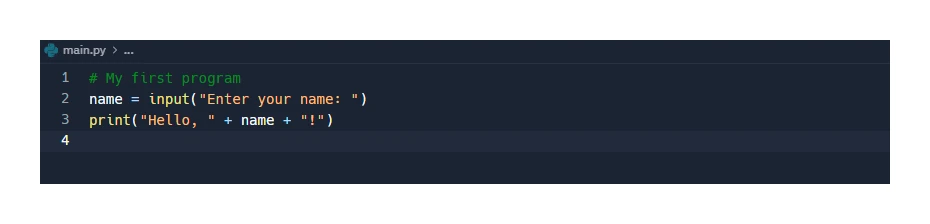
2. Error diagnostics
Tools to spot, locate and fix errors:
- Syntax checking in the background as the programmer types, underlining typos and missing punctuation in real time.
- Specific error messages that name the line and the kind of error.
- Suggested fixes for common mistakes.

3. Run-time environment
The IDE can run the program from inside itself and show its output in a panel beside the source code. The programmer does not have to leave the IDE to test changes.

4. Translator (built-in compiler or interpreter)
A built-in translator means the programmer can press a button or use a keyboard shortcut to compile and run (for compiled languages) or simply run (for interpreted languages), without having to install the translator separately.
Common exam question
Giving the functions of an IDE
Question: Given that the built-in translator is one function of an IDE, give or describe three other common functions, or explain the purpose of an IDE (3–6 marks).
Asked in 3 of the 17 papers. The credited functions are a code editor (where code is entered and amended), a run-time environment (where the program runs and shows its output), error diagnostics (showing where the errors are), auto-completion (suggesting commands as you type), auto-correction (fixing a minor misspelling in a command) and prettyprint (colouring the key commands).
When the question says give three functions, each feature named earns a mark. When it says describe three ways the IDE helps, for six marks, add what each feature does for the programmer: bare feature names are capped at four. When it says explain the purpose, for four marks, describe it as software for writing, editing, testing and debugging code; it offers features such as auto-completion and also translates the code into machine code.
Other useful IDE features
The syllabus also names auto-completion and prettyprint (covered under the editor above) and auto-correction, which corrects a small spelling mistake in a command. Real IDEs include many more useful features:
- Debugger with breakpoints, step-through execution, watch windows and variable inspection. Essential for finding logic errors.
- Version control integration (Git, SVN) so changes can be saved and shared.
- Refactoring tools that rename variables across a project or restructure code safely.
- Project management: lets the programmer organise files into projects and folders.
- Plug-ins and extensions that add support for new languages or frameworks.