1. Computational thinking
Programming is not just typing code. Before any code is written, the programmer has to understand the problem, break it into manageable parts, and decide what the solution needs to do. This thinking phase is called .
Three skills make up computational thinking:
| Skill | What it means |
|---|---|
| Decomposition | Break a large problem into smaller sub-problems that can be solved one at a time |
| Abstraction | Strip away the unimportant details so you can focus on what really matters |
| Pattern recognition | Spot similarities between sub-problems so a single approach can be reused |
The first two are the ones the syllabus tests directly.
2. Decomposition
Decomposition is the process of breaking a large, complex problem down into smaller, easier sub-problems.
A small problem is easier to design, code, test and debug than a big one. Once each sub-problem has been solved, the solutions are combined to solve the original problem.
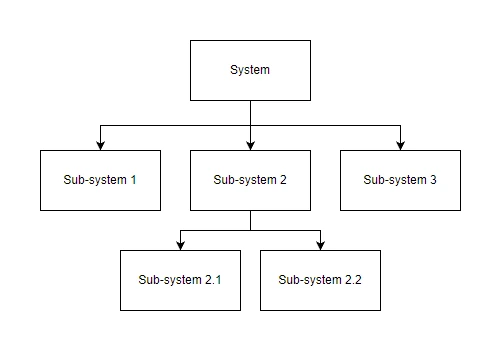
Why decomposition helps
- Easier to think about: a small task is easier to plan than a huge one.
- Easier to code: each sub-problem becomes a procedure or function (topic 24).
- Easier to test: small chunks of code can be tested in isolation.
- Easier to share: different programmers can work on different sub-problems in parallel.
- Easier to debug: a bug in one sub-problem can be fixed without disturbing the others.
3. Abstraction
Abstraction is the process of removing unnecessary detail from a problem so you can focus on the parts that matter.
A good model of a problem captures the essentials and leaves out the rest. The classic textbook example is the London Underground map: it hides the real geography of London (distances, road layouts, where the river runs) and shows only which stations connect to which lines, because that is the only information a traveller needs.
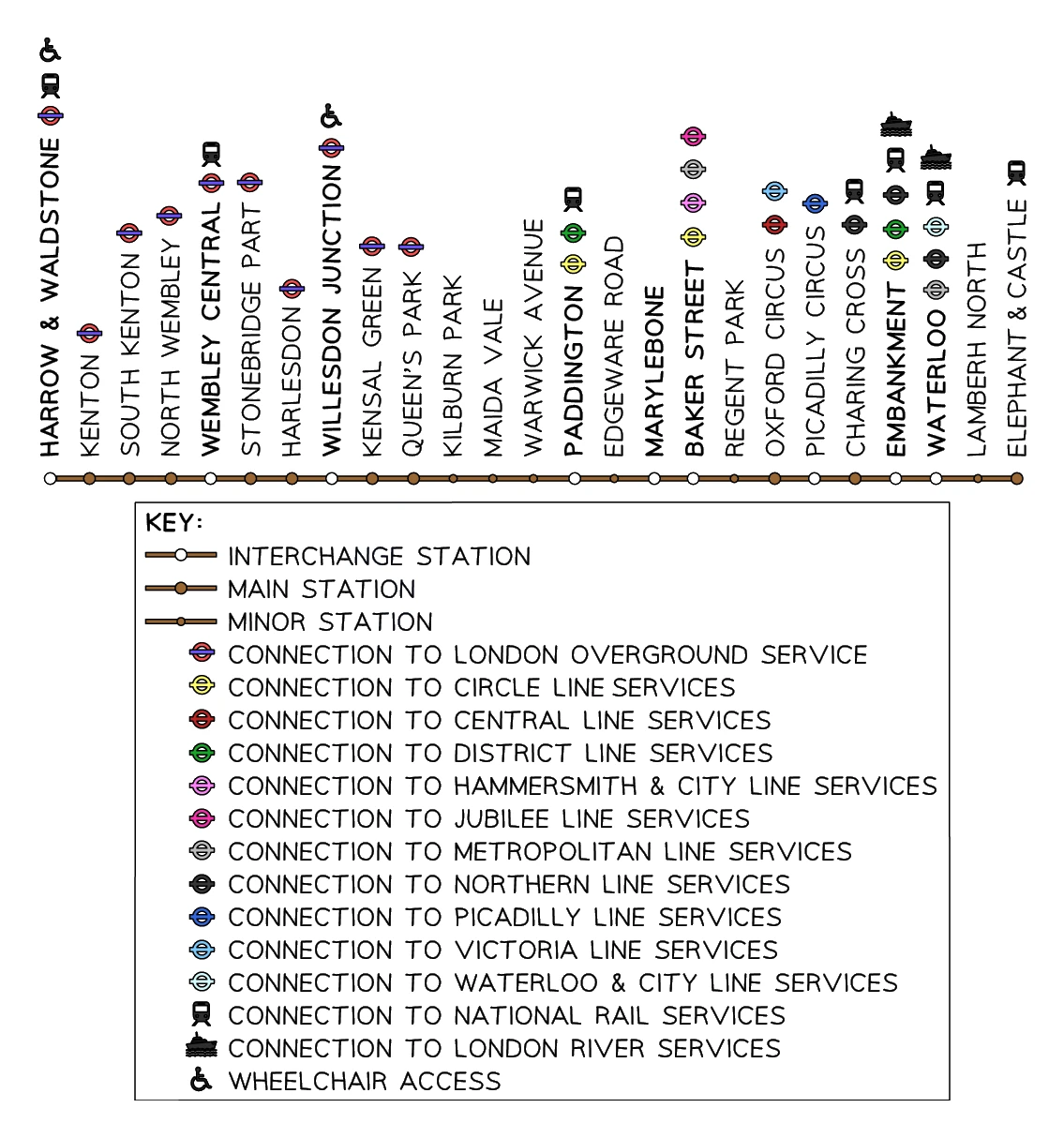
What to keep, what to throw away
When building a solution, you keep only the data and behaviour the program actually needs:
| For a school attendance system, KEEP... | THROW AWAY... |
|---|---|
| Student name and ID | Hair colour, favourite food, height |
| Attendance status (present/absent) per day | Mood, weather, lunch choice |
| Class group | Phone wallpaper |
A program that tracks every irrelevant fact would be slower, harder to write and harder to maintain.
Two kinds of abstraction
- Data abstraction: choosing which information about a real-world thing to store in the program (e.g. a student record stores name and attendance, not all biological data).
- Process abstraction: choosing what a piece of code does without worrying about how it does it (e.g.
calculate_percentage(presents, total)hides the multiplication and division behind a clean name).
4. Inputs, processes and outputs
Every program can be described as a pipeline of inputs, processes and outputs. Identifying these clearly is a key step in the analysis stage of the development life cycle.
| Stage | What it is | Examples |
|---|---|---|
| Input | Data that enters the program from outside | Keyboard typing, mouse clicks, sensor readings, file contents, network messages |
| Process | What the program does with the data | Calculate, compare, sort, search, filter, transform |
| Output | Data that leaves the program for the user or the environment | Text on screen, printed page, sound, control signal to an actuator |
5. The program development life cycle
Most programming projects follow a standard sequence of stages, sometimes called the program development life cycle.
Analysis
The analysis stage is about understanding the problem clearly before any code is written.
The deliverable is a requirements document that lists:
- What the program must do (functional requirements: "the program shall calculate average attendance").
- Any constraints (non-functional requirements: "must run on a school computer", "must complete in under 5 seconds").
- The success criteria that say when the requirement has been met.
This is where and abstraction are most useful: the programmer breaks the big problem into sub-problems and identifies only the data and behaviour that matter.
Common exam question
Abstraction and decomposition in the analysis stage
Question: Describe what is meant by abstraction, identify the component parts a problem is broken into at the analysis stage, or describe the analysis stage of the program development life cycle (2–3 marks).
Asked in 2 of the 17 papers. For abstraction each separate idea is a mark: simplifying the problem, removing the unnecessary detail (or selecting only the elements that are needed) and filtering out the irrelevant characteristics of those elements. "Simplifying the problem" alone is one mark; say what gets removed or kept for the second.
The component parts of a decomposed problem are inputs, processes, outputs and storage, and any three earn the three marks. Describing the analysis stage is one mark per point, and a task's name and what it does are separate points: abstraction; discarding the irrelevant detail; decomposition; splitting the problem into inputs, processes and outputs; identifying the problem; identifying the solution's requirements; researching it by collecting data; an example of that research.
Design
The design stage produces a blueprint for the solution before any code is written.
Common ways of describing a design:
- Structure diagrams show how the program is decomposed into modules.
- Flowcharts show the step-by-step flow of control (topic 19).
- Pseudocode is a code-like notation that is language-independent (topic 19).
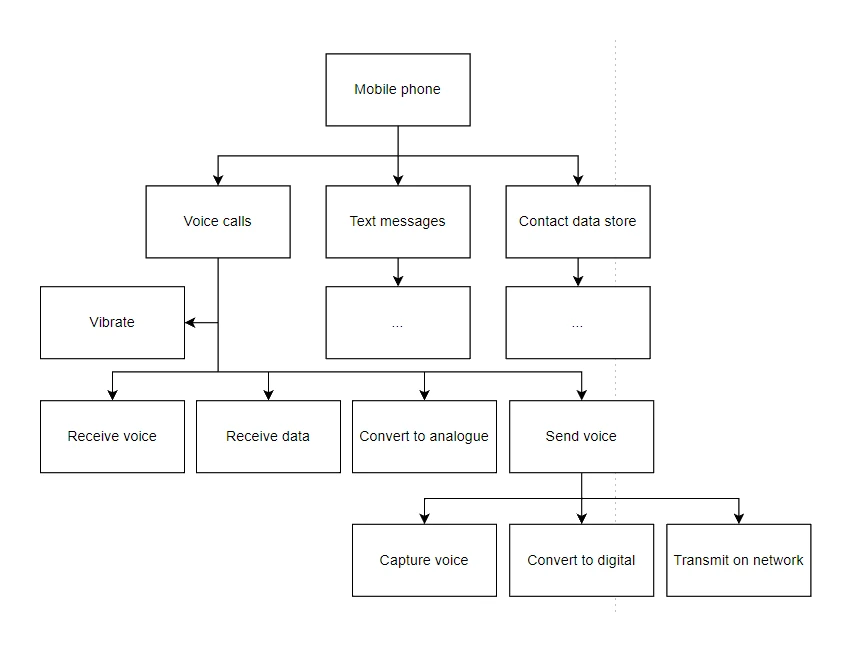
Common exam question
Methods used to design and present a solution
Question: Identify three different ways the design of a solution can be presented, describe three methods used to design and construct a solution, or tick the one method of construction in a list (1–6 marks).
Asked in 4 of the 17 papers. The three credited methods are always structure diagrams (structure chart is accepted), flowcharts and pseudocode. When a description is wanted, naming each method is one mark and describing it a second: a structure diagram is a hierarchical diagram that breaks the program down into its sub-programs; a flowchart is a diagram of the ordered steps the program takes; pseudocode sets out what the program does in plain language.
In the tick-box versions the other options are not design methods at all (abstraction, test data, a variable, procedures, processes, sub-systems), so the answer is the structure diagram.
Coding
The coding stage turns the design into a working program in a chosen programming language.
Each module is coded according to the design. Programmers run iterative tests as they write: as soon as a module exists, it gets tested; as soon as something fails, it gets debugged before the team moves on.
Testing
The testing stage exercises the finished program with carefully chosen to confirm it meets every requirement.
The whole program is run many times, with different inputs, to find any remaining bugs and confirm the requirements are met. Section 6 covers the test-data categories you should know.
Common exam question
Naming and describing the stages of the life cycle
Question: Identify the first stage, pick three stages out of a list of words, state one other stage, or identify and describe one or two stages other than analysis (1–6 marks).
Asked in 5 of the 17 papers. The stages are analysis, design, coding and testing, and analysis is the first. Only these four are credited: decomposition, pseudocode, input and variable sit in the word list as distractors, and the schemes for the "other stage" questions list just design, coding and testing.
When a stage must be described, its name is one mark and a matching description the second: design sets out the details of the solution, using standard methods such as flowcharts; coding is writing the program, with iterative testing as it is written; testing runs the program to find errors and checks that it meets its requirements. In the six-mark version the third mark for each stage is that second half of the description.
Where the program goes next
After testing, programs are usually released (or deployed) and then enter a maintenance phase, where bugs are fixed and new features added over the program's life. The syllabus stops at testing, but in real life maintenance is often the biggest stage of all.
6. Test data
Test data is a carefully chosen set of inputs used to check that a program works correctly.
Different kinds of test data probe different parts of the program's behaviour. The syllabus names four categories.
Normal data
Normal data is data that the program should accept because it is within the expected, valid range.
For a program that accepts ages from 12 to 18:
- Normal data: 14, 16, 17. All valid, should be accepted.
Normal data shows that the program does what it is supposed to do for typical input.
Extreme data
Extreme data is the largest and smallest values that should still be accepted.
For ages 12 to 18, the extremes are 12 and 18: the valid endpoints. Both should be accepted, because they are the smallest and largest values inside the allowed range.
Boundary data
tests the values either side of a limit: at each end of the range, the largest accepted value together with the smallest rejected value (the value just past the limit).
Boundary data checks both sides of each threshold, so for ages 12 to 18 the boundary tests are:
- 11 (just below the lower limit): should be rejected.
- 12 (the lower limit, smallest accepted): should be accepted.
- 18 (the upper limit, largest accepted): should be accepted.
- 19 (just above the upper limit): should be rejected.
Boundary data is where bugs often hide: many off-by-one errors only show up at the very edge of the valid range. Extreme data uses only the accepted endpoints (12 and 18); boundary data pairs each accepted endpoint with the rejected value immediately beyond it (so it also tests 11 and 19).
Abnormal / erroneous data
Abnormal data (also called erroneous or invalid data) is data that the program should reject because it is the wrong type, format, or simply outside the valid range.
For an age field, abnormal data might include:
"F"(a letter, wrong type).-5(negative, impossible).200(far outside the valid range).""(empty input)."@"(a symbol).
A well-written program does not crash on abnormal input; it shows an error message and asks the user to try again.
Common exam question
Choosing test data and stating the expected outcome
Question: Identify types of test data for a stated range or limit, with an example value and its expected outcome, or give two items of test data with a reason for each (4–9 marks).
Asked in 4 of the 17 papers. Type, example value and outcome or reason are each a separate mark. For ages 12 to 18: normal is a value inside the range, 15, accepted; extreme is an end value, 12 or 18, accepted; abnormal is outside, 25, rejected; boundary is a pair, 18 and 19, the first accepted and the second rejected.
To test a single whole-number limit such as "no more than 50", give 50, the largest that should be accepted, and 51, the smallest that should be rejected; the scheme accepts boundary or extreme for 50 and boundary, abnormal or erroneous for 51. For a format check, normal data fits the format (accepted) and abnormal data breaks it (rejected): the reason mark needs that verdict.
7. Validation
Validation is an automated check carried out by the program that an input is plausible and obeys the rules of the field it belongs to, applied the moment the data is entered.
Validation cannot guarantee that an input is correct (no program can tell whether a typed name is really the user's name). It can only guarantee that the input is plausible. A well-validated form accepts everything that is plausible and rejects everything that is obviously wrong.
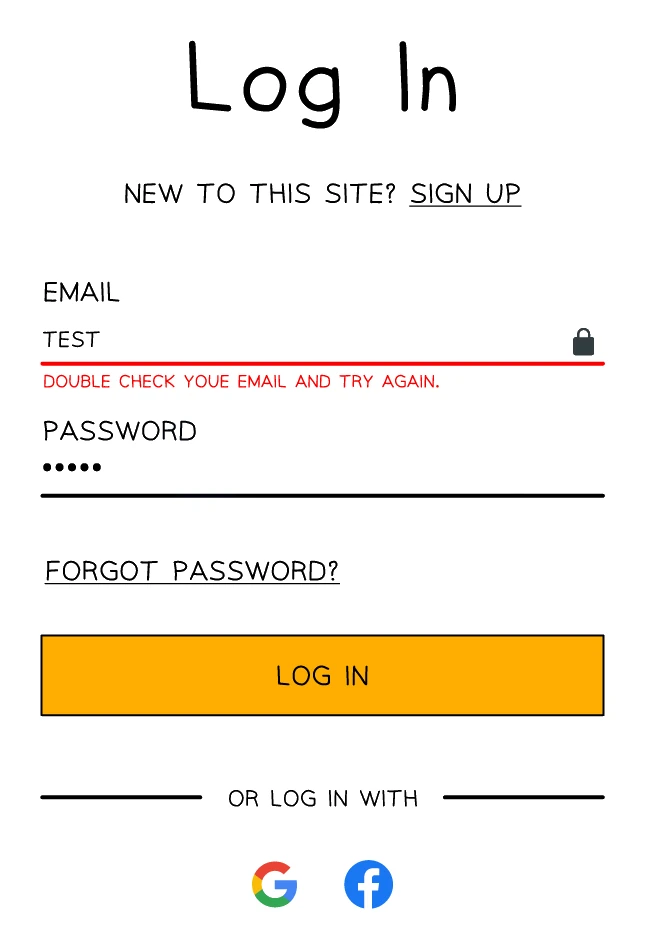
The syllabus names six validation checks you should know.
Range check
Tests that a number falls within a specified range.
Length check
Tests that a string has the right number of characters.
Type check
Tests that the input is of the expected data type (integer, real, string, boolean, etc.).
Presence check
Tests that a value has actually been entered (the field is not blank).
Format check
Tests that the input matches a specific pattern.
Check digit
An extra digit appended to a numerical code (e.g. ISBN, barcode) that is calculated from the other digits and used to detect errors when the code is entered.
Check digits were covered in detail in topic 5 (Error Detection); the same idea is reused as a validation method on input forms.
Combining validation checks
A single field may need several validation checks at once. A password field might use a length check (at least 8 characters), a presence check (not blank), and a format check (must contain a letter and a digit). Each check rules out one kind of invalid input.
Common exam question
Naming the validation check for a described rule
Question: State or tick the validation check for a described rule, match descriptions to checks, or describe the checks a program needs for its input rules (1–4 marks).
Asked in 6 of the 17 papers. Use the exact names: range check (a value between two limits), format check (a dd/mm/yyyy date, an email address with an @ sign), presence check (something has been entered), type check (an integer was entered; "character check" is also credited), length check (the right number of characters), check digit (an identification number has no errors).
Describing the checks for a set of rules earns one mark per check, named with what it tests: a range check with its limits, a presence check for a blank entry, a type check so a number is entered, a length check capping the digits (on a dd/mm/yyyy date, it counts 10 characters and rejects other lengths). Double entry and visual checks are tick-box distractors: they are verification, not validation.
8. Verification
Verification is a check that the data entered into the system matches the data that was intended.
Validation asks "Is this input sensible?" Verification asks "Did the user actually mean to type this?"
Two common verification methods:
Double-entry verification
The user enters the same value twice; the program checks that the two entries match.
Visual check
The system displays the entered data back to the user and asks them to confirm it is correct before continuing.
When to use which
- Double-entry verification is best for values the user cannot easily check by reading (passwords, where the characters are usually masked).
- Visual verification is best for values the user can easily eyeball (addresses, names, phone numbers).
Common exam question
Verification checks and why they are used
Question: Explain why input data is verified, outline one or two types of verification check and their use, or tick the check that is verification (1–4 marks).
Asked in 5 of the 17 papers. Explaining the purpose is two marks: data is copied accurately, with no changes to the values intended, and is copied from one source to another. One tick-box puts it as a value that has not changed during input, and the one verification check in a list of validation checks is the visual check.
For the types, the name is one mark and its use the second. Visual check: the user reads back the data entered on screen and confirms it is correct, or corrects any errors. Double entry check: the user enters the data twice, the computer compares the two entries and asks for a re-entry if they differ. Asked why a program adds a double entry check, answer "to verify the data": verification, not validation.
The big-picture difference
| Validation | Verification | |
|---|---|---|
| What it asks | Is the input plausible / sensible? | Did the user actually mean to type this? |
| Performed by | The program (automatically), based on rules | The user (with a prompt from the program) |
| Methods | Range, length, type, presence, format, check digit | Double-entry, visual check |
| Catches | Invalid types, blank fields, out-of-range values, typos in formatted codes | Typing the wrong but plausible value (e.g. wrong email address) |
| Limit | Can confirm input is sensible, not that it is correct | Can confirm the user typed what they meant, but not that the meaning is right |