1. Why computers use binary
Inside every computer, every piece of information is stored and processed as patterns of ones and zeros. The reason is physical: a computer's circuits are built from millions of tiny switches called logic gates, and each switch has only two stable states, on or off. The two binary digits 1 and 0 map directly onto those two states: 1 represents "on" and 0 represents "off".
This two-state design is what makes computers fast and reliable. A circuit only has to distinguish between "voltage present" and "no voltage", which is easy to do millions of times per second without errors. A system with more states (say, ten different voltage levels for the ten denary digits) would be slower, more expensive, and more prone to errors.
Every other kind of data is just a clever way of encoding it as binary:
- Magnetic hard drives store data as patches of north or south polarity (1 or 0).
- Optical discs (CD, DVD, Blu-ray) store data as flat areas (lands = 1) and pits = 0.
- Solid-state drives store data as charged or uncharged transistors.
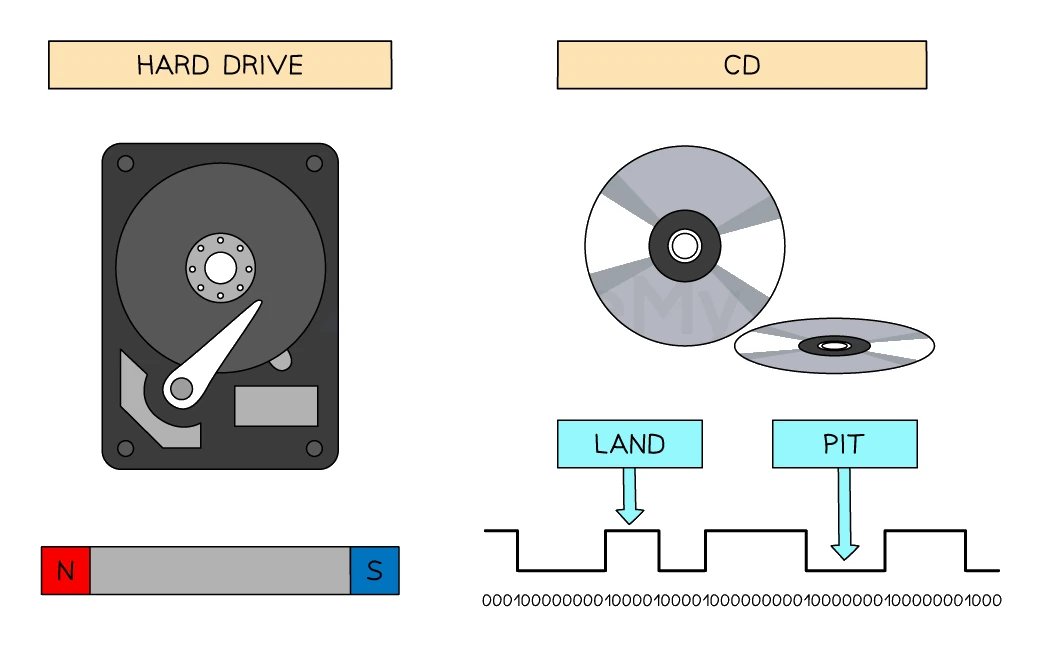
Mark-scheme phrase to remember: computers process data using logic gates that can only have two states (1 and 0).
Common exam question
Why computers use binary
Question: Explain why data has to be converted to binary before a computer can process it, or tick the reason computers use binary from a list of four (1–2 marks).
Asked in 2 of the 17 papers. The credited reason is physical. A computer is built from logic gates or switches, and each one has only two states, so it can process only the two values 1 and 0. In the two-mark version one mark is for the gates or switches and the other for their two states, or for the two values they process.
In the multiple-choice version the wrong options blame the user or the data: that a computer can only accept 1s and 0s as input, that binary needs no converting before it is displayed, or that people and computers both process binary quickly. Only the hardware reason, switches and gates that are either on or off, is right.
2. Three number systems you need to know
Computer science uses three number systems. The key idea is the base: the number of distinct digits the system uses.
| System | Base | Digits used | Example |
|---|---|---|---|
| Denary (decimal) | 10 | 0 to 9 | 3268 |
| Binary | 2 | 0 and 1 only | 1100 |
| Hexadecimal | 16 | 0 to 9 plus A to F | 9C |
Common exam question
Describing a number system by its base and digits
Question: Explain what is meant by a binary number system, or give one similarity and two differences between hexadecimal and binary (2–3 marks).
Asked in 2 of the 17 papers. A number system is defined by its base and by the digits it uses, so give both. Binary has a base of 2 and uses only two values, 1 and 0; any two of those three points earn the two marks. The matching facts for hexadecimal are a base of 16 and the digits 0 to 9 plus the letters A to F.
The one-mark similarity is simply that both are number systems. For the differences, pair the facts: binary is base 2 where hexadecimal is base 16, and binary uses only digits (0 and 1) where hexadecimal also uses letters. Naming the two bases is one difference, so the second must be about the digits.
Denary (base 10)
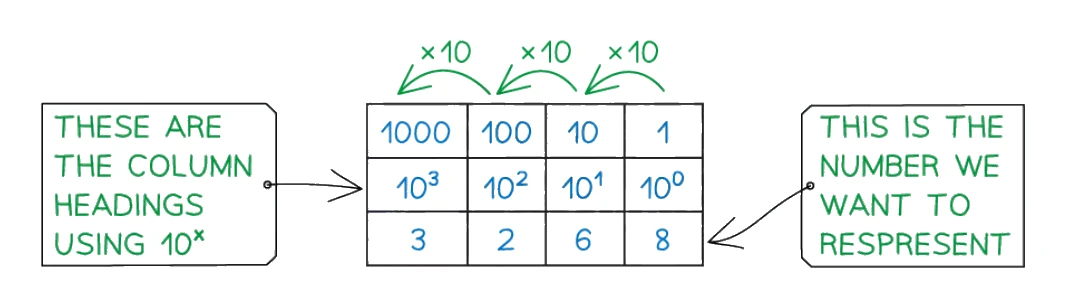
Denary is the everyday number system used by humans. Each digit's value depends on the column it is in. Reading right to left, the columns are powers of 10: 1, 10, 100, 1000 and so on.
For example, the number 3268 breaks down as:
(3 × 1000) + (2 × 100) + (6 × 10) + (8 × 1) = 3268
Binary (base 2)
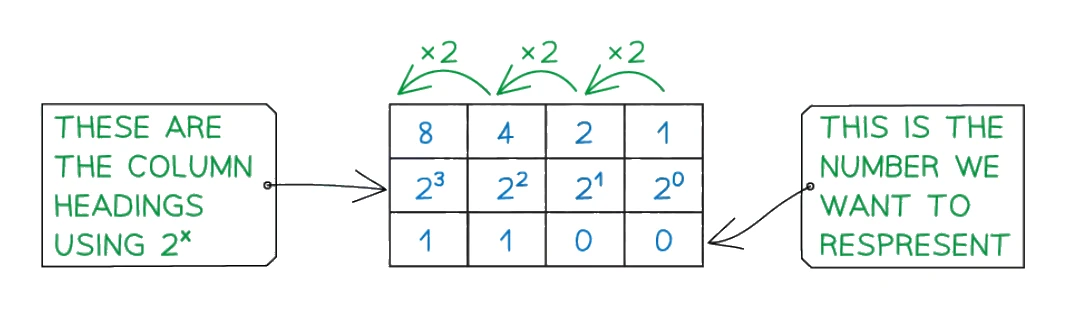
Binary uses only two digits, 0 and 1. Each digit is called a bit (short for binary digit). Each column is a power of 2, doubling as you move left: 1, 2, 4, 8, 16, 32, 64, 128 and so on.
For example, the binary value 1100 breaks down as:
(1 × 8) + (1 × 4) + (0 × 2) + (0 × 1) = 12
The 8-bit place values you must memorise:
| 128 | 64 | 32 | 16 | 8 | 4 | 2 | 1 |
|---|
For 16-bit binary, the columns continue further: 32 768, 16 384, 8 192, 4 096, 2 048, 1 024, 512, 256, 128, 64, 32, 16, 8, 4, 2, 1. The largest denary number that can be stored in 16 bits is 65 535 (binary 1111 1111 1111 1111).
Hexadecimal (base 16)
Hexadecimal needs 16 different symbols, but only ten digits exist (0 to 9), so the next six values are written as letters:
| Denary | 0 | 1 | 2 | 3 | 4 | 5 | 6 | 7 | 8 | 9 | 10 | 11 | 12 | 13 | 14 | 15 |
|---|---|---|---|---|---|---|---|---|---|---|---|---|---|---|---|---|
| Hex | 0 | 1 | 2 | 3 | 4 | 5 | 6 | 7 | 8 | 9 | A | B | C | D | E | F |
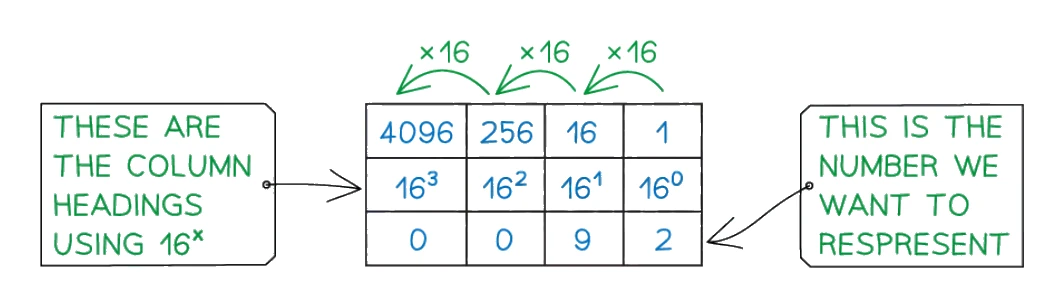
Each column is a power of 16: 1, 16, 256, 4096 and so on. For example, the hexadecimal value 13 in 2-digit form means:
(1 × 16) + (3 × 1) = 19 in denary
The key relationship: one hex digit = one nibble
A group of 4 binary bits is called a (half a byte). The largest 4-bit binary value is 1111, which is 15 in denary, which is F in hexadecimal. So one hex digit covers exactly the same range as one nibble of . This is what makes binary-to-hex conversion fast: split the binary into nibbles from the right, convert each nibble to one hex digit.
3. Converting between binary and denary
Denary to binary
The standard method is the place-value table:
- Write a row of place-value headings (1, 2, 4, 8, 16, 32, 64, 128) from right to left.
- Working from the left of the table, ask: does the largest column heading fit into the denary number? If yes, write a 1 under it and subtract that value from the denary number. If no, write a 0.
- Move to the next column heading and repeat with the remainder.
- Continue until you reach the rightmost column.
- The string of 1s and 0s along the bottom is the binary value.
Binary to denary
The reverse is simpler:
- Write the binary number under a row of place-value headings.
- For every column that has a 1, write down the column heading.
- Add them all up.
Common exam question
Converting between denary and binary
Question: Convert one or more denary numbers to binary, or a binary number to denary, sometimes as the contents of an 8-bit register (1–3 marks).
Asked in 8 of the 17 papers, every Paper 1 but one. Each converted number is one mark, so three numbers are three marks. When the question says to show your working the conversion is worth two: one for a valid method, such as the place values that add up to the number, and one for the answer, so write the place values down even when you can do it in your head.
Most schemes bracket leading zeros in a plain conversion, but one printed them without brackets, and a register or an 8-bit answer must show all eight bits, so pad every binary answer to eight bits: 9 goes in as 00001001. A binary-to-denary conversion is one mark for the value, so check the addition of the place values under the 1s.
Worked example
Converting denary to binary
Convert the denary number 201 to 8-bit binary.
Solution:
- Write the 8-bit place-value headings: 128 | 64 | 32 | 16 | 8 | 4 | 2 | 1
- 201 ≥ 128? Yes → write 1, remainder = 201 − 128 = 73
- 73 ≥ 64? Yes → write 1, remainder = 73 − 64 = 9
- 9 ≥ 32? No → write 0
- 9 ≥ 16? No → write 0
- 9 ≥ 8? Yes → write 1, remainder = 9 − 8 = 1
- 1 ≥ 4? No → write 0
- 1 ≥ 2? No → write 0
- 1 ≥ 1? Yes → write 1
- Result: 11001001
4. Converting between hexadecimal and denary
There are two methods for each direction. Method 1 goes through binary as a stepping stone and is foolproof; method 2 uses arithmetic directly and is faster once you are confident.
Denary to hex, Method 1: via binary
- Convert the denary number to an 8-bit value.
- Split the binary value into two (groups of 4 bits).
- Convert each nibble to its denary value (0 to 15).
- Write each value as a hex digit using the A to F table for 10 to 15.
Denary to hex, Method 2: divide by 16
- Divide the number by 16. The whole part is the first hex digit; the remainder is the second hex digit.
- Convert any value 10 to 15 to its hex letter (A to F).
Hex to denary, Method 1: via binary
- Convert each hex digit to a 4-bit binary nibble.
- Join the two nibbles into an 8-bit binary number.
- Convert the binary number to denary using place values.
Hex to denary, Method 2: multiply by 16
- Multiply the first hex digit by 16.
- Add the second hex digit to the result.
Common exam question
Converting denary to hexadecimal
Question: Convert one or more denary numbers to hexadecimal (1–3 marks).
Asked in 5 of the 17 papers. Use either method from this section, then check the number of digits: a value from 0 to 255 is at most two hex digits, and a single digit such as B is a complete answer for 11. Values of 10 to 15 must appear as their letters, so 27 is 1B, not 1 11.
A number from 256 to 4095 needs three hex digits, and the one paper that set one marked it out of two: one mark for two correct digits, two for all three in the right order. Divide by 16 twice, then write the last quotient followed by the remainders from last to first (428 → 26 remainder 12, 26 → 1 remainder 10, so 1AC), or go through binary and pad its nine bits to three nibbles.
5. Converting between binary and hexadecimal
This conversion is the fastest of the three pairings, because one hex digit always corresponds to exactly one nibble (4 bits).
Binary to hex
- Split the binary number into from the right, padding the leftmost group with zeros if needed.
- Convert each nibble to its denary value (0 to 15).
- Write each value as a single hex digit.
Hex to binary
- Take each hex digit and convert it to a 4-bit nibble.
- Join the nibbles together to form the full binary number.
Common exam question
Converting between binary and hexadecimal
Question: Convert an 8-bit or 16-bit binary number to hexadecimal, or write given hexadecimal numbers in binary (1–4 marks).
Asked in 6 of the 17 papers. Split the binary into nibbles from the right and turn each nibble into one hex digit. Most schemes give one mark per correct character in the correct order (two for an 8-bit number, four for a 16-bit one), though one paper gave a single mark for the whole answer. A nibble of 0000 is still a digit, so write the leading 0 (00001011 is 0B, and that 0 is one of the marks).
Going the other way, write every hex digit as a full four-bit nibble: the one paper that asked this set out its answers that way, so 2B becomes 0010 1011 and a three-digit hex number becomes twelve bits. Keep the nibbles in the same order as the digits.
Worked example
Converting binary to hexadecimal
Convert the binary number 11010110 to hexadecimal.
Solution:
- Split into nibbles from the right: 1101 | 0110
- Left nibble 1101: 8 + 4 + 1 = 13 → hex digit D
- Right nibble 0110: 4 + 2 = 6 → hex digit 6
- Result: D6
6. Why hexadecimal is used
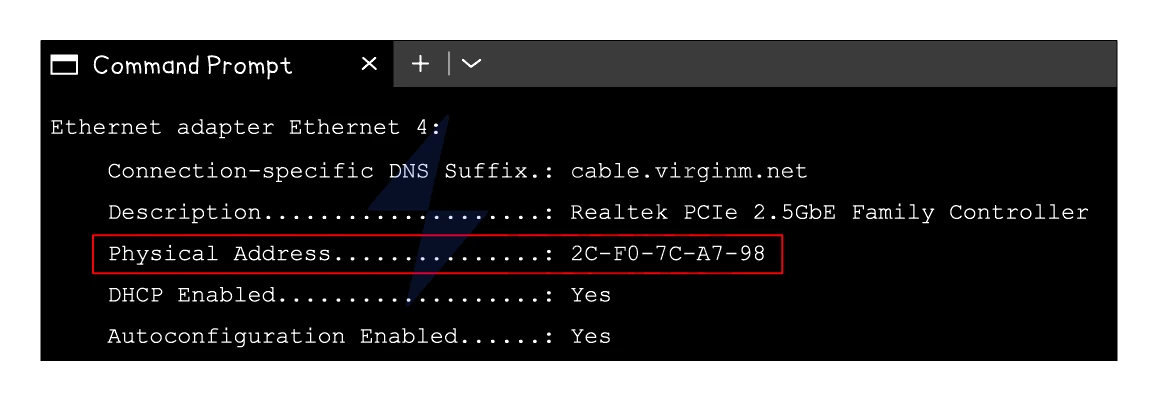
Hexadecimal is much shorter than binary, which makes it easier for humans to read and copy without error. Long binary numbers are difficult to deal with: a 48-bit MAC address would be a meaningless wall of 0s and 1s, but as 12 hex digits it is manageable.
Three common uses of hexadecimal you need to remember for the exam:
MAC addresses
A MAC address is a 48-bit identifier given to every network device. Written in binary it would be 48 digits long; written in hexadecimal it is 12 digits, usually grouped into 6 pairs separated by colons:
3F:1A:8C:00:2D:E5 is far easier to read and copy than its 48-bit binary expansion 00111111 00011010 10001100 00000000 00101101 11100101
Writing the binary version out by hand or trying to type it into a configuration tool would almost certainly introduce errors. The hex version is short enough to handle safely.
Colour codes
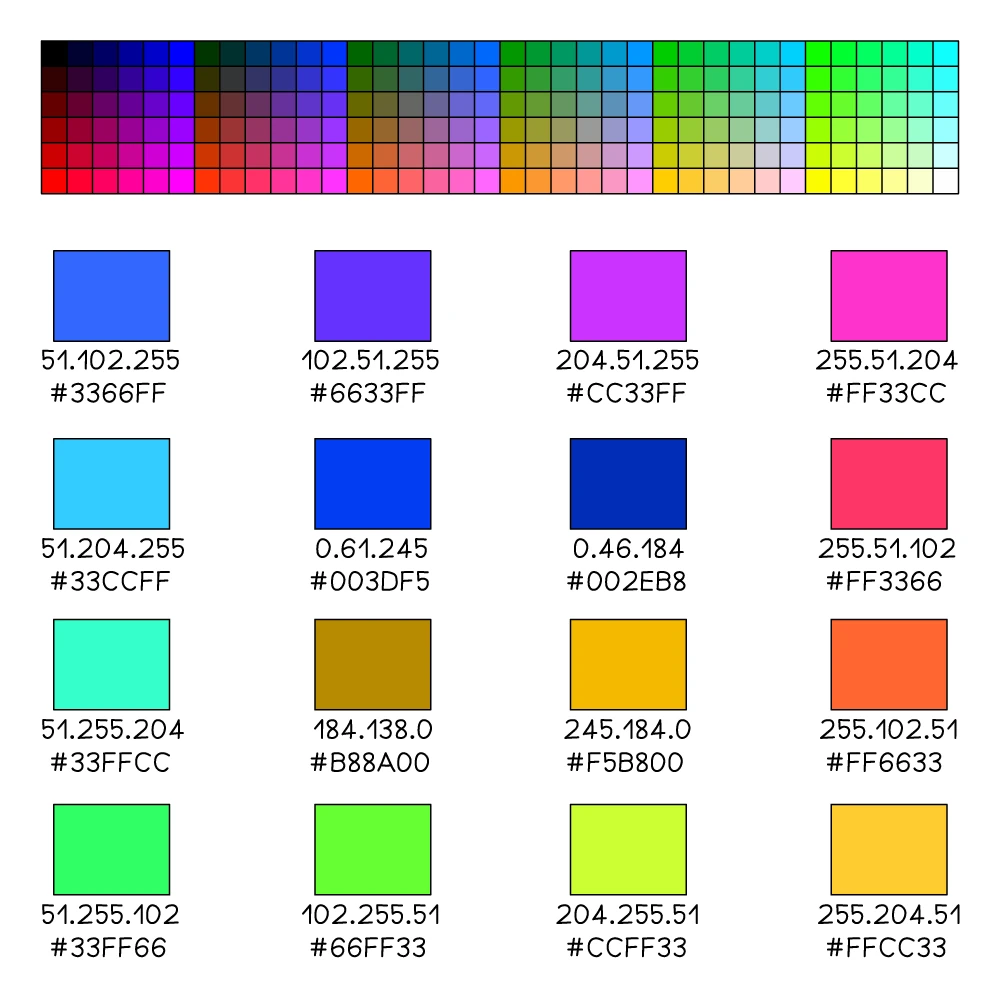
In HTML and CSS, colours are given as 6-digit hex codes preceded by a hash. Each pair of digits represents the intensity (0 to 255) of one of the three primary screen colours: red, green and blue.
#66FF33 means red = 66₁₆ (102), green = FF₁₆ (255), blue = 33₁₆ (51), producing a bright green.
The same number written in binary would be 24 digits long, which is far harder to read and type.
URLs
A URL can only contain a limited set of characters (letters, digits and some punctuation). If a URL needs to contain a character outside that set (a space, an accented letter, a non-Latin symbol), the character is replaced by its hex code preceded by %. For example, a space character becomes %20.
Exam-style phrasing: mark schemes reward precise statements such as "fewer digits in hex than , so easier for humans to read" and "less chance of copying errors". Vague phrases that just say hex looks neater or is more convenient do not score.
Common exam question
Why hexadecimal is used instead of binary
Question: Give one or two reasons or benefits of using hexadecimal rather than binary to represent data, or state how a long binary code could be shortened for display (1–2 marks).
Asked in 3 of the 17 papers. Every credited point compares hexadecimal with binary from a person's point of view: it is easier and quicker for humans to read, write or remember, it is a shorter representation that takes less space on screen and is quicker to enter, it makes a mistake less likely, and it is easier to spot errors and debug. One distinct idea per mark, so for two reasons give two different ideas, say shorter and fewer errors, rather than two wordings of one.
The scenario version describes binary codes too long for a small display and asks how they could be shortened: converting them to hexadecimal is the expected answer (converting to denary is accepted too).
7. Binary addition
Binary addition is done column by column from right to left, just like denary addition, but with only two digits and a carry rule.
The five rules of binary addition
| Sum | Result | Carry |
|---|---|---|
| 0 + 0 | 0 | none |
| 0 + 1 | 1 | none |
| 1 + 0 | 1 | none |
| 1 + 1 | 0 | carry 1 (because 1 + 1 = 10 in binary) |
| 1 + 1 + 1 | 1 | carry 1 (because 1 + 1 + 1 = 11 in binary) |
The fifth rule covers the case where two 1s and an incoming carry meet in the same column.
8. Overflow
A computer stores numbers using a fixed number of bits. An 8-bit register can hold values from 0 to 255. An overflow error happens when the result of an addition is too big to fit in the available bits.
How overflow appears in binary addition
Adding 11111111 (255) and 00000001 (1) should give 256. In binary, 256 is 100000000, which is 9 bits long. An 8-bit register can only hold 8 bits, so the leftmost 1 has nowhere to go. The register ends up holding 00000000 and a carry of 1 has been generated out of the most significant bit.
An overflow has occurred when the result of an addition needs more bits than the register can hold, producing a carry out of the leftmost column.
Why overflow matters
If the program does not check for overflow, the carried-out bit is silently lost and the result inside the register is wrong. In safety-critical software (aircraft, medical devices, financial systems), undetected overflow can cause serious failures. Real CPUs set an flag in a status register so that the program can detect and handle it.
Example exam answer for "explain what an overflow error is":
- The result of the calculation is too large to be stored in the available bits.
- A carry is generated out of the most significant bit of the register.
- The stored answer is therefore incorrect.
Common exam question
Adding two 8-bit binary numbers
Question: Add two 8-bit binary numbers using binary addition, giving the answer in binary and showing all your working (3–4 marks).
Asked in 5 of the 17 papers. The marks are split the same way each time: one mark for each correct nibble of the answer and one mark for the working, which means the carries written above the columns. Write every carry down, because the working mark needs them (or another visible method) on the page.
When the two numbers add to more than 255 the question is worth four, and the fourth mark is for identifying the overflow, the final carry out of the leftmost column. Write that 1 as a ninth bit to the left of the eight-bit answer, as the schemes do. Three of the five sums set so far overflowed.
9. Logical binary shifts
A logical binary shift is the operation of moving every bit of a binary number a fixed number of places to the left or to the right. Bits that fall off the end of the register are lost; the vacated positions are filled with 0s.
Logical left shift
A logical left shift by 1 moves every bit one position to the left. The leftmost bit falls off; a 0 is filled in on the right.
The effect on the value is to multiply by 2 (provided no 1-bit falls off the end):
- Left shift by 1 = ×2
- Left shift by 2 = ×4
- Left shift by 3 = ×8
- Left shift by n = ×2ⁿ
Logical right shift
A logical right shift by 1 moves every bit one position to the right. The rightmost bit falls off; a 0 is filled in on the left.
The effect on the value is to divide by 2 (integer division, with no remainder):
- Right shift by 1 = ÷2
- Right shift by 2 = ÷4
- Right shift by n = ÷2ⁿ
When information is lost
If a 1 is shifted off either end of the register, the simple ×2ⁿ or ÷2ⁿ rule no longer holds and information is lost:
- On a left shift, losing a 1 means the result is smaller than the true product. This is an for shifts.
- On a right shift, losing a 1 means the result is rounded down (the lost place value is discarded).
Common exam question
Performing a logical shift and stating its effect
Question: Give the 8-bit number or register contents after a logical shift, describe the process, or state its effect (1–2 marks per part).
Asked in 6 of the 17 papers. Move every bit the stated number of places, drop the bits that fall off the end and fill the gaps with 0s, keeping eight bits (a left shift of three turns 00110101 into 10101000). Left shifts multiply by 2 per place and right shifts divide by 2 per place; a two-mark effect question wants operation and factor: a right shift of four places is "divide" (one mark) "by 16, or 2⁴" (the second).
A description of a left shift scores for any two of: every bit moves one place left, the most significant bit is lost, a 0 fills the least significant bit. Losing bits off the end makes the value inaccurate, another credited effect, and the multiple-choice version asks which bits a left shift loses: the most significant.
10. Two's complement
So far every binary number has been unsigned, meaning all the bits represent positive values. To store negative numbers, the syllabus uses , an 8-bit format where the leftmost bit's place value is negative.
The key idea
In an 8-bit two's complement value, the column headings are:
| −128 | 64 | 32 | 16 | 8 | 4 | 2 | 1 |
|---|
Notice the leftmost column is −128, not +128. The other columns keep their normal positive values. The leftmost bit is therefore the sign bit: if it is 0, the number is positive (or zero); if it is 1, the number is negative.
The range of 8-bit two's complement
| Bit pattern | Denary value |
|---|---|
| 00000000 | 0 |
| 01111111 | +127 (the largest positive value) |
| 10000000 | −128 (the smallest negative value) |
| 11111111 | −1 |
So the range is −128 to +127 inclusive.
Reading a two's complement number
To find the denary value of a two's complement number, sum every column heading whose bit is set to 1, treating the leftmost column as −128.
Writing a negative number in two's complement
The fastest method on paper is the copy-and-invert trick:
- Write the positive equivalent of the number in 8-bit binary.
- Working from the right-hand end, copy each bit unchanged until you have written down the first 1 you meet (the 1 itself is also copied).
- Invert every bit to the left of that 1 (turn 0s into 1s and 1s into 0s).
Alternative method: invert all bits and add 1
A second standard method gives the same answer:
- Write the positive equivalent in 8-bit binary.
- Invert every bit (flip 0 ↔ 1). This gives the one's complement.
- Add 1 to the result. The final 8-bit value is the two's complement.
Both methods are accepted in the exam; pick whichever you find easier and stick with it.
Common exam question
Converting to and from two's complement
Question: Convert a denary number to an 8-bit two's complement integer, convert a two's complement integer to denary, or name the system used to store negative integers (1–2 marks).
Asked in 5 of the 17 papers. A two-mark conversion is one mark for working and one for the answer, and the schemes' example of acceptable working is flip and add 1: show the positive value in 8-bit binary, every bit inverted, then the 1 added. From two's complement to denary, the same steps on the bit pattern give the magnitude, and the second mark is for the denary value, minus sign included.
Read the sign before you start. Two papers asked for a positive number in two's complement, and the answer is its ordinary 8-bit binary with 0 as the sign bit (where working is marked, it is the conversion to binary); flipping it would make it negative. The one-mark naming question's answer is two's complement.
Worked example
Converting a negative denary number to two's complement
Express −90 as an 8-bit two's complement integer.
Solution:
- Write the positive equivalent in 8-bit binary: 90 = 64 + 16 + 8 + 2 = 01011010
- Invert every bit (one's complement): 10100101
- Add 1 to the one's complement: 10100101 + 1 = 10100110
- Result: 10100110 (which represents −90 in 8-bit two's complement)
Check: −128 + 32 + 4 + 2 = −90 ✓
Why two's complement is used
Two's complement is the dominant way of storing signed integers in modern computers because:
- One representation for zero. Some other schemes (like sign-and-magnitude) have both a +0 and a −0, wasting a bit pattern. Two's complement has only one 0.
- Addition works the same for positive and negative numbers. The CPU can use one binary adder for both signed and unsigned arithmetic; no special "subtract" hardware is needed.
- Negative numbers behave naturally. Adding a number and its negative gives 0 (with the carry-out discarded), exactly as expected.