1. Why transmission errors happen
When data travels along a wire or through the air, the signal can be distorted by physical effects, and a bit that was sent as a 0 can arrive as a 1 (or vice versa). The causes:
| Source of error | Where it bites |
|---|---|
| Electromagnetic interference | Nearby motors, microwave ovens, fluorescent lights, cables carrying other signals |
| Cable degradation | Old cables develop corrosion or damaged insulation; long cables suffer signal loss |
| Weather | Wireless links are degraded by heavy rain, fog and physical obstacles |
| Physical barriers | Walls, buildings, vehicles and people absorb or reflect wireless signals |
| Crosstalk | Adjacent wires in a cable bleed signal into each other |
| Bad connectors | Loose plugs and corroded sockets introduce intermittent noise |
The three things that can go wrong with a transmitted byte:
- Data loss: some bits never arrive.
- Data gain: extra bits appear that were never sent.
- Data change: bits arrive flipped (0s become 1s and vice versa).
Computers cannot recover from a corrupted transmission unless they can detect that the corruption has happened. That is what every method in this topic does: it gives the receiver a way to spot when something has gone wrong, so the data can be rejected or re-sent.
This topic covers five methods: parity check, parity blocks, , , and . It also covers (ARQ), the protocol that handles re-transmission when an error is found.
2. Parity check
A parity check detects errors by adding a single extra bit (the ) to each byte so that the total number of 1s in the byte follows an agreed pattern.
The sender and receiver agree in advance whether they will use or odd parity:
- Even parity: the total number of 1s in the byte (including the parity bit) must be even.
- Odd parity: the total number of 1s in the byte (including the parity bit) must be odd.
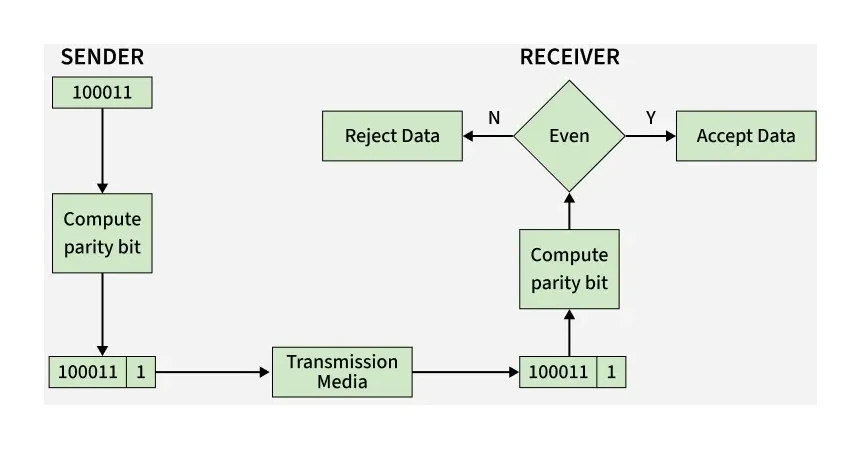
Setting the parity bit
To set the parity bit, the sender:
- Counts the 1s in the 7 data bits.
- If the count already matches the agreed parity, sets the parity bit to 0.
- If the count is the wrong parity, sets the parity bit to 1 to flip the total.
How the receiver detects an error
The receiver:
- Counts the 1s in every received byte.
- Checks whether the count matches the agreed parity.
- If yes, no error has been detected.
- If no, an error has occurred (and the data should be discarded or re-sent).
Worked example
Setting a parity bit and checking for an error
A sender and receiver have agreed to use odd parity. The sender wants to transmit the 7-bit data value 1 0 1 1 0 0 1. What parity bit must be added, and how does the receiver spot an error if one bit flips in transit?
Solution:
- Count the 1s in the seven data bits 1011001: there are four, an even number.
- Odd parity needs an odd total, so the parity bit must be 1, making five 1s. The transmitted byte, written parity bit first, is 1 1011001.
- If the byte arrives intact, the receiver counts five 1s in 1 1011001. Five is odd, the parity matches, and no error is detected.
- If the third data bit flips from 1 to 0, the receiver gets 1 1001001 and counts four 1s. Four is even but odd parity was agreed, so an error is detected and the byte is rejected or re-requested.
Exam tip
Explaining how a parity check detects errors
To explain how an odd (or even) parity check detects errors (4 marks), write the process as separate steps, each credited on its own: the 1s in each byte are counted, then a parity bit goes in front of the seven data bits before transmission, set so that the byte's total of 1s is odd (or even). After transmission the receiver counts again: the agreed parity means no error was detected, the other parity means an error was detected. Those two outcomes are separate points, so give both, and name the parity that was agreed.
Limitations of a single parity bit
Parity checks are cheap and quick but they cannot detect every error:
- Two bits flipped in the same byte cancel each other out and the parity still matches.
- A whole even-numbered group of bit flips also leaves the parity unchanged.
- Bit transposition (two bits swapping positions) does not change the parity at all.
- The parity check tells you whether an error has happened, but not which bit is wrong.
For better protection, the bytes are arranged into a parity block with an extra parity byte, described next.
3. Parity blocks (two-dimensional parity)
A parity block combines a horizontal parity bit (one per byte) with a vertical parity byte (one bit per column), so that the row AND column of any single-bit error can be identified.
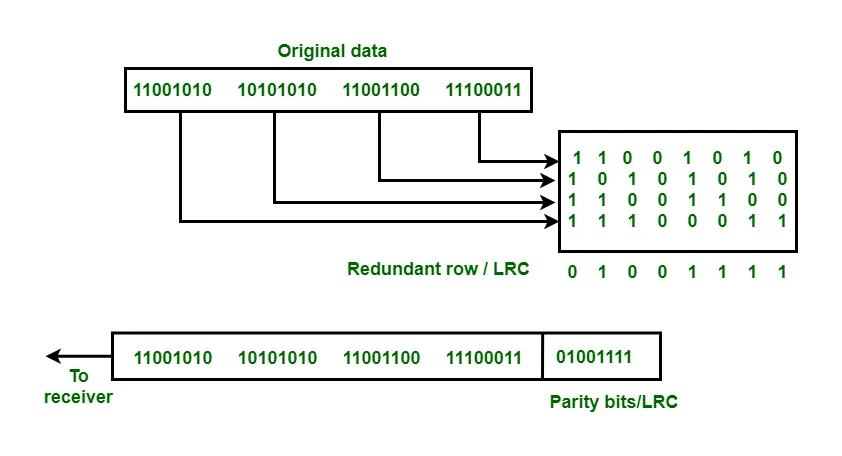
The structure:
- A block of (say) nine 8-bit bytes, arranged as 9 rows × 8 columns.
- Each row has its own parity bit, calculated across the row's data bits.
- A 10th row, called the parity byte, holds one parity bit per column, calculated down the column.
When the block is received, the receiver re-calculates every row parity and every column parity. The intersection of the mismatched row and the mismatched column pinpoints the exact bit that flipped, which can then be corrected automatically.
Worked example
Completing the parity byte of a parity block
Four bytes, each a parity bit followed by the data bits b7 to b1, are transmitted as a parity block using even parity. The parity bit of each byte has already been set. Complete the parity byte.
| parity bit | b7 | b6 | b5 | b4 | b3 | b2 | b1 | |
|---|---|---|---|---|---|---|---|---|
| byte A | 0 | 1 | 1 | 0 | 0 | 1 | 0 | 1 |
| byte B | 1 | 1 | 0 | 1 | 0 | 1 | 0 | 0 |
| byte C | 0 | 0 | 1 | 0 | 0 | 1 | 1 | 1 |
| byte D | 1 | 0 | 1 | 1 | 1 | 0 | 0 | 0 |
| parity byte |
Solution:
- Treat each column like a row: count its 1s and, for even parity, write 1 if the count is odd and 0 if it is already even.
- Counting the 1s down the columns, parity bit first: 2, 2, 3, 2, 1, 3, 1, 2.
- The b6, b4, b3 and b2 columns are odd, so they get a 1 and the rest get a 0.
- Parity byte: parity bit 0, then 0 1 0 1 1 1 0 for b7 down to b1.
- Check: the parity byte holds four 1s, an even number, as it must when every row and column is even.
A single flipped bit then fails its row and its column, and the bit where they cross is the error. In the paper that set this, two right bits earned one mark, five earned two and all eight earned three, so fill every cell.
What parity blocks detect
- Single-bit error: detected AND located.
- Two errors in the same row: row parity passes, but two columns mismatch (still detected, harder to locate).
- Even number of errors in the same row AND same columns: undetectable.
Parity blocks are far stronger than a single parity bit, at the cost of one extra byte per block.
4. Checksum
A checksum is a value calculated from the data using an agreed algorithm, sent alongside the data, and re-calculated by the receiver to verify the data was not corrupted.
How it works
- Before transmission, the sender runs every byte of the data through a algorithm. The output is a small fixed-size number (often a single byte or a few bytes).
- The sender transmits the data together with the checksum.
- The receiver re-runs the same checksum algorithm on the received data.
- The receiver compares its calculated checksum with the one that was sent.
- If the two checksums match, no error has been detected. If they differ, the data has been corrupted in transit.
A simple example checksum algorithm
A textbook example: take each byte of the data as a number, add them all up, and keep only the last byte of the sum.
For data bytes 45, 200, 12, 99:
- Sum: 45 + 200 + 12 + 99 = 356
- Last byte (modulo 256): 356 − 256 = 100
- Transmitted checksum: 100
If a single byte changes during transmission, the receiver's sum will be different and the checksums will not match. Real algorithms (CRC, MD5, SHA) use more complex maths to catch a much wider range of corruption patterns.
What checksums can and cannot do
- Detects that an error has occurred.
- Does NOT locate where the error is.
- Does NOT correct the error.
- Can miss carefully crafted changes that happen to give the same checksum (extremely rare with good algorithms).
Exam tip
Why mismatched checksums prove the data changed
A two-mark question told you that the two checksum values did not match and asked why that shows an error. Any two of three points earned the marks: the checksum is calculated from the data itself; the receiver recalculates it with the same algorithm; so different values can only have come from different data. Repeating that the values differ is the question's own premise, so your answer has to say why they differ: the data that arrived is not the data that was sent.
5. Echo check
An detects errors by having the receiver re-transmit what it got to the original sender, who then compares the echo against what was originally transmitted.
How it works:
- The sender transmits the data.
- The receiver echoes the data straight back to the sender.
- The sender compares the echo with what it originally sent.
- If the two match, the transmission is treated as correct.
- If they differ, the sender re-transmits.
Strengths and weaknesses
- Strength: catches almost any error because the sender has the original data to compare against, bit for bit.
- Weakness: it is impossible to tell whether the error happened in the forward direction (sender → receiver) or in the return direction (receiver → sender). The data may have arrived correctly and only the echo corrupted, but the sender will still re-transmit.
- Cost: doubles the amount of data on the network because every byte travels twice. Slow and bandwidth-hungry.
Echo checks are mostly used in short or low-traffic links where reliability matters more than efficiency.
Common exam question
Explaining how an echo check detects errors
Question: Explain how an echo check is used to check transmitted data for errors, or describe the role of the sender and the receiver in an echo check (3 marks).
Set in 2 of the 17 papers, and a third paper describes the process and asks you to name it. The three steps are the three marks, so write each one: the receiver sends a copy of the data back to the sender; the sender compares what it sent with the copy that came back; and if the two differ, an error has occurred (and no error if the two are identical). Say which device does which: the comparison happens at the sender, the only device holding both versions. One scheme also credited what the sender does next, confirming the data if it matched or re-sending it if it did not.
6. Check digits
A check digit is an extra digit appended at the right-hand side of a numerical code, computed from the other digits via an agreed algorithm, so that the receiver can spot data-entry errors.
Check digits are different from the methods above: they protect against errors in numerical data entry by humans, not against transmission errors. The same maths is used, but the use case is different.
Typical errors that check digits catch:
- Single-digit error: a wrong digit was typed (e.g. 7 instead of 1).
- Transposition error: two adjacent digits were swapped (e.g. 21 instead of 12).
- Omitted or extra digits: a digit was missed out or one was added by mistake.
- Phonetic errors: confusion between digits that sound similar over the phone (e.g. 13 vs 30).
How a check digit works
- The other digits in the number are run through the check-digit algorithm.
- The algorithm produces a single digit.
- This digit is appended to the end of the number.
- Whenever the number is entered or scanned later, the algorithm is re-run on the digits and the result is compared with the final digit.
- If they match, the number is treated as valid. If not, the number is rejected.
Common uses of check digits
- ISBN-10 book identifiers: every printed book carries a 10-digit ISBN whose final digit is a check digit. An ISBN-10 is valid if (1 × digit₁ + 2 × digit₂ + … + 10 × digit₁₀) is divisible by 11.
- Barcodes (EAN-13, 13 digits; UPC-A, 12 digits): product codes used on supermarket items, ending in a check digit. The barcode scanner re-calculates the check digit from the bars it has read; if the calculated digit does not match the printed one, the scanner refuses the read and beeps for a retry.
- Bank card numbers (Luhn check)
- National identity numbers in many countries
- Vehicle Identification Numbers (VINs) on cars
Exam tip
Explaining how a check digit checks a scanned barcode
A four-mark question asked how a barcode scanner's check digit catches input errors. The scheme listed six separate points and credited any four: the check digit is calculated from the other digits of the barcode; using an algorithm (naming one, such as modulo 11, counts); it is added to the barcode; once the barcode is scanned the digit is recalculated from the digits read; using the same algorithm; and if the result differs from the stored digit, an error has occurred (or, if they agree, no error). Recalculating and comparing are separate points, so keep them as separate sentences.
7. Automatic Repeat reQuest (ARQ)
ARQ is a protocol that automatically requests a re-transmission whenever the receiver detects an error.
ARQ is not a method of detection in itself; it is the rule that combines an error-detection method with automatic retransmission. It works like this:
- The sender transmits a packet of data.
- The receiver uses an error-detection method (parity, checksum, etc.) to check the packet.
- If the packet is correct, the receiver sends back a positive acknowledgement (ACK). The sender then transmits the next packet.
- If the packet is corrupted, the receiver sends back a negative acknowledgement (NAK), and the sender re-transmits the same packet.
- If the sender hears nothing at all within a fixed amount of time (the timeout), the sender assumes the packet (or its acknowledgement) was lost and re-transmits.
- Steps 1 to 5 repeat until every packet has been correctly received and acknowledged, or until a retry limit is reached.
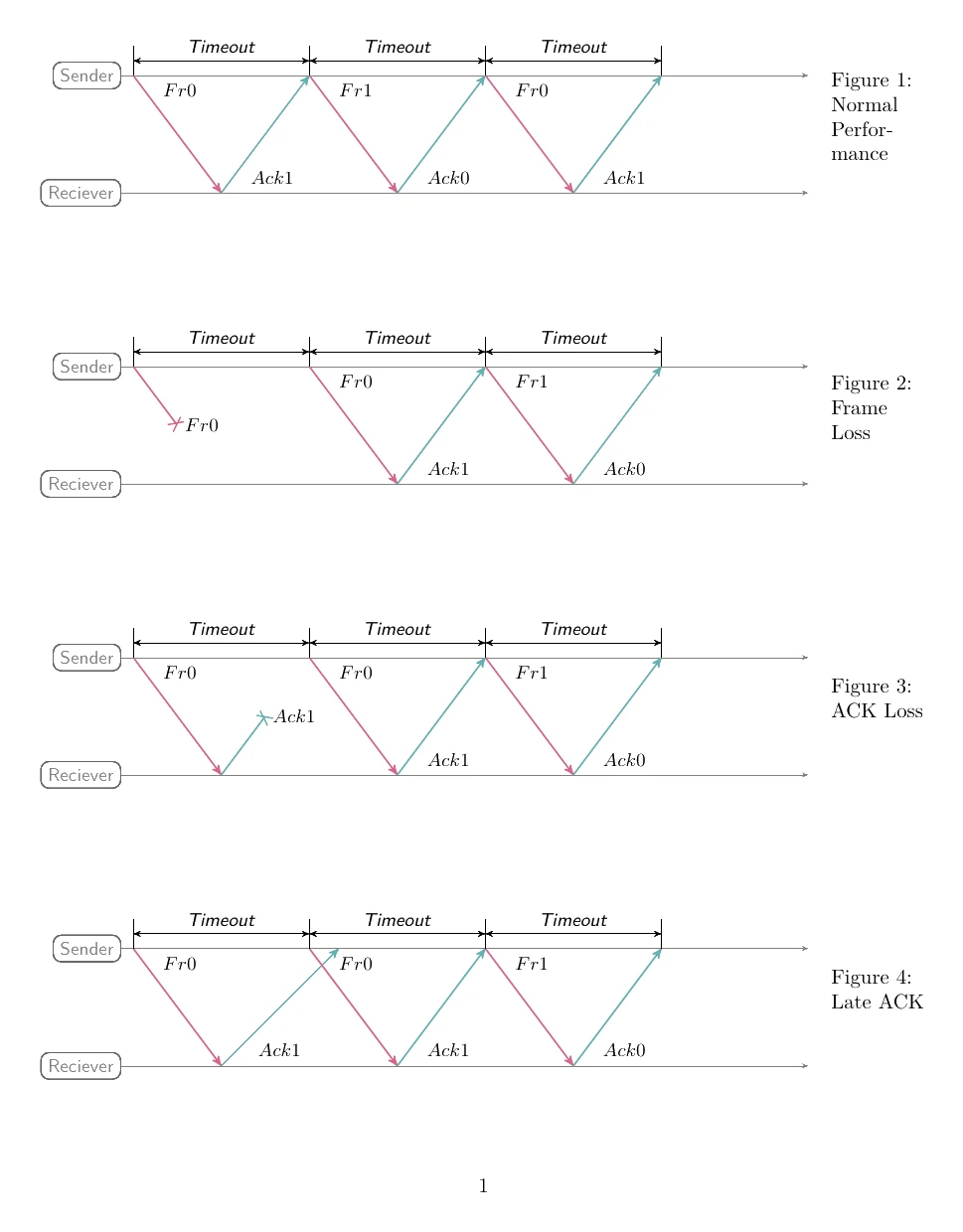
Why ARQ matters
- Combines detection with correction. A parity or checksum on its own only tells the receiver something is wrong. ARQ uses that signal to actually fix the problem by re-transmitting.
- Handles total packet loss. Without ARQ's timeout, a completely missing packet would never be re-sent. With ARQ, a packet that fails to arrive is automatically requested again.
- Used by TCP. The protocol behind almost every internet connection uses ARQ to guarantee reliable delivery in spite of unreliable underlying networks.
A glance at the names
The Cambridge specification calls this Automatic Repeat Query, but you may also see it written as or Automatic Retransmission Request. All three refer to the same idea.
Exam tip
Explaining ARQ with a positive acknowledgement
A five-mark question asked how ARQ operates with a positive acknowledgement, crediting any five of eight points: a timer starts when the sender transmits a packet; the receiver checks the packet for errors; once the packet is error-free, an acknowledgement goes back to the sender; the sender then sends the next packet; if the timer ends with no acknowledgement, a timeout occurs and the packet is re-sent; and this repeats until an acknowledgement is received or the maximum number of attempts is reached. Timer and timeout are separate points, so include both, and it is the receiver that checks.
8. Side-by-side: which method does what
| Method | Detects | Locates | Corrects | Best for |
|---|---|---|---|---|
| Parity check | Single-bit errors (and other odd numbers of errors) | No | No | Fast, cheap link-level checks |
| Parity block | Single-bit errors | Yes (intersection of row + column) | Single-bit only | Memory chips, simple data blocks |
| Checksum | Most random corruption | No | No | Files, packets, web downloads |
| Echo check | Almost any corruption | No (and ambiguous about direction) | No (use ARQ on top) | Short links where reliability matters more than speed |
| Check digit | Single wrong digit, transpositions, omissions | No | No | Human-entered numerical codes (ISBN, barcodes, bank cards) |
| ARQ | Uses another method (e.g. checksum) | Depends | Yes (via re-transmission) | Combined with detection for reliable delivery |
Choosing the right tool
A typical exam question gives a scenario and asks which method best fits. The decision tree:
- Is the data human-entered numbers? → Check digit.
- Is the data a transmitted byte or packet? → Parity (very fast, weak) or checksum (slower, stronger).
- Does the system need to know exactly which bit is wrong? → Parity block.
- Does the system need to automatically recover from errors, not just detect them? → ARQ on top of any of the above.
Common exam question
Naming an error-detection method
Question: Name the error-detection method from a description of it, pick the one that fits a stated property, or give two methods that could check data after it has been transmitted (1–2 marks).
Asked in 3 of the 17 papers. For data checked after transmission, the credited methods are a parity check (odd or even, or a parity byte or parity block check), a checksum, an echo check and ARQ, for which either expansion, automatic repeat query or automatic repeat request, was accepted. A check digit was not in that list: it checks data on input. A description in which the receiver sends a copy of the data back and the two versions are compared is the echo check. The echo check is also the answer when asked which method does not use a calculated value: parity, checksum and check digit all compute a value from the data, while the echo check compares the data itself.
The next topic in this chapter, Encryption (topic 6), addresses a different concern: not whether data is correct, but whether it can be read by anyone who intercepts it.