1. What a database is
A database is an organised collection of data, stored on secondary storage in a way that lets a program retrieve, update and analyse it efficiently.
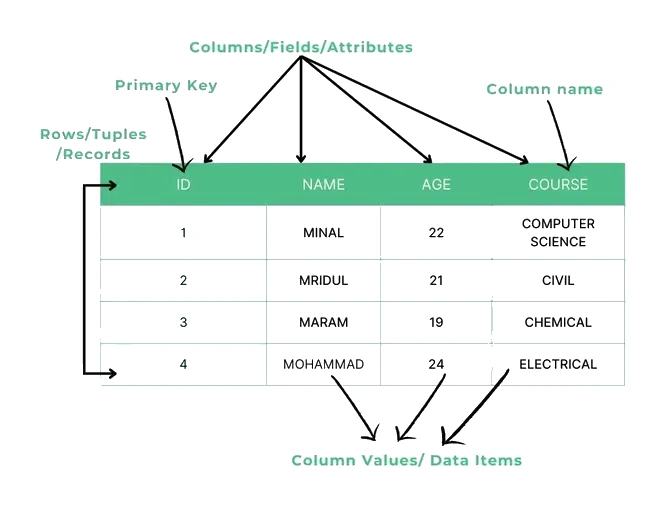
The focus here is on single-table databases: just one rectangular table of data with named columns (called ) and one row per real-world item (called ).
Databases vs plain text files
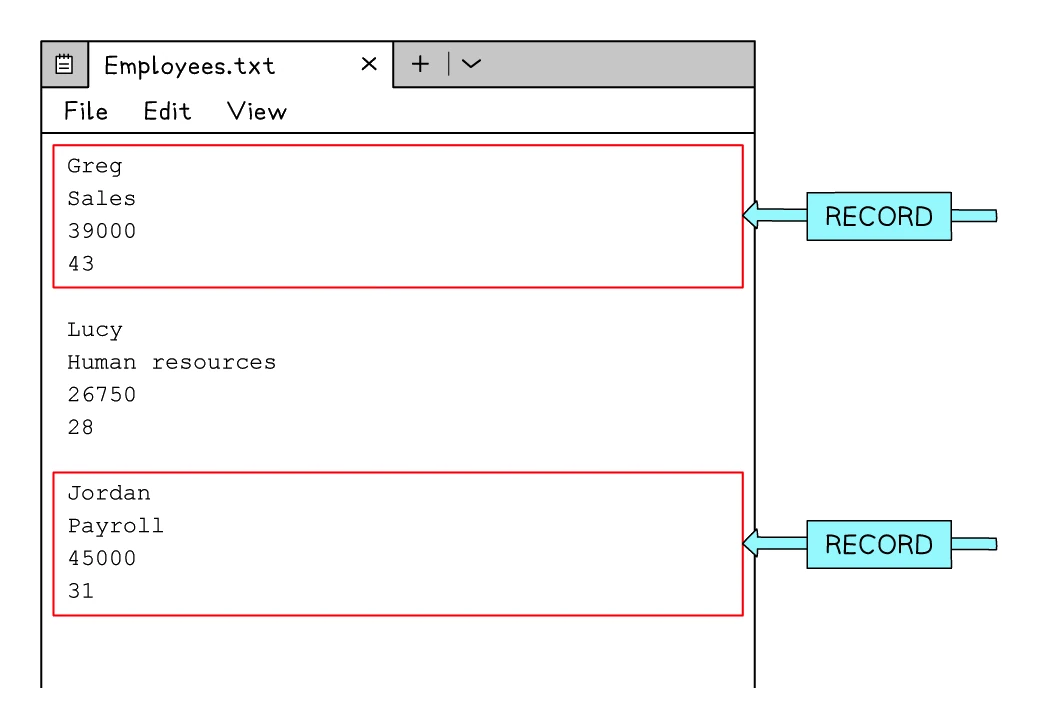
Text files were covered in topic 23. The same data could be stored either way; databases offer several advantages. In a plain text file, each item's fields are simply written on consecutive lines, and one such group of lines is a single record:
| Feature | Plain text file | Database |
|---|---|---|
| Data organisation | Lines of text; the program decides what each line means | Named fields, rows, and column data types |
| Searching | Read every line in turn (linear) | Indexed lookup; very fast even with millions of records |
| Concurrent access | Awkward; one writer at a time | Built-in support for many users at once |
| Validation | Done by the program reading the file | Validation rules on each field at the database level |
| Security | Limited; depends on the OS | Per-user access controls, encrypted at rest, audited |
| Best for | Small amounts of structured text data | Large, structured data accessed by many users |
For a school's collection of student grades, a database is almost always the right tool. For a small configuration file, a plain text file may be enough.
2. The structure of a single-table database
Every single-table database is made of three building blocks: fields, records and (usually) a .
Fields
A field is one specific piece of information about each item; it appears in the table as a single column.
Examples of fields for a customer database: CustomerID, FirstName, LastName, DateOfBirth, PhoneNumber.
Records
A record is the collection of fields that all belong to one specific item; it appears in the table as a single row.
For the customers table, each customer is one record. If there are 200 customers, there are 200 records.
Easy way to remember: fields are columns, records are rows.
Primary keys
A primary key is a single field whose value is unique for every record in the table. It uniquely identifies each record so the database can tell one from another.
Examples:
StudentIDin a school students table.CarRegistrationin a vehicles table.ProductCodein a shop's products table.MemberIDin a club's members table.
A primary key cannot be left blank, and no two records can share the same primary-key value. This matters because the database needs an unambiguous way to refer to each record, especially when records are updated or deleted.
Common exam question
Choosing and justifying a primary key
Question: Name the field that should be the primary key and give a reason for choosing it, or describe what a primary key is for (1–2 marks).
Asked in 7 of the 17 papers. Naming the field earns one mark and the reason the other. Choose the code or number field whose values all differ (a catalogue number, a room code); the reason is that it is a unique identifier, so it uniquely identifies each record. That is also the answer when you are asked what a primary key is for.
Two versions turn it round. Asked why a named field would not do, say its values repeat, so the data is not unique. Asked whether any given field would suit, the answer can be no: if every field could hold the same value in two records (a name, a supplier, a size), none is unique, and the mark needs the "no" with that reason.
A worked example: a students table
| StudentID | FirstName | LastName | MarkSubmitted | Percentage |
|---|---|---|---|---|
| 2014501 | Aisha | Khan | Y | 62 |
| 2014502 | Ben | Cooper | N | 18 |
| 2014503 | Chen | Wei | Y | 81 |
| 2014504 | Dara | O'Neill | Y | 73 |
| 2014505 | Emma | Foster | Y | 41 |
| 2014506 | Faisal | Ahmed | N | 55 |
In this table:
- The (columns) are
StudentID,FirstName,LastName,MarkSubmitted,Percentage. There are 5 fields. - Each row is a for one student. There are 6 records.
- The primary key is
StudentIDbecause every student has a unique seven-digit ID.
Common exam question
Counting the fields and records in a table
Question: State how many fields and how many records there are in the database table shown (1–2 marks).
Asked in 4 of the 17 papers, one mark for each number. Fields are the columns and records are the rows of data; the heading row only holds the field names, so it is not a record. The tables printed are long (two had 18 and 19 rows), so tick each row off as you count it.
Never read the number of records off the last ID code. The codes in these tables skip values: one table's codes ended at 37 but it held only 18 records. Every column counts as a field, including a run of similar ones such as a separate T/F column for each day of the week. One more paper tests the words themselves in a gap-fill: rows are records and columns are fields.
3. Data types for database fields
When a table is created, each field is given a that says what kind of value it can hold. Choosing the right type makes the data smaller, faster and safer.
| Data type | Holds | Example fields |
|---|---|---|
| Integer | Whole numbers | Age, year of birth, ID number, quantity in stock |
| Real | Numbers with a fractional part | Price, weight, percentage with decimals |
| Text / Alphanumeric | A sequence of characters | Name, address, description |
| Character | A single character | A grade letter ('A'), a size code ('S', 'M' or 'L') |
| Date / Time | A specific calendar date or time | Date of birth, date joined, last-login timestamp |
| Boolean | A simple true/false value | "Has paid?" "Is active?" "Newsletter subscriber?" |
Choosing the right type
For each field, ask three short questions in order:
- Does it ever need decimals? Yes →
Real. No → keep going. - Is it a count or whole-number ID? Yes →
Integer(an ID that contains letters, such asAB123, is text). No → keep going. - Is it just true or false? Yes →
Boolean. Is it a date or timestamp? Yes →Date/Time. Is it exactly one character (a code or flag)? Yes →Character. Otherwise →Text / Alphanumeric.
Two common slips to avoid. Phone numbers and postcodes are stored as text, not integers: they may start with a leading zero, contain spaces or letters, and never have arithmetic done on them. Calendar dates are stored as a Date type, not as text: only a true date field can sort chronologically and reject impossible values like 2024-02-30.
Common exam question
Choosing the data type for each field
Question: Complete a table giving the most suitable data type for each field, chosen from a list of types (2 marks).
Asked in 5 of the 17 papers. With four fields, all four right earns both marks and two or three right earns one. Decide from the example data:
- a code mixing letters and digits, a name or a description: text/alphanumeric
- only ever one of two values, such as Yes/No or T/F: Boolean (one scheme also took Boolean for a gender field holding M or F)
- whole numbers: integer, even for money (a weekly rate in whole dollars was marked integer)
- values with decimal places, such as a price of 12.95: real
- a date: date/time
One paper turns it round and asks for a different field to fit each type. Another asks for a name and a type for each described item, one mark per pair; write the name as one word, such as DateJoined.
Why the right data type matters
- Memory efficiency: an integer takes less space than the same number stored as text.
- Correct comparisons:
>and<compare numbers by value but text character by character, so as text"10"comes before"9". - Validation: a date field rejects a value like "purple" automatically.
- Sorting: a properly-typed date field sorts chronologically; the same date as text would sort alphabetically.
4. Validation at the database level
When a field is defined, validation rules can be attached so that bad data is rejected before it ever reaches the table.
| Validation type | What it checks |
|---|---|
| Length check | The number of characters entered (e.g. phone number = 11 digits) |
| Format check | The pattern of the input (e.g. a product code must be two letters then five digits) |
| Range check | The value is between a minimum and maximum (e.g. age 0-120) |
| Presence check | The field is not left blank |
| Type check | The value matches the field's data type (e.g. only dates in a date field) |
| Check digit | An algorithm-derived final digit confirms the rest of the number was entered correctly (topic 5) |
Validation at the database level is a safety net: even if the application code forgets to check, the database itself will reject bad data.
5. SQL: the language for querying databases
(Structured Language) is the standard language used to ask questions of a and to update its contents.
Almost every real database system understands SQL: MySQL, PostgreSQL, Microsoft SQL Server, SQLite, Oracle and many others. The dialects differ slightly, but the core syntax is shared.
The focus is on just enough SQL to retrieve from a single using the SELECT statement.
6. The SELECT statement
A typical SQL query has up to three clauses:
SELECT  field1, field2, ...
FROM    TableName
WHERE   condition;
Each line has a specific job:
| Clause | What it does |
|---|---|
| SELECT | Lists which fields (columns) to display in the result |
| FROM | Names the table to read from |
| WHERE | Filters which records (rows) to include |
The semicolon at the end is the SQL "end of statement" marker.
Common exam question
Saying what an SQL statement does
Question: State what SELECT, FROM and WHERE are each used for, or explain the purpose of SQL statements you are given (3 marks).
Asked in 2 of the 17 papers, one mark per point. For the keywords, SELECT lists the fields to be displayed, FROM names the table, and WHERE gives the condition the records must meet.
For a whole statement, say what it works out and for which records. One using SUM finds the total of the values in its field, one using COUNT finds how many records there are, and the WHERE condition that limits them to one group of records is a mark of its own. Name the real field and value in your answer ("the total stock of all the blue items"), not just "it adds them up".
SELECT every field
To return every column for every record, use the wildcard * after SELECT:
SELECT *
FROM Customers;
This returns the whole table.
SELECT specific fields
To return only certain columns, list them by name:
SELECT FirstName, LastName, Age
FROM Customers;
Only those three columns appear in the result, even if the table has many more.
SELECT with a WHERE filter
To return only certain rows, add a WHERE clause with a condition:
SELECT *
FROM Customers
WHERE Age > 25;
Only customers older than 25 are returned.
Common exam question
Completing an SQL statement
Question: Fill in the gaps in an SQL statement so that it displays, or totals, the records the question describes (2–5 marks).
Asked in 4 of the 17 papers, usually one mark per line or gap. SELECT takes only the fields asked for, FROM the table's name as printed, and WHERE the field tested, an operator and the value. In all four papers the field tested was not one displayed.
Put a text value in quotes (WHERE Colour = 'Blue';). For a yes/no field the schemes accept NOT Paid, Paid = False, Paid = No or Paid = "No". For the number of items in stock, when each record holds a quantity, SELECT needs SUM of that field: COUNT only counts the records.
Two papers then ask how a different field could give the same result: name that field and the value it is tested for (zero for an out-of-stock quantity); one scheme gives a mark for each.
A customers table to practise on
Consider this Customers table:
| ID | Name | Age | City | Country |
|---|---|---|---|---|
| 101 | Maya Hassan | 32 | Toronto | Canada |
| 102 | Liam O'Brien | 25 | Dublin | Ireland |
| 103 | Hiroshi Tanaka | 47 | Osaka | Japan |
| 104 | Priya Gupta | 19 | Mumbai | India |
Query 1: SELECT * FROM Customers; returns all five fields for all four records (the whole table).
Query 2: SELECT ID, Name, Age FROM Customers WHERE Age > 25;
| ID | Name | Age |
|---|---|---|
| 101 | Maya Hassan | 32 |
| 103 | Hiroshi Tanaka | 47 |
(Liam O'Brien is excluded because his age is exactly 25, while the query asked for strictly greater than 25. Priya Gupta is excluded because 19 < 25.)
7. WHERE clauses: comparison operators
Conditions inside WHERE use comparison operators, much like the ones in topic 21.
| Operator | Meaning | Example |
|---|---|---|
= | Equal to | WHERE City = 'London' |
<> | Not equal to | WHERE Country <> 'France' |
< | Less than | WHERE Age < 18 |
> | Greater than | WHERE Salary > 30000 |
<= | Less than or equal to | WHERE Mark <= 40 |
>= | Greater than or equal to | WHERE Age >= 18 |
Text values are wrapped in quotes, single or double ('London', "London"), as the exam papers use both; numbers are written without quotes (30, 40000).
Common slip: writing
WHERE City = London(without quotes) makes the database look for a column calledLondon, which does not exist, and the query fails. Always quote text values.
8. Combining conditions: AND and OR
When a WHERE clause needs to test more than one condition, AND and OR combine them, exactly like in topic 21.
AND: every condition must be true
SELECT *
FROM Customers
WHERE Age > 18
  AND City = 'New York';
Returns only customers who are both older than 18 and living in New York.
OR: at least one condition must be true
SELECT *
FROM Customers
WHERE City = 'London'
   OR City = 'Paris';
Returns customers living in either London or Paris.
Multiple combined conditions
SELECT *
FROM Customers
WHERE (Age > 30 AND Country = 'USA')
   OR Country = 'France';
Returns customers who are either over-30 USA residents, or any customer from France. Brackets make the meaning unambiguous.
9. LIKE and the % wildcard
A WHERE condition often needs to match a pattern in text rather than an exact value. SQL uses the LIKE keyword with the % wildcard, which stands for "any sequence of characters" (including no characters at all).
| Pattern | Meaning |
|---|---|
'J%' | Starts with "J" (e.g. "John", "Jane", "Jake") |
'%son' | Ends with "son" (e.g. "Johnson", "Wilson") |
'%ar%' | Contains "ar" anywhere (e.g. "Mary", "Carter", "Bar") |
'_' | Underscore matches exactly one character (e.g. 'M_n' matches "Man" or "Min") |
Pattern: countries starting with C
SELECT Name, Country
FROM Customers
WHERE Country LIKE 'C%';
For the table from section 6, this returns:
| Name | Country |
|---|---|
| Maya Hassan | Canada |
The other three records (Ireland, Japan, India) are excluded because their country names do not start with C.
Pattern: names containing "as"
SELECT Name
FROM Customers
WHERE Name LIKE '%as%';
Returns Maya Hassan. The % on both sides means "as" can appear anywhere in the name.
10. Determining the records output by a query
A common exam question gives a table and a SELECT query and asks which the returns. The approach:
- Look at the FROM clause to find the table.
- Look at the WHERE clause and identify the condition each record must satisfy.
- Check each record in the table against the condition.
- Keep only the records where every condition is true.
- Look at the SELECT clause and write down only the columns asked for.
Common exam question
Writing the output of an SQL query
Question: Write down the output that a given SELECT statement would produce from the table printed (2–3 marks).
Asked in 4 of the 17 papers. The marks go on the records chosen (often one per correct row) and on their order, across each line and down the page. One scheme gives its first mark for printing the columns the SELECT names, whatever rows you choose, and its last for every value right with nothing extra. Write one line per record, each value as the table prints it.
Order is where marks slip. Fields come out in the order the SELECT list names them, not the table's column order. Records keep the table's order unless there is an ORDER BY, and ORDER BY with no ASC or DESC sorts ascending: in one paper that reversed two rows of the table. Test every record against the WHERE condition exactly: >= includes the boundary value and <> means "not equal to".
Walkthrough: a Dublin or Osaka query
Using the Customers table from section 6:
SELECT *
FROM Customers
WHERE City = 'Dublin' OR City = 'Osaka';
Step by step:
- Maya Hassan:
City = 'Toronto'→ does not match either → excluded. - Liam O'Brien:
City = 'Dublin'→ matches → included. - Hiroshi Tanaka:
City = 'Osaka'→ matches → included. - Priya Gupta:
City = 'Mumbai'→ does not match either → excluded.
Result:
| ID | Name | Age | City | Country |
|---|---|---|---|---|
| 102 | Liam O'Brien | 25 | Dublin | Ireland |
| 103 | Hiroshi Tanaka | 47 | Osaka | Japan |
Walkthrough: an animal breeding query
Consider the tbl_zoo table:
| Species | InCaptivity | DailyFeedKg |
|---|---|---|
| Giraffe | Yes | 35 |
| Cheetah | Yes | 3 |
| Tortoise | Yes | 2 |
| Anaconda | No | 5 |
| Macaw | Yes | 1 |
| Bison | Yes | 25 |
| Pelican | Yes | 2 |
| Tarantula | No | 1 |
| Gorilla | Yes | 20 |
| Komodo Dragon | Yes | 4 |
A keeper wants the names of every species that is held in captivity and eats more than 10 kg of food a day:
SELECT Species
FROM tbl_zoo
WHERE InCaptivity = 'Yes'
  AND DailyFeedKg > 10;
Working through each record against both conditions:
- Giraffe: in captivity and 35 > 10 → both true → included.
- Cheetah: in captivity but 3 is not > 10 → excluded.
- Tortoise: in captivity but 2 is not > 10 → excluded.
- Anaconda: not in captivity → excluded.
- Macaw, Pelican, Komodo Dragon: in captivity but their feed amounts (1, 2, 4) are not > 10 → excluded.
- Bison: in captivity and 25 > 10 → included.
- Tarantula: not in captivity → excluded.
- Gorilla: in captivity and 20 > 10 → included.
Result:
| Species |
|---|
| Giraffe |
| Bison |
| Gorilla |
11. Sorting results with ORDER BY
ORDER BYsorts the records in the result by a chosen field, either ascending or descending.
ORDER BY is added after the WHERE clause (or after FROM if there is no WHERE). The direction is set with ASC (ascending: A→Z, smallest first) or DESC (descending: Z→A, largest first). If neither is written, the default is ascending.
SELECT Species, DailyFeedKg
FROM tbl_zoo
WHERE InCaptivity = 'Yes'
ORDER BY DailyFeedKg DESC;
This lists the captive species from the largest daily feed to the smallest, so Giraffe (35) appears first, then Bison (25), then Gorilla (20), and so on down to Macaw (1).
You can sort on text too. ORDER BY Species ASC would list the species in alphabetical order.
12. Summarising data with SUM and COUNT
Two functions calculate a single value from a whole column of results rather than listing the rows.
SUM
SUM(field)adds up all the values in a numeric field across the records the query selects.
SELECT SUM(DailyFeedKg)
FROM tbl_zoo
WHERE InCaptivity = 'Yes';
This adds the daily feed for every captive species (35 + 3 + 2 + 1 + 25 + 2 + 20 + 4 = 92), so the query returns a single value: 92.
COUNT
COUNT(field)returns how many records the query selects, rather than the records themselves.
SELECT COUNT(Species)
FROM tbl_zoo
WHERE InCaptivity = 'No';
Two species are not in captivity (Anaconda and Tarantula), so this returns 2. Using COUNT(*) counts every selected record in the same way.