1. Units of data storage
Every value held on a computer ultimately lives as bits. The units in the table below give names to bigger and bigger collections of bits, which is what file sizes are measured in.
| Unit | Symbol | Size | In bytes |
|---|---|---|---|
| Bit | b | a single 1 or 0 | 1/8 byte |
| Nibble | — | 4 bits | 1/2 byte |
| Byte | B | 8 bits | 1 byte |
| Kibibyte | KiB | 1024 bytes | 1 024 |
| Mebibyte | MiB | 1024 KiB | 1 048 576 |
| Gibibyte | GiB | 1024 MiB | 1 073 741 824 |
| Tebibyte | TiB | 1024 GiB | 2⁴⁰ |
| Pebibyte | PiB | 1024 TiB | 2⁵⁰ |
| Exbibyte | EiB | 1024 PiB | 2⁶⁰ |
The Cambridge 0984/0478 syllabus uses the binary convention: each prefix is a factor of 1024 (= 2¹⁰), and the units are named kibibyte (KiB), mebibyte (MiB), gibibyte (GiB) and so on. The syllabus is explicit that calculations must use 1024 and not 1000, so this is the convention to apply in every exam answer.
The amount of the previous denomination is always 1024: there are 1024 bytes in a kibibyte, 1024 kibibytes in a mebibyte, 1024 mebibytes in a gibibyte, and so on up the table.
Common exam question
Recalling the units of data storage
Question: State how many bits make a byte or how many kibibytes make a mebibyte, name the smallest unit of data, or tick the largest unit (or the one that is not a unit) in a list (1 mark each).
Asked in 4 of the 17 papers, always as one-mark recall. The credited answers are 8 bits in a byte, 1024 kibibytes in a mebibyte (and 1024 of each unit in the next one up, never 1000), and the bit as the smallest unit. A nibble is 4 bits, so two bytes hold 4 nibbles.
For a tick-box list, run up the table: kibibyte, mebibyte, gibibyte, tebibyte, pebibyte, exbibyte, so the largest of tebibyte, pebibyte, mebibyte and gibibyte is the pebibyte. The option that is not a unit is the made-up word (one paper offered "bot" alongside bit, nibble and byte).
The decimal (SI) prefixes you will also see
Storage manufacturers commonly label disks using the older SI (decimal) prefixes, where each prefix is a factor of 1000: kilobyte (kB), megabyte (MB), gigabyte (GB), terabyte (TB). This is why a disk sold as a "1 TB hard drive" holds 1 000 000 000 000 bytes. These prefixes are useful to recognise, but the exam uses the 1024-based binary units above.
For exam questions, read the question carefully and follow the syllabus rule: calculations use 1024, not 1000. Give your answer in whatever unit the question specifies.
2. Converting between units
The standard rules are simple once you remember the two factors:
- Bits ↔ bytes: multiply or divide by 8 (because 1 byte = 8 bits).
- Bytes ↔ KiB ↔ MiB ↔ GiB: multiply or divide by 1024 between adjacent units, as the syllabus requires.
Going up a unit (smaller → larger) means dividing. Going down a unit (larger → smaller) means multiplying.
3. Calculating file sizes
These formulas were introduced in topic 2; they appear constantly in storage and compression questions too.
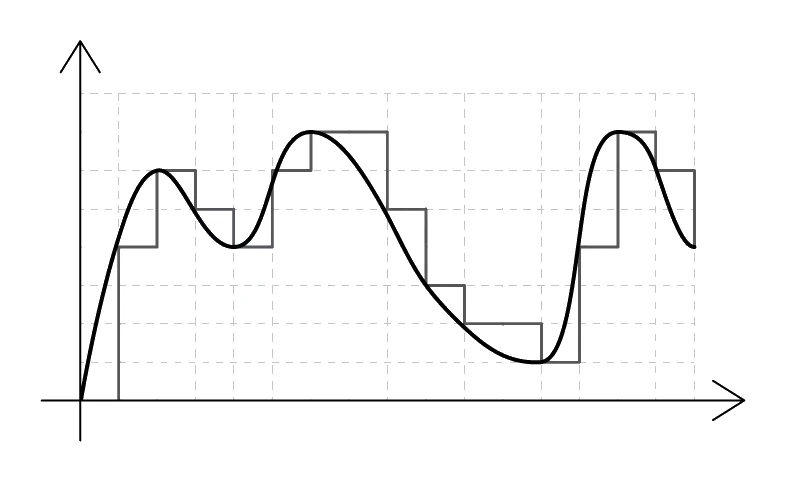
Sound file size
(bits) = sample rate (Hz) × sample resolution (bits) × duration (seconds)
Worked example
Calculating a sound file size in kibibytes
A 24 second audio clip is recorded with a sample rate of 32 000 Hz and a sample resolution of 16 bits. Calculate the file size of the clip in kibibytes (KiB), showing your working.
Solution:
- File size in bits = sample rate × sample resolution × duration = 32 000 × 16 × 24 = 12 288 000 bits
- Convert to bytes: 12 288 000 ÷ 8 = 1 536 000 bytes
- Convert to KiB: 1 536 000 ÷ 1024 = 1500 KiB
In the one paper that set this calculation it was worth 3 marks: two for the working (multiplying the three values, dividing by 8 for bytes, dividing by 1024 for kibibytes) and one for the final answer in the unit asked for. Write every step down and finish in that unit.
Image file size
(bits) = image width (pixels) × image height (pixels) × colour depth (bits per pixel)
4. Why files are compressed
shrinks a file so it takes up less room. Three standard exam-friendly reasons to compress:
| Reason | What it means |
|---|---|
| Less storage space | More files fit on the same disk; lower storage cost |
| Faster transmission | Smaller files upload, download or stream more quickly |
| Less bandwidth used | Less data crosses the network, which matters on metered or mobile connections |
A typical Cambridge question gives 3 marks for stating three distinct reasons. Distinct is the key word: "saves disk space" and "uses less storage" are the same reason in two different wordings.
Common exam question
What compression does and why files are compressed
Question: State what is meant by compressing a file, or the effect compression has on it, then give one to three benefits of compressing a file for storage or transmission (1–3 marks).
Asked in 5 of the 17 papers; three of them first ask for the definition or the effect, the same one-mark idea: compression reduces the size of the file. Each benefit is then a separate mark from the same short list every time: the file takes less storage space, it is quicker to transmit, upload or download, it needs less bandwidth, it uses less of a mobile data allowance, and it is more likely to fit under an email attachment limit.
Read the stem before you write. If it asks for a benefit of compressing for storage, give less storage space; if it already names a benefit (one paper gave storage space), give others. Each distinct benefit is credited once, so never give one benefit in several wordings.
There is always a cost. A compressed file has to be decompressed before it can be opened, which takes processor time. And some compression methods discard information that can never be recovered (covered next).
There are two completely different families of compression methods: lossless and lossy.
Common exam question
Identifying the compression method from a description
Question: Identify the compression method that permanently reduces the colour depth and resolution of an image, or the method to use when no data may be permanently removed; or give the two types of compression (1–2 marks).
Asked in 3 of the 17 papers. The two types are lossy and lossless, one mark each when both are asked for. The clue is the word permanently: a method that permanently removes data, such as cutting an image's colour depth or resolution or a sound's sample rate or resolution, is lossy; a method that removes nothing permanently, so the original file can be rebuilt exactly, is lossless. One word is the whole answer.
5. Lossless compression
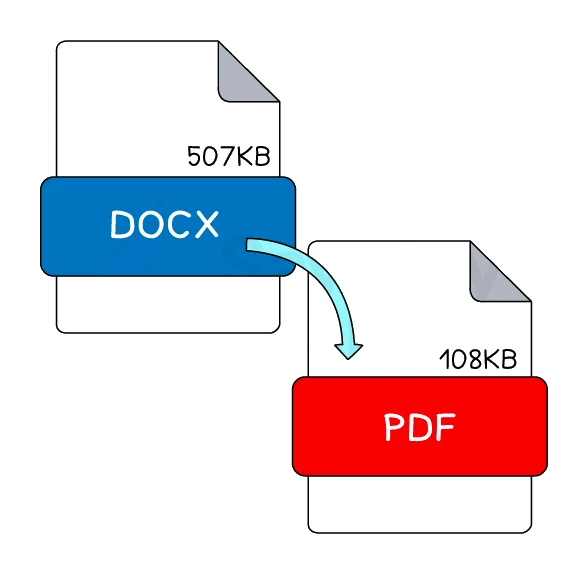
reduces file size without removing any data. The original file can be perfectly reconstructed when the file is decompressed.
Key features:
- No data is lost. Every bit of the original can be recovered.
- The reduction in size is usually modest (typical lossless compression gives ratios from 1.5:1 to 4:1, depending on the content).
- It is the right choice when every bit matters: text documents, source code, spreadsheets, medical images, archival masters.
How it works: lossless methods look for patterns, redundancy and repetition in the data and replace them with a more compact code that can later be reversed. There are many algorithms; the one to focus on is run length encoding (RLE).
Exam tip
Describing how lossless compression shrinks a file
When asked to describe or explain how lossless compression compresses a file (4 marks in the one paper that set it, 5 in the specimen paper), the marks are for the mechanism. Say that a compression algorithm is used (one scheme also credited naming run length encoding), then describe the indexing both schemes credit: repeated characters, words or patterns are identified and stored once in an index that records how many times each occurs and where, so the file can be rebuilt exactly. Saying only that no data is lost scores one mark at most, and only in the specimen.
Common lossless formats: PNG images, FLAC audio, ZIP archives, GIF images, PDF documents (which use lossless compression internally).
6. Run length encoding (RLE)
RLE is a simple lossless method that works well on data containing long runs of the same value repeating in a row.
How RLE works
- Walk through the input one value at a time.
- Whenever you find a run of the same value repeating, count how many times it occurs.
- Replace the whole run with a single (count, value) pair.
- Continue to the next value (or run) and repeat.
The decoder reverses this by expanding each pair back into count copies of value.
When RLE works well, and when it does not
RLE is only effective if the data has long runs:
- ✅ Works well: scanned line art, simple icons, large patches of uniform colour in a bitmap, faxes.
- ❌ Works poorly: natural photographs (almost every pixel is slightly different from its neighbour), high-frequency audio, already-compressed data, encrypted data.
In the worst case, RLE can actually increase the file size: if every value is different from the next, each value becomes a 1-value run, so the output is roughly twice the original size.
RLE is lossless
The decoded data is bit-identical to the original. RLE counts as lossless because expanding each (count, value) pair back to count copies of value perfectly restores the input.
7. Lossy compression
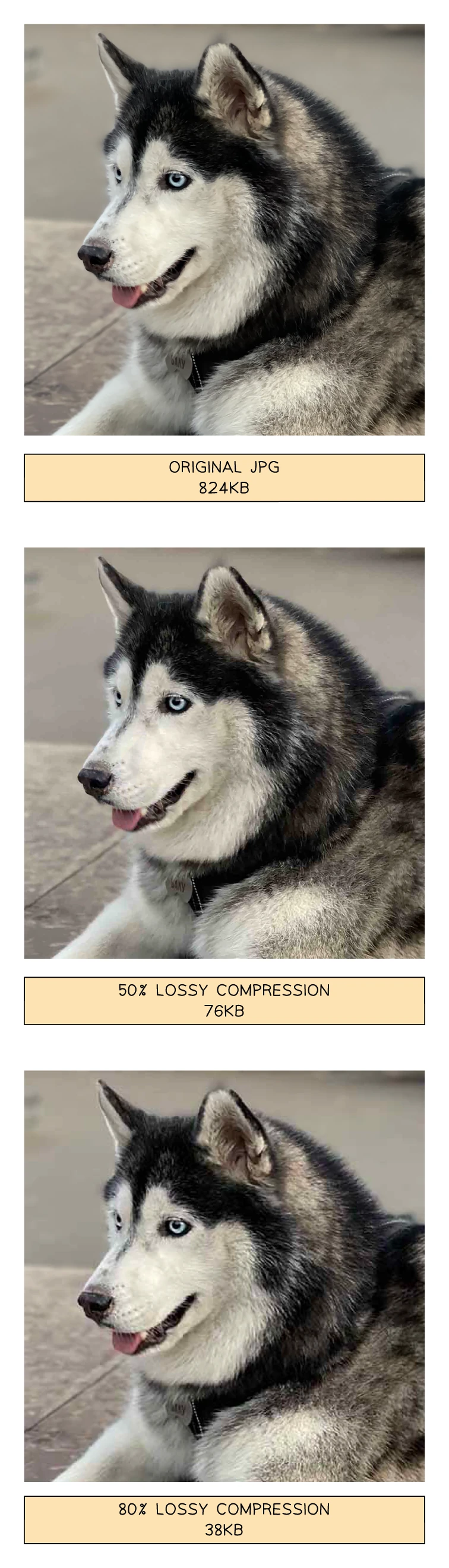
reduces file size by permanently removing data that the user is unlikely to notice. The original cannot be perfectly reconstructed.
Key features:
- Data is permanently lost. The original file can never be exactly recovered.
- The reduction in size is much greater than with lossless (often 10:1 or higher).
- It is the right choice when small size matters more than perfect fidelity: streaming media, web previews, email attachments, social media images.
How lossy methods reduce data
Lossy methods take advantage of the limits of human perception:
For sound:
- Reduce the sample rate so high frequencies above human hearing are no longer captured.
- Reduce the sample resolution so each sample uses fewer bits.
- Use that removes sounds the human ear cannot hear (very quiet sounds drowned out by louder ones nearby).
For images:
- Reduce the colour depth so similar shades are merged into one code.
- Reduce the resolution so several adjacent pixels are merged.
- Group visually similar colours together so the image stores fewer distinct colour values.
For video:
- Apply image lossy methods to each frame.
- Store only differences between successive frames rather than each frame separately.
Common lossy formats
- JPEG images (the standard for photographs on the web)
- MP3 audio (the format that made digital music portable in the late 1990s)
- MPEG / H.264 / H.265 video (used by streaming services and DVDs)
- AAC audio (used by Apple, YouTube, Spotify)
8. Lossy vs lossless: side-by-side
This comparison comes up regularly in exam questions worth 3 to 4 marks.
| Feature | Lossless | Lossy |
|---|---|---|
| Is any data lost? | No | Yes (permanently) |
| Can the original be reconstructed? | Yes, perfectly | No |
| Typical size reduction | Modest (1.5× to 4×) | Large (10× or more) |
| Effect on quality | None; quality identical to the original | Quality is reduced |
| Best for | Text documents, source code, archives, anywhere every bit matters | Photos, music, video, anywhere small size matters and minor quality loss is acceptable |
| Examples | PNG, FLAC, ZIP, GIF, RLE, PDF text | JPEG, MP3, MPEG/H.264, AAC |
Common exam question
Explaining why lossless is chosen instead of lossy
Question: Explain why someone would compress a file with lossless rather than lossy compression, or why lossy compression is not suitable for that file (3 marks).
Asked in 2 of the 17 papers, both for 3 marks, and both answers are built from the same chain of points. Lossy compression permanently removes data; that data could be important, so for a text document the file would be damaged or corrupted, and for a sound recording or an image the quality would be reduced. Lossless compression removes nothing permanently, so the original can be restored, kept at its highest quality or edited later.
Tie each point to the file in the question: a report with text and pictures, a recording the musician still wants to edit. "No data is lost" is one of the three marks, not all of them, so develop it into what lossy would do to this particular file.
Choosing which to use
- If the file is a text document or spreadsheet, choose lossless: a single missing word changes the meaning.
- If the file is source code or a database backup, choose lossless: a single missing bit can crash the program.
- If the file is a photograph for a website, choose lossy: a 10× smaller image that looks almost identical is a much better user experience.
- If the file is a music track to stream over a mobile network, choose lossy: most users cannot hear the difference between a 320 kbps MP3 and the studio master, and the smaller size saves bandwidth.