1. What an array is
An array is a named, ordered collection of values of the same data type, stored as a single variable. Each value is accessed using an .
Three things make arrays different from ordinary variables:
- One name, many values. Instead of
Score1,Score2,Score3, ...,Score30, you can use a single arrayScoreswith 30 elements. - Same data type for every . An array of integers can only hold integers; an array of strings can only hold strings.
- Fixed size. The size is set when the array is declared and (in CIE pseudocode) does not change.
Arrays are essential because programs almost always need to handle many values at once: a class of students, a row of pixels in an image, a list of stock prices, a sequence of network packets.
2. Declaring a 1D array
A 1-dimensional array (1D array) is a single row of elements, like a list.
In CIE pseudocode an array is declared with DECLARE, an ARRAY[start:end] size, and a data type:
DECLARE Scores : ARRAY[1:5] OF INTEGER
DECLARE Names  : ARRAY[1:10] OF STRING
DECLARE Flags  : ARRAY[1:3] OF BOOLEAN
Scores : ARRAY[1:5] OF INTEGERcreates an array calledScoreswith 5 elements (indices 1, 2, 3, 4 and 5), each holding an integer.Names : ARRAY[1:10] OF STRINGcreates 10 string slots.
After declaration, the array exists but the elements have no useful values yet; they need to be assigned.
1-indexed vs 0-indexed
CIE pseudocode normally uses 1 as the lower bound: the first element is at position 1, the last element at position n (where n is the size). Both syllabuses allow the first index to be zero or one, so read the bounds in the declaration: an array declared with ARRAY[0:4] also has five elements, at positions 0 to 4.
Python is 0-indexed: the first element is at position 0, the last at position n − 1.
| CIE pseudocode | Python | |
|---|---|---|
| First element of an array of size 5 | Arr[1] | arr[0] |
| Last element of an array of size 5 | Arr[5] | arr[4] |
Start your arrays at 1 in CIE pseudocode answers unless the question sets one up from 0. A lower bound of 0 is also allowed, but every index and loop must then stay within the bounds you declared.
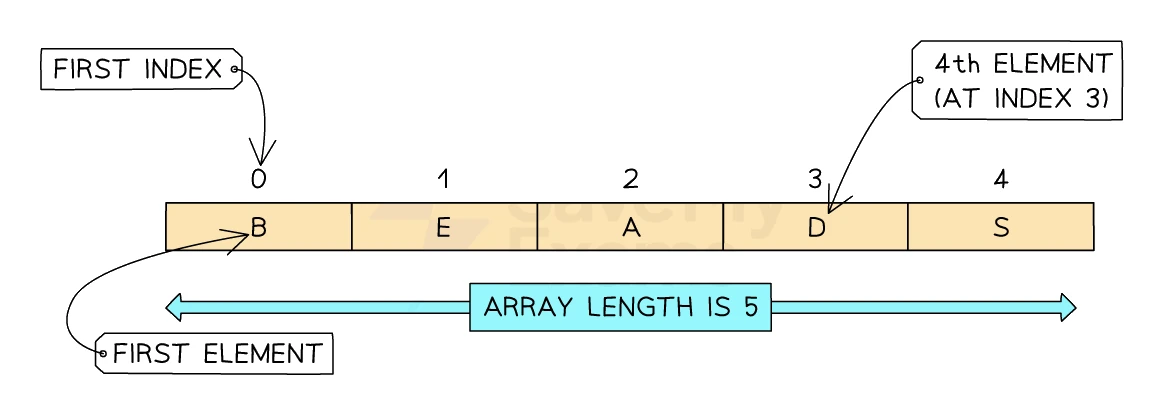
The diagram below shows the anatomy of a 0-indexed array of length 5: the first element sits at index 0 and the last at index 4, so an array of size n runs from index 0 to index n − 1.
Exam tip
Writing an array declaration in full
Write each declaration in full, such as DECLARE Scores : ARRAY[1:30] OF INTEGER (a 2D array has two pairs of bounds, ARRAY[1:8, 1:12]). One error-correction question declared a 2D array of city and country names with no colon and as BOOLEAN; the corrected line restores the colon and makes the type STRING. Two printed algorithms use shortened forms such as DECLARE A[1:50] : INTEGER; neither is the syllabus form, so do not copy them.
Every element shares one type, so a scenario keeps its names in one array and the numbers it calculates with in another, linked by index.
Initialising an array with values
In CIE pseudocode, array elements are assigned one at a time, each by its index. There is no whole-array literal: you cannot write Scores ← [12, 10, 5, 2, 8] in CIE pseudocode.
DECLARE Scores : ARRAY[1:5] OF INTEGER
Scores[1] ← 12
Scores[2] ← 10
Scores[3] ← 5
Scores[4] ← 2
Scores[5] ← 8
After this, Scores contains the five values 12, 10, 5, 2, 8. When the values follow a pattern, a FOR loop can assign the elements instead of writing each line out by hand.
3. Reading and writing array elements
Read an element using its index
To read the value at a given position, use the array name followed by the index in square brackets:
OUTPUT Scores[3] // outputs 5 (the third element)
The expression Scores[3] is just a single value (an integer in this case). It can be used anywhere a normal integer can:
TotalSoFar ← Scores[1] + Scores[2]
IF Scores[4] > 0
  THEN
     OUTPUT "Has a positive score"
ENDIF
Write a new value into an element
To change the value at a given position, assign with ←:
Scores[2] ← 100    // changes the second element from 10 to 100
// Scores is now: [12, 100, 5, 2, 8]
The other elements are untouched.
What happens if the index is out of range?
If the index is 0 or 6 (in our 5-element example), the access is invalid and the program will report an error or behave unpredictably. Always make sure indices stay within the declared bounds (here 1 ... 5).
4. Looping through an array
A FOR loop is the natural way to visit every element of an array in turn. The counter variable becomes the index.
DECLARE Index : INTEGER
FOR Index ← 1 TO 5
   OUTPUT Scores[Index]
NEXT Index
This prints every element of Scores in turn:
12
100
5
2
8
Common array-processing patterns
Sum every of a numeric array:
DECLARE Total : INTEGER
Total ← 0
FOR Index ← 1 TO 5
   Total ← Total + Scores[Index]
NEXT Index
OUTPUT "Total: ", Total
Find the largest element (assumes at least one element exists):
DECLARE Highest : INTEGER
Highest ← Scores[1]
FOR Index ← 2 TO 5
   IF Scores[Index] > Highest
     THEN
        Highest ← Scores[Index]
   ENDIF
NEXT Index
OUTPUT "Highest: ", Highest
Common exam question
Finding the highest or lowest value in an array
Question: Write an algorithm with a single loop that finds the lowest or highest value in an array and outputs it once, sometimes with the name stored at the same index in another array (4 marks on its own).
Asked in 3 of the 17 papers, once as a four-mark algorithm and twice inside the 15-mark program. The four marks come from five points: a variable started no lower than anything the array can hold (or at its first element), a loop over every element, an IF comparing each element with the lowest so far, replacing it when the element is smaller, and one output after the loop. Starting at 0 fails when every value is positive.
For the highest, start below any possible value. To output a name, record the index in the same IF and use it on the parallel array afterwards. Where joint winners are possible, a second loop collects every index whose value equals the maximum.
Count how many satisfy a condition (e.g. count pass marks ≥ 50):
DECLARE Passes : INTEGER
Passes ← 0
FOR Index ← 1 TO 30
   IF Marks[Index] >= 50
     THEN
        Passes ← Passes + 1
   ENDIF
NEXT Index
OUTPUT "Number of passes: ", Passes
Common exam question
Completing an algorithm that counts or totals an array
Question: Complete a given pseudocode algorithm that counts, totals or averages the values in an array, then output its results with suitable messages (3 marks for each part).
Asked in 2 of the 17 papers. Completing the code earns one mark per missing line: a counter or index set before the loop (Count ← 0, Index ← 1), the test or update inside it (IF Values[Index] = 0, Total ← Total + Values[Index]), and the line that closes the loop or works out the average after it. The output part gives a mark for each value displayed and a third for suitable messages, so label both.
When a WHILE loop stops at a 0 marking the end of the data, the index has moved one past the last value: with 6 and 8 stored before the 0, it stops at 3. So the number of values is the index minus 1, and the average divides the total by that.
Search for a value (linear search, topic 20):
DECLARE Found : BOOLEAN
Found ← FALSE
FOR Index ← 1 TO 30
   IF Marks[Index] = Target
     THEN
        Found ← TRUE
        OUTPUT "Found at position ", Index
   ENDIF
NEXT Index
IF Found = FALSE
  THEN
     OUTPUT "Not found"
ENDIF
Storing the array size in a variable
Real algorithms usually need to know the array's size at run time, not as a hard-coded number. A common idiom:
DECLARE Size : INTEGER
Size ← 30
DECLARE Marks : ARRAY[1:Size] OF INTEGER

FOR Index ← 1 TO Size
   OUTPUT Marks[Index]
NEXT Index
Now if the class size changes, only the line Size ← 30 needs to be edited.
5. 2-dimensional arrays
A 2-dimensional array (2D array) is a table of values with rows and columns. Each element is accessed using two indices: one for the row, one for the column.
A 2D array is the natural way to store anything that fits a grid: a noughts-and-crosses board, a school timetable, a spreadsheet, the pixels of a small image.
Declaring a 2D array
DECLARE Grid : ARRAY[1:3, 1:3] OF INTEGER
This creates a 3 × 3 grid: 3 rows (indices 1 to 3) and 3 columns (indices 1 to 3), 9 elements in total, each an integer.
Reading and writing 2D elements
Access an element with two indices separated by a comma:
Grid[1, 1] ← 1     // top-left
Grid[1, 2] ← 2
Grid[1, 3] ← 3
Grid[2, 1] ← 4
Grid[2, 2] ← 5
Grid[2, 3] ← 6
Grid[3, 1] ← 7
Grid[3, 2] ← 8
Grid[3, 3] ← 9     // bottom-right

OUTPUT Grid[1, 1]   // outputs 1
OUTPUT Grid[2, 3]   // outputs 6
The first index is the row; the second is the column. CIE conventions are 1-indexed for both.
Exam tip
Matching each 2D index to its row and column
The first index picks the row, in most exam scenarios one record (a room, a club, a customer); the second picks the column, and the question says which field each column holds. Hold the column number constant and let the loop variable supply the row: Sizes[Room, 1] for a length, Sizes[Room, 2] for a width. One error-correction question read city names into the countries' column; the correction was the right column number.
To total one field for every record, one loop down the rows with the column fixed is enough; nested loops, rows outer and columns inner, visit every cell.
A 2D array as a worked table
Visualise the array above as a 3 × 3 grid:
| Col 1 | Col 2 | Col 3 | |
|---|---|---|---|
| Row 1 | 1 | 2 | 3 |
| Row 2 | 4 | 5 | 6 |
| Row 3 | 7 | 8 | 9 |
Grid[2, 3] is the element at row 2, column 3 (the value 6).
Convention: [Row, Column] or [X, Y]?
The CIE convention is Array[Row, Column], with both indexes inside one pair of square brackets (Python writes array[row][column] instead). Always check the question's description of what each row and column holds; do not assume.
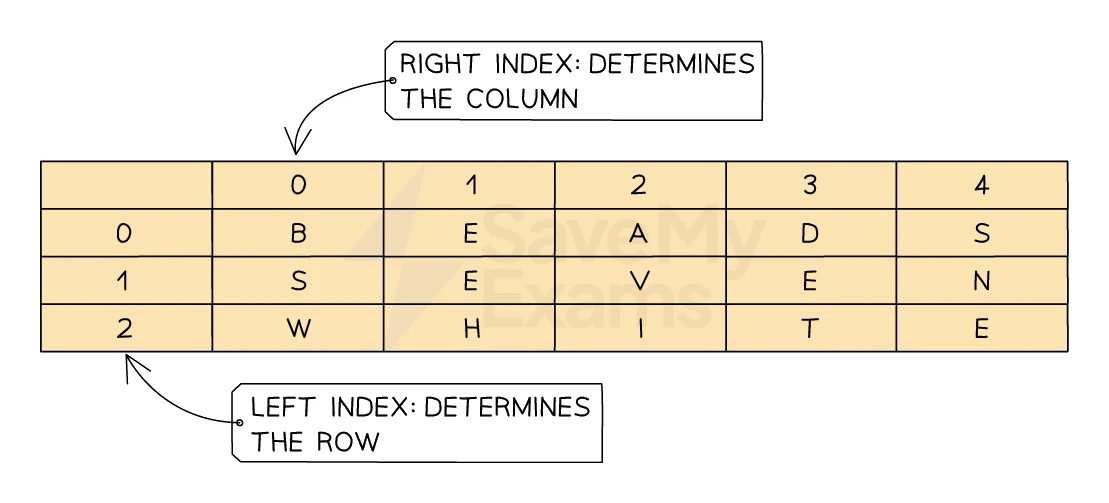
Whatever the indexing base, the same principle holds: the first index selects the row and the second index selects the column, as shown below.
6. Looping through a 2D array
To visit every element of a 2D array, you need a nested loop: one for the rows, one for the columns.
DECLARE Row : INTEGER
DECLARE Col : INTEGER

FOR Row ← 1 TO 3
   FOR Col ← 1 TO 3
      OUTPUT Grid[Row, Col]
   NEXT Col
NEXT Row
The outer loop steps through each row; for each row, the inner loop steps through every column. The output for the Grid example above is:
1
2
3
4
5
6
7
8
9
This prints the grid one row at a time, left to right.
Summing a 2D array
DECLARE Total : INTEGER
Total ← 0

FOR Row ← 1 TO 3
   FOR Col ← 1 TO 3
      Total ← Total + Grid[Row, Col]
   NEXT Col
NEXT Row

OUTPUT "Total: ", Total
For the example grid (1 to 9), the total is 45.
Counting matching cells
Count how many cells contain the number 0 in a noughts-and-crosses board:
DECLARE EmptyCount : INTEGER
EmptyCount ← 0

FOR Row ← 1 TO 3
   FOR Col ← 1 TO 3
      IF Board[Row, Col] = 0
        THEN
           EmptyCount ← EmptyCount + 1
      ENDIF
   NEXT Col
NEXT Row

OUTPUT "Empty squares: ", EmptyCount
7. A 2D array in action: a TV-watching log
A parent records the minutes of TV watched by 4 children (Quinn, Lyla, Harry, Elias) over 5 weekdays (Monday to Friday). The data is held in a 2D array called MinsWatched indexed as [Day, Child], where days 1 to 5 are Monday to Friday and children 1 to 4 are Quinn, Lyla, Harry and Elias.
| 1 (Quinn) | 2 (Lyla) | 3 (Harry) | 4 (Elias) | |
|---|---|---|---|---|
| 1 Monday | 34 | 67 | 89 | 78 |
| 2 Tuesday | 56 | 43 | 45 | 56 |
| 3 Wednesday | 122 | 23 | 34 | 45 |
| 4 Thursday | 13 | 109 | 23 | 90 |
| 5 Friday | 47 | 100 | 167 | 23 |
Reading a single element uses the row-then-column order:
- Lyla on Tuesday:
OUTPUT MinsWatched[2, 2]outputs 43. - Harry on Friday:
OUTPUT MinsWatched[5, 3]outputs 167. - Quinn on Wednesday:
OUTPUT MinsWatched[3, 1]outputs 122.
Calculating each child's weekly total
FOR Child ← 1 TO 4
   ChildTotal ← 0
   FOR Day ← 1 TO 5
      ChildTotal ← ChildTotal + MinsWatched[Day, Child]
   NEXT Day
   OUTPUT "Child ", Child, ": ", ChildTotal, " minutes"
NEXT Child
For Quinn (Child 1): 34 + 56 + 122 + 13 + 47 = 272 minutes.
Finding the day with the most total viewing
DECLARE MaxTotal : INTEGER
DECLARE MaxDay : INTEGER
MaxTotal ← 0
MaxDay ← 0

FOR Day ← 1 TO 5
   DayTotal ← 0
   FOR Child ← 1 TO 4
      DayTotal ← DayTotal + MinsWatched[Day, Child]
   NEXT Child
   IF DayTotal > MaxTotal
     THEN
        MaxTotal ← DayTotal
        MaxDay ← Day
   ENDIF
NEXT Day

OUTPUT "Highest day was ", MaxDay, " with ", MaxTotal, " minutes total"
Common exam question
Using arrays in the 15-mark program
Question: Write a commented program for a scenario whose data sits in named 1D or 2D arrays, meeting a list of requirements, with messages on every input and output (15 marks).
Set in 8 of the 17 papers: every Paper 2 ends with it, always with the data in arrays. It is level-marked (up to 9 marks for techniques and data structures, up to 6 for comments, meaningful names and logic), and the top level needs data structures that store all the data required. Use each array name exactly as given, as every scheme requires.
When an item's data shares an index across the arrays, one loop variable drives them all: Pupils[Index], Marks[Index, 2] and Grades[Index] belong to one pupil. Store calculated values (an area, a points total) in their array too. When a variable says how many items are stored, loop to it, not to the array's full size, and put each new entry at the next free index.
Worked example
Storing the items that pass a test in a second array
The parallel arrays Players[1:6] and Goals[1:6] hold six players' names and their goals this season, so the goals at index 3 of Goals belong to the player at index 3 of Players. Players holds Ava, Ben, Cara, Dev, Ella and Finn, and Goals holds 12, 7, 10, 3, 15, 9. Write pseudocode that copies the name of every player with at least 10 goals into the array Award[1:6] and outputs how many awards there are. What does Award hold afterwards?
Solution:
- Set a counter to 0 before the loop. It counts the awards and also gives the next free position in
Award. - Visit every index from 1 to 6. When
Goals[Index]is at least 10, add 1 to the counter first, then copyPlayers[Index]intoAward[Count]. - Output the counter once, after the loop.
Count ← 0
FOR Index ← 1 TO 6
   IF Goals[Index] >= 10
     THEN
       Count ← Count + 1
       Award[Count] ← Players[Index]
   ENDIF
NEXT Index
OUTPUT "Number of awards: ", Count
- Index 1: 12 goals, so
Countbecomes 1 and Ava goes intoAward[1] - Index 3: exactly 10 goals, which
>=accepts, soCountbecomes 2 and Cara goes intoAward[2] - Index 5: 15 goals, so
Countbecomes 3 and Ella goes intoAward[3]; indexes 2, 4 and 6 fail the test - Output: Number of awards: 3, with
Awardholding Ava, Cara, Ella in elements 1 to 3
Placing each name at Award[Index] instead would leave gaps (Ava at 1, Cara at 3, Ella at 5), and > in place of >= would lose Cara.