World Wide Web
Internet and Its Uses
Putting the pieces together, here is the full journey from typing a URL to seeing the page:
- The user enters a in the browser's address bar (or clicks a link that contains one).
- The browser strips out the domain name from the URL.
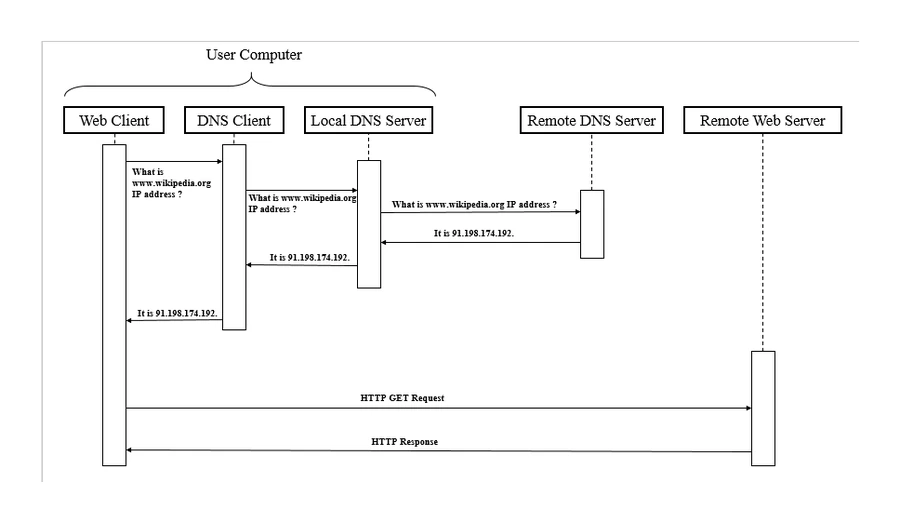
- The browser asks a server to translate the domain name into the IP address of the web server hosting that site.
- The browser sends an HTTP/ request to that IP address, asking for the resource at the URL's file path.
- The receives the request, finds the requested resource, and sends back an HTTP/HTTPS response.
- The response contains the document for the page, plus references to any , JavaScript, images and other media the page needs.
- The browser renders the HTML (with CSS to style it and JavaScript to make it interactive) into the visible web page.
- Any extra files referenced (images, scripts) trigger their own HTTP requests, which the browser fires off in parallel.
- The user sees the finished page and can interact with it (click links, fill in forms, etc.).
Common exam question
Showing how a web page is located and retrieved
Question: Draw and annotate a diagram showing how a web page is located, retrieved and displayed when a user enters a URL (5 marks), or name the system that stores URLs with their IP addresses (1 mark).
Asked in 4 of the 17 papers, twice as the diagram and twice as a 1-mark identification of the domain name server (DNS). One mark per labelled part, up to five: URL sent from browser to DNS; DNS finds the matching IP address in its table of URLs and IP addresses; otherwise the next DNS is asked; IP address returned to browser; browser requests the page from the web server at that address; web server processes the request and returns the page as HTML; browser renders the HTML.
Four of the seven creditable parts are DNS steps, so a diagram that skips the DNS earns at most three marks. Label what travels along every arrow: the marks are for labelled parts, not shapes.
The Domain Name System (DNS)
The DNS (Domain Name System) is the 's directory service, mapping human-readable domain names to numerical IP addresses.
Think of DNS as a global phonebook. When the browser needs to know where www.example.com is, it asks a DNS server. The DNS server looks up the domain in its records and replies with the IP address. The browser can now connect directly to the server at that address.
DNS is what makes URLs usable: without it, every user would have to remember IP addresses. DNS is hierarchical (root servers, top-level domains like .com, .org, individual sites), but the simple "domain name → IP address" mapping is enough at this level.
The web server
A web server is a computer (or set of computers) whose job is to store web pages and respond to browser requests for them. Typical web-server features:
- Available 24/7 so people anywhere in the world can reach the site at any time.
- Serves the same page to many users at once (sometimes thousands or millions).
- Maintained by the website's owner (or a hosting company); responsible for keeping it patched, backed up and secure.
Big websites use many web servers behind a load balancer to share the traffic; small websites may live on a single shared server with many other sites.
HTML: the language of web pages
HTML (Hypertext Markup Language) is the markup language used to define the structure and content of a web page.
HTML is made up of tags that wrap content:
<p>This is a paragraph.</p>: a paragraph<h1>Welcome</h1>: a top-level heading<a href="...">Click here</a>: a hyperlink<img src="..." alt="...">: an embedded image<ul>and<li>: bullet lists
A complete simple HTML page might look like:
<!DOCTYPE html>
<html>
  <head>
    <title>My Web Page</title>
  </head>
  <body>
    <h1>Welcome to my site</h1>
    <p>This is a paragraph of text.</p>
  </body>
</html>
The browser reads this HTML and produces the visible page. Two related technologies usually accompany HTML:
- (Cascading Style Sheets) controls the visual style of the page (colours, fonts, layout).
- JavaScript is a programming language that runs inside the browser and makes pages interactive (form validation, animations, live updates, games).
The exam wants you to know what HTML is for (it provides a page's structure and content); CSS (styling) and JavaScript (interactivity) are background only, as the syllabus does not name them, and you do not have to write any of these languages.
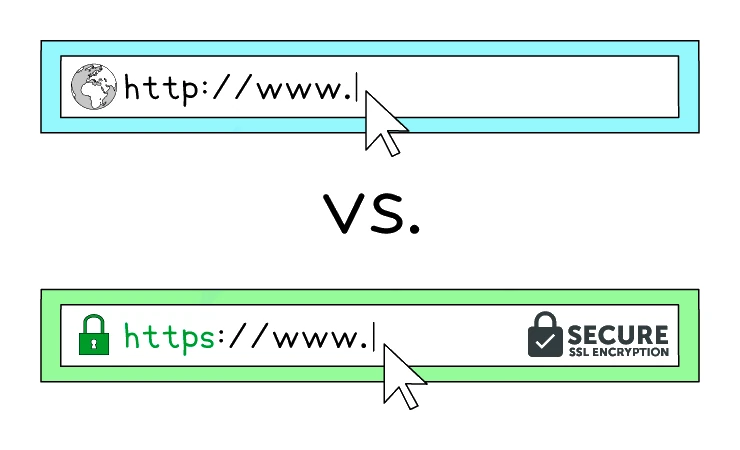
A page loaded over plain HTTP shows http:// in the address bar; a page loaded over the secure version, , shows https:// together with a padlock indicating the connection is encrypted with SSL/TLS.